| British National Newspaper, The Guardian has just unveiled plans to take their online news reporting global. They have announced that they will incorporate their US, UK and Australian division under the single online property TheGuardian.com. The move into a singular news website will obviously benefit readers, who will have a all encompassing destination to read country specific and world news. Really, the reason why they are doing this is for higher internet traffic and to attract online advertisers. The Guardian Newspaper has a fairly solid internet presence with 81 million unique browsers in April. This is the third straight month that they have increased the number of eyes on their digital website. They are hoping with my eyes on the main website that they will be able to have a higher click through rate and increase revenue. Simplifying their brand is the best move for further expansion into other markets. Tanya Cordrey, Chief Digital Officer at Guardian News & Media said "This may be a small URL change but it marks a big step for the Guardian and reflects our evolution from a much-respected national print newspaper based only in the UK – reaching hundreds of thousands of people once a day – to a leading global news and media brand, with offices around the world, and an ever-growing worldwide audience accessing Guardian journalism every minute of every day." She added, "our move to theguardian.com will only strengthen our global presence and is a loud signal of our status as a leading digital news provider and of the breadth and depth of our content." There is no word yet on the exact time the new website will go live. Currently, the new domain name resolves to the UK version, but it is worth to keep checking every few days to see when the entire transfer will be complete. We will let you guys know via Facebook and Twitter updates when you can see the new site in all of its glory. The Guardian Newspaper Goes Global is a post from: E-Reader News |
Saturday, May 25, 2013
The Guardian Newspaper Goes Global


OverDrive Launches Digital Library Champions Contest
| Overdrive is running a new contest for libraries participating in their digital eBook lending service. They are looking for innovative ways libraries promote their eBook collections to their community and unique marketing angles that draw traffic to their websites. Winners receive $500.00 in eBook credits, an e-Reader and promotion on their main website. The contest centers around five different aspects of marketing and promotion and Overdrive is serious about libraries blazing their own trail and not being reliant on stock marketing materials. The first category is, Inside the Library – How are you making your physical branch aware of your 'Virtual Branch'? Examples could include unique shelving and displays; patron training classes; gadget galleries; staff training; in-library events. The second category deals exclusive with their online presence, What are you doing through social networking, email or on your library website to drive traffic to your digital collection? The third category deals with the real world! In what ways are you reaching out to your community to spread the word about your digital collection? Examples could include: billboards; sponsoring a local event; partnering with an area business; commuter outreach; ads in the paper or on TV. The fourth deals with libraries that loan out e-Readers and tablets via the Testdrive initiative. How are you promoting the program and making the public aware that you have technology for patrons to use and borrow? Finally, Excellent eBook Educator (Open to K-12 schools and colleges only) – This new category is set aside for any school or college who would like to share their most innovative marketing ideas. This is inclusive of any and all promotional efforts that impact your OverDrive collection, including online marketing and in school campaigns. If you want to enter your library in the Digital Library Champions contest, fill out the PDF entry form and email it to outreachcontest@overdrive.com or fax it to 216.573.6888 by Tuesday June 11, 2013. OverDrive Launches Digital Library Champions Contest is a post from: E-Reader News |

Digital Comics Review: Adventures of Superman #1-3
| DC releases all its print comics on in digital the same day as print, but the venerable publisher is taking a slightly different tack in its digital-first releases. Unlike their print counterparts, DC’s digital-first Adventures of Superman comics are short, self-contained, and not dependent on complicated continuity. That makes them a nice treat for regulars and newcomers alike. I read the first three issues, each of which is by a different writer-artist team. The result is that each is very distinct in style and story from the others. Yet they all share a common format: 20 pages of story, done in landscape format with just one to four panels per page. Unlike Marvel’s Infinite Comics, there is nothing uniquely digital about these comics—no changes in focus, no word balloons that appear when you swipe. These are simply comics you read on a screen rather than paper, and I believe the plan for print publication is to stack two of the horizontal digital pages to make one vertical-format printed page. Adventures of Superman #1, written by Jeff Parker and illustrated by Chris Samnee, is a very classic style Superman story in which the Man of Steel faces off against a crazed street guy who has taken a drug that causes him to lose his mind but also gives him telekinetic powers. Superman thus gets to use his super-powers in a variety of dramatic situations. At the end, we see who gave him the drug, which gives us some closure but doesn’t really feel like the end of the story. This issue is labeled “Chapter One,” so I thought there would be more in the second issue, but there wasn’t. In fact, Adventures of Superman #2 couldn’t be more different: Written and illustrated by Jeff Lemire, it is a story about two boys playing Superman, set in a rural area and illustrated with Lemire’s trademark wobbly line and watercolor washes. It’s a nice little story, but it’s a complete break with the first issue and isn’t even set in the world of the comic; it’s about Superman fans, not Superman. Adventures of Superman #3, by Justin Jordan and Riley Rossmo, returns us to Metropolis for a story that is pretty bare-bones: Bizarro tries to help people and messes up; Superman fights with him and then figures out another way out of the problem. To understand this comic you have to know that when Bizarro speaks, his meaning is the exact opposite of his words. DC is making these first three issues available as a print comic, Adventures of Superman #1, which is priced at $3.99 for 40 pages of story; that seems like a good deal compared to other print comics, but it’s a buck more than the cost of the three digital comics. Which is kind of interesting—most comics publishers are pricing their digital comics the same as print when they are released on the same day. As it is, 99 cents is about right for each of these short comics, and for the Parker/Samnee one, which is by far the best so far, it’s a bargain. Digital Comics Review: Adventures of Superman #1-3 is a post from: E-Reader News |

Friday, May 24, 2013
Hands on Review of the Booklive Reader by Lideo
| The Toshiba BookPlace Mono and Booklive Reader by Lideo are two Japan exclusives that popped by to say hello at SID Display Week 2013 in Vancouver. Obviously, with a new e-Reader we were all over it, and seems to do quite well in Japan. How does this e-Reader stack up against the competition and is it a worthy investment? Hardware The Booklive Reader by Lideo features an older version of e Ink Pearl with a resolution of 600×800 and 16 levels of grey. It has 4 GB of internal memory, but you only have 3 GB of practical use. There is no expandable memory, so you will not be able to load more content in via MicroSD. There is a 800 MHZ processor, which tends to make things a bit speedy. When you look at the competition in Japan with the Sony PRS-T2, Kobo Glo and Kindle Paperwhite, they all have higher resolution then than the Booklive. This is an important factor to consider if you are into Manga, Graphic Novels and image heavy content. Resolution on PDF images, are fairly important for the types of books that are popular in Japan. The price is right though, you will spend around 7,000 yen, making it more affordable then the competition. You can think of this e-Reader as a terminal. You only can connect to the Booklive eBook store, which has around 75,000 titles currently available. There is no internet browser, and it lacks critical essential social media features like Facebook and Twitter. It connects via WIMAX to the store, and there is no charge for data to download books, you just have to pay for them. The Booklive has a touchscreen display that you use to pinch and zoom and click on content. It has four physical home buttons on the bottom, similar to the old Sony designs. You can hit back, home, settings etc. Finally, you will get around a solid month of use, before you have to recharge it. This falls in line with most readers, when you engage in casual reading. The Booklive e-Reader is very simple in design, in terms of UI and the overall layout of the menu. When you first fire it up for the first time it asks for your birthday, sex, email address and name. The main screen comprises of your bookshelf, which shows the cover art by default. You can tweak the settings so it shows it in list view instead, which is useful for larger book collections. Speaking of book collections, it supports EPUB and PDF, but you can’t load in your own books. For some reason this e-Reader only works with purchases made directly from the store built into it. This might turn a ton of users off, but will curb book piracy. You can turn pages by tapping or flicking your hand in a gesture, obviously being a Japanese exclusive you tend to turn pages to the left. There is a big refresh issue with this unit, as every single page turn creates the flickering as the e Ink screen refreshes. There is no options to configure it, such as to make it refresh every three, six or nine pages. There are six different options to increase the size of the text when you are reading EPUB books, and no options to change the types of fonts. You can also make highlights and look words up in the built in dictionary. The main gripe of most reviewers in Japan is that the dictionary is weak compared to the competition.If you want to search, you can do it via the virtual software keyboard, which is actually one of the best features on this device. One of the best features is being able to adjust the brightness. This is useful, since most Manga has different art styles. Some use very hard lines and some very soft, it is great to be able to turn up the brightness of the screen to give you the best Manga experience. When you are finished reading a book, at the end of it, are links to continue reading the series. Normally, you can purchase a single issue, and if you like it, continue to buy more. Instead of making you search the next issue within the Booklive store, you get links to buy it. You can’t buy in bulk though, but most stores don’t really have a great shopping cart system on e-readers. If you subscribe to newspapers though, the new issue is delivered to you every day. Wrap Up You would buy this e-reader if you are loyal to the BookLive market place for newspapers, eBooks and Manga. It is more affordable than most other e-Readers currently available in Japan. Sharp, Toshiba, Sony, Amazon and Kobo all compete heavily in that market and sometimes its hard for the smaller players to stay relevant. In the end, I would not recommend this e-Reader. It is mostly slow and unresponsive, and the inability to load in your own books may be a deal breaker. There is a ton of eBooks available to buy, but it doesn’t matter much if all of your competition as higher resolution screens and better hardware. I would likely recommend Kobo, Kindle or Sony models better than this, mainly because of the better software and the ability to buy books in different languages. Sometimes you want to learn a new language by reading books, but Booklive only sells books in Japanese. PROS Interesting Design, looks unique Cons Sluggish and Unresponsive Rating: 4/10  Hands on Review of the Booklive Reader by Lideo is a post from: E-Reader News |


Rowman & Littlefield Opens their own eBook Store
| Publisher Rowman & Littlefield are starting their own eBook Store and taking the direct to market approach. Over 12,000 of their own eBooks will be available starting today. The eBook Store is closely connected with the publisher's Unity platform for title development, which houses full title metadata and all the digital assets associated with each new book. This close integration means that the e-book version of each new title is available for purchase from the moment of publication. The publisher also garners more revenue in the long-term bypassing the need to rely on other online bookstores. Finally, Rowman & Littlefield intends on working with libraries to provide their electronic books directly. Commenting on the launch, CEO Jed Lyons said: "Technology has become a real strength of Rowman & Littlefield, with robust bespoke systems supporting all of the processes that connect our authors with our readers. We know that our academic, library, professional and trade customers all value the ability to access our titles in every format, and this new platform gives us the capability to deliver books instantly to a range of devices including PCs, MACs, IOS and Android. The system uses Adobe Content Server to enable secure Digital Rights Management. " Rowman & Littlefield Opens their own eBook Store is a post from: E-Reader News |

Amazon Launches Summer Reading
| Barnes and Noble announced the semantics surrounding its summer reading program yesterday and online giant Amazon announced its new program today. Amazon is betting on kids trying to meet their reading goals by giving them incentives to get lost in an ebook. There are three major elements to the Amazon Summer Reading campaign, the first is The Summer Reading Sweepstakes! To sweeten summer reading even more, students, parents, and teachers can enter for a chance to win 50 Kindle e-readers for their school and keep the fun going all year round. The second focuses on Book Recommendations, with so many books to choose from, how do you decide what to read first? Now students can head on over to the Summer Reading for Kids page for hand-picked recommendations from our knowledgeable book editors. The list includes favorites for kids (and parents) of all ages. Finally, if your child is an aspiring sleuth, they can participate in the Summer Reading Adventure Map! X marks the spot! Students can embark on a reading adventure by printing out a map where they can track books they have read and what date they were completed. Of course, Amazon has curated a number of ebook titles on the main summer reading page with targeted age appropriate material. Most of it is geared towards YA Fiction, but there is lots of kids ages 1-3. Of course, there is the ubiquitous editors’ picks and discounts galore. Amazon Launches Summer Reading is a post from: E-Reader News |

Review of the Toshiba BookPlace Mono e-Reader
| The Toshiba BookPlace Mono e-Reader is a Japanese exclusive that just landed in that market a few weeks ago. For the launch of this new device, Toshiba revised its old ebookstore Blio and transformed it into the BookPlace. How does this e-reader rank up against the competition? Hardware The Toshiba BookPlace Mono features a six inch e Ink Pearl Display with a resolution of 1024×768 pixels. It uses IR technology from Neonode, instead of the traditional capacitive touchscreen. Underneath the hood is a Freescale i.MX508, 800MHz processor and 512 MB RAM. It has 4 GB of internal memory that can be expanded further via the Micro SD card. The MicroUSB cable both charges the unit and facilitates the transfer of data to your device. It is hyped up to last a few months or around 8,000 page turns. WIFI is the only way it will connect to the internet and the Toshiba BookPlace eBook store. This reader, when connected to the internet and browsing the store, is woefully slow. On the main page of the store are 3 or 4 different images hyping up manga, cookbooks, kids books, and other price points. This results in slow navigation because of all the different graphics that are loading up at once. When you are not online, and just browsing the various menus, it tends to be snappy. One of the cool things about the BookPlace Mono is the inclusion of a 3.5mm headphone jack. This allows you to listen to music and audiobooks, but there is no physical speaker on the e-reader. The overall design is very unique. The screen is deeply sunken into the body of the unit, to accommodate the IR touchscreen display. It also has a physical home button, to bring you back to your main screen. Really, it is quite a solid e-reader and the main selling point is buying content from the Toshiba BookPlace eBook store. Software The entire UI is in Japanese and there is no way to load in different languages for an English crowd. Toshiba is focusing exclusively on the Japanese market and enhanced the Japanese bookstore to launch this new e-reader. Let’s talk about the ebookstore, since this is your destination to buy content. There are various categories to browse from, as well as a dedicated search area. You can sort by price in YEN if you want to find cheaper or more expensive books. We noticed at least three thousand books total in the ecosystem that mainly comprise of Manga, Graphic Novels, Cookbooks, Kids Books, and eBooks. Most of the Manga is only available via PDF and the rendering engine to display content is painful. You can’t pinch and zoom to isolate specific panels, but if you press one, you can zero in on a panel. Obviously, page turning in Manga is swiping on the left hand side. It also, has a PDF rendering engine to allow you to scroll around the document. Your main home screen comprises of your library shelf, where the cover art of the books you own are presented in all of their glory. You can sort by list view, but the default is cover view. It looks like there are 15 titles that can be on your main screen. At the very bottom of the display area is links to your library, settings, and the BookPlace. You can configure various options, such as page refresh, WIFI setup, font sizes, and alternative settings. In the video at the bottom of the review, we show you most of the menus and sub-menus. Our Japanese is a bit rusty, but Peter knew enough to set the e-reader up for a review. In order to even start using the reader from scratch, you need to setup a user ID, password, and email address. The Toshiba BookPlace Mono reads EPUB and PDF documents by default. It sells ebooks and manga in both of these formats, but does allow you to upload your own titles that you download from the internet. There is a small sync button, so when you upload your own titles from the Micro USB to USB cable on your PC, you want to make sure to sync your new content. Overall, e-reading is very solid. The traditional EPUB book, turns pages very quickly. You can customize the font size, font type, linespacing, margins, and gesture direction. By default, the e-reader is configured to turn pages when you swipe to the left, but you can change it to the right. The PDF experience is OK, as long as you are just turning pages. The e-reader tends to buckle under the pressure if you are initiating the zoom feature or scrolling around the document. In the end, this is an ebook reader geared towards a very specific market. Toshiba spent a ton of money and man hours relaunching its online store in conjunction with the release of the Mono. You can download free samples of most manga, but we noticed that not all books had samples. Wrap Up Will this reader sell? It is priced at around $140 US, and ebooks cost anywhere from 200 Yen to 900 Yen. I can see this as being a fringe device, as most people are gravitating towards smartphones and tablets for their everyday use. The one thing it has going for it is Manga. Traditionally, it is not in color anyways, so you don’t lose out on not having a full color screen. The art, panels, and overall experience is fairly solid, and even Toshiba’s line of tablets doesn’t tap into the BookPlace ecosystem. I would recommend this over some of the alternatives available in Japan, such as the BookLive Reader by lideo. PROS Great manga selection CONS Tends to stagger under the weight of zooming on PDF files Rating: 7/10 Review of the Toshiba BookPlace Mono e-Reader is a post from: E-Reader News |


Juvenile and Young Adult Summer Reading- Part 2
| Each generation of readers has fantasy titles they grew up with: in the 1870's, Jules Verne's '20,000 Leagues under the Sea' was published to the delight of the French citizens and eventually readers the world over. The 1930's brought 'The Hobbit' and 'The Lord of Rings' trilogy by J.R.R. Tolkien. The story of 'Harry Potter and the Sorcerer's Stone' by J. K. Rowling rose to popularity during the 1990's and the boy wizard continues to enthrall children and adults alike. Fantasy is an ever-evolving genre of literature that feels both classic and modern; keeping us reading and thinking about these weird and wonderful stories well after their release.
Fantasy Tales That Soar
The 'Beautiful Creatures' series by Kami Garcia is another National Bestseller, popular with both teen and adult audiences. While it has elements of the 'Twilight' series it's set in the graceful, Old South with mystery, magic and some romance for good measure. Be sure to read the book before seeing the movie!
In keeping with the classics, the tale of Robin Hood and his Gang of Merry Thieves has been re-imagined by A.C. Gaughen with a head strong female leader in 'Scarlet'. Gaughen masterfully provides the reader with a familiar tale of a well-known hero but provides a thrilling, new angle. Other modern fairytales including 'Beastly' by Alex Flinn and 'Wildwood Dancing' by Juliet Marillier also bring new perspectives to beloved and legendary tales.
These titles and many more great summer reads are available for purchase in Content Reserve in the Summer 2012 YA/Juvenile Read-A-likes list.
Renee Lienhard is an Analyst for the Collection Development team at Overdrive  |

Ruckus Adds New Long-Distance Reading Feature with Grant from NSF
| Just when it seems that digital publishing has reached the peak of innovation, someone has to make it even better. Ruckus Media Group, known for its interactive enhanced children’s ebooks, announced that it received grant funding from the National Science Foundation to make a collaborative ebook which will enable parents and their children to read and play embedded games within the same title, even when they are physically separated by distance. “The challenge to collaborative learning comes when the parent is not co-located with the child — when a parent is away from the family home serving in the military or on a business trip, for example,” explained Ruckus in a press release. “Currently eBook platforms do not provide the opportunity for mobile devices like smartphones and tablets to work, in real time, with non-mobile devices like desktop and laptop computers; by automating the process and tapping into the growing ubiquity that networked, mobile technology can address, Ruckus' RTWA technology will provide a parent and child with the experience of being co-located so they can take advantage of the value of synchronous collaboration.” This collaboration between parents and young readers, even while apart, not only fosters a love of reading and establishes the importance of literacy, but can also greatly benefit emerging readers who are still only learning. "Nothing fosters literacy like parents, caregivers and kids reading and sharing books together," says Jason Root, Ruckus' Chief Content Officer. "Storytelling has a rich read-along, read-out-loud heritage. We are honored to have been selected by the NSF to further our idea of utilizing proprietary mobile technology to create remote read-together experiences in real time. Parents may be separated from their children due to military or business assignments or divorce, and grandparents often live in different states or countries — yet they all want to read with their children. Our goal, simply, is to keep families connected through reading, whether they are physically co-located or not." For its part, the NSF funds not only science, but broader spectrum approaches to education. Its annual budget of approximately $7 billion goes to support a number of projects in education, for which it received about 50,000 requests each year.
Ruckus Adds New Long-Distance Reading Feature with Grant from NSF is a post from: E-Reader News |

Kobo Intends to Hype e-Reader Brand on US Public Radio
| Kobo has signed a deal with the National Public Radio system in the United States to start promoting its e-readers and ebooks. The campaign starts on June 3rd and runs until the end of the year and will have brand messages on All Things Considered; Morning Edition; Wait, Wait, Don't Tell Me; Weekend Edition; and Ask Me Another. Kobo is hoping to reach more than 6.5 million listeners, with more than 18 million total listener impressions. Most of the brand messages will be pointing listeners to visit their favorite local bookstore that participates with the American Booksellers association. These select locations have deals in place with Ingram to have the e-readers ready to sell in their stores and royalty channels for purchasing ebooks. "This is very big, and very good news," said ABA CEO Oren Teicher. "Responding to the needs of our market, and the direct feedback of ABA bookstores in the e-reader and ebook program, Kobo has taken a significant step in strengthening their brand in the U.S. NPR is the gold standard for reaching our best customers, and it's expected that this program's national reach and penetration will reach markets large and small from coast to coast." Kobo Intends to Hype e-Reader Brand on US Public Radio is a post from: E-Reader News |

The American Library Association Wants to Change eBook Copyright Law
| The American Library Association is getting behind a new treaty that would make books and ebooks more accessible to the blind and people suffering from reading difficulties. ALA wants to get permission to start converting publisher’s books from the normal format to braille and super large fonts. The organization also doesn’t want barriers based on geographical location, the removal of which would allow libraries in Europe and Canada share commonly converted books. ALA is running a petition on the main Whitehouse website to lobby for stronger stance at the summit. “Less than 1% of printed works globally are accessible to the blind. This is because laws around the world bar printed material from being turned into formats useable by the blind and visually impaired, or for such material to be shared across borders.” The petition goes on to say, “That's why 186 countries will soon convene in Morocco to finalize a treaty that would empower the world's nearly 300 million blind citizens with the same rights to read, learn, and earn that the sighted enjoy. However, huge and powerful corporations – many wholly unaffected by the proposed Treaty – are working to fatally weaken it or block its adoption.” Sounds like a great idea, who would be opposed to making ebooks available for the blind? General Electric, Exxon, and the motion picture and publishing industries are opposing the treaty. Emily Sheketoff, executive director of the ALA Washington Office told me exclusively, “Librarians have always been committed to getting information into people's hands in whatever format works for them, and that includes audio and Braille books. In the new modern publishing world, e-readers that are able to translate print to voice provide people with visual disabilities access to a wide range of books. We strongly support the international Treaty for the Blind because we believe that no one should be excluded from information because of where they live.” The American Library Association Wants to Change eBook Copyright Law is a post from: E-Reader News |

Thursday, May 23, 2013
A Second Look at the Sony 13.3 Inch e-Reader
| The Sony 13.3 inch e-Reader is going to usher in a brand new era of high quality e-Paper that allows for a true PDF experience. Sony has exclusivity over this brand new technology they created and worked on, in conjunction with e INK. On the first day of SID Display Week, we were walked through some of the core features, but was that really enough? We received hundreds of emails, comments and messages asking us to look deeper into what this has to offer, we have heard your pleas, and will show you mercy. I won’t rehash the specs of the hardware, you can read all about it HERE. There are some very exciting elements to this device, that no one but us has managed to capture. The PDF experience is the main attraction of the 13.3 inch e-Reader and gives you a true, full page experience. Obviously you can take notes and make annotations by either writing with the stylus or the full virtual keyboard. If you make a note, you can save that page as an independent file. If you have a big PDF document and make all sorts of edits, you can save it as a “Workspace” into its own PDF document. This insures you have your virgin file, with no edits and then your changed document with all of your notes. If you have a large document with many notes, you can actually initiate a new feature that will allow you to look up all of the notes or changes you made on the document. A search feature will bring up a list on the right hand side, listing every single change you have ever made. If you tap on any of them, the page will open. There was some confusion over the Stylus or Digitizer that came bundled with the Sony 13.3 inch e-Reader. Some people were saying the screen would not work without it and there was an air of uncertainty. I found out that you can do everything via touch. The stylus is useful for drawing notes or making changes. You can turn the pages and interact with every single menu with your hand. There is a small button on on the stylus, that acts as an eraser. Click on a body of text or notes, and you can delete it. There is a nice fully featured internet browser, that is accessible via a WIFI connection. Browsing the internet does not cause a massive amount of page-refresh issues, that normally plague lower-end devices. This might be perfect for people who check news websites, such as Good e-Reader! e Ink was very clear that the firmware and overall design might change on the commercial release. I noticed it did not currently have EPUB support, which means you will not be able to load in your own books. Likely, we will see Sony’s own eBook store loaded on the device, and will allow users to purchase eBooks directly from their regions store. Currently Sony has been opening a number of new online stores in Europe, UK, Australia and many other markets. It would make sense for them to incorporate this into their technologies. Currently, the prototype is at many different events during the next few months. Sony is listening to peoples opinions and incorporating changes into the firmware and hardware. My suggestions were to hot-key the stylus eraser button to do different things. As an example, it would be nice to turn to the next page with a click. I also suggested the ability to pinch and zoom. It seems that you cant make the fonts any larger or increase your zoom levels. This would be essential, as some people prefer bigger fonts or like to focus on specific bits of information.
A Second Look at the Sony 13.3 Inch e-Reader is a post from: E-Reader News |


Wayland preview
| If you’re familiar with the Raspberry Pi desktop experience, you’ll have noticed that windows on the desktop can be a bit slower to move around than you’re used to on your PC or laptop. This is because X, the windowing software (or composition protocol) that we use, is not optimised to use the graphics core of the BCM2835, the chip at the heart of the Raspberry Pi. All the work is done by the ARM processor instead, which slows things down and leaves the graphics core twiddling its thumbs. That graphics core is extremely powerful, so we’re working on putting it to good use to fix the issue. We’ve made the decision to bypass X completely. Over the past few months we’ve been working with our friends at Collabora to implement the open-source Wayland composition protocol on top of the BCM2835 hardware video scaler (HVS). The HVS is a very powerful piece of hardware, with a scaling throughput of 500 megapixels per second and blending throughput of 1 gigapixel per second. It runs independently of the OpenGL ES hardware, so we can continue to render 3d graphics at the full, very fast rate, even while compositing.  Wayland composited desktop with XWayland and native applications. In comparison to our current X11 desktop environment, Wayland frees the ARM from the burden of stitching together the top level of the composition hierarchy, and allows us to provide some neat features, including non-rectangular windows, fades for windows which don’t have input focus and an Exposé-like scaled window browser (the sort of thing that Mac users will be familiar with). Legacy X applications can still be supported using XWayland. Check out this video from Collabora to see these features in action, and to compare the current state of affairs with the Wayland future. Those non-rectangular shapes? They’re also windows. We’re still working to improve performance and memory consumption, and don’t expect to be able to replace X11 as our default desktop environment until later in the year, but we will be including a technology preview in our next Raspbian release. Until then, this post on Collabora’s website gives some more background. As with PyPy, the Raspberry Pi Foundation has funded this work on Wayland; it’s one of the ways we are trying to give back to the open-source community. Obviously, much of the work on this particular project is Raspberry Pi specific, but there’s a large portion of what’s being done, particularly around X-Wayland and some of the generic effects in Weston, that can be reused on many other platforms. We’re looking forward to being able to push out the full release in the next few months. We hope you like the look of it! |
Hands on with the Onyx e Ink Android Phone
| Onyx intends on releasing the first fully featured e ink phone in the 3rd quarter of 2013. We got our hands on the final hardware model of this new phone and the only thing that will change is the firmware. One of the big hyping factors behind this is the front-lit display, much akin to the Amazon Kindle Paperwhite and the one week battery life. The Onyx e Ink phone takes e-Paper out of the e-Reader world and transplants it in the very competitive smartphone arena. It features a 4.2 inch screen, running on Android 2.3 operating system. The resolution is 480×800 and is powered by a 1 GHZ CPU processor. Battery life should last you around one week, the device we had was being constantly fondled for the last 36 hours and was still at 90%. The phone itself is rather brilliant! It does not suffer from the page-refresh issues that plague most modern day e-Readers. If you are text messaging, adding a contact or typing in a phone number, its instant. I never saw any ghosting on the screen and there is a button you can press to turn on the front-lit display. This will insure that you can use the phone in low-light conditions, something you could not do with e-Paper a few years ago. Aside from text messaging, contacts and the phone itself, it comes bundled with an e-Reader app. It does not give you much in the way of editing font sizes or highlights, but since it runs Android, it would be very easy to install your favorite. I verified that in the settings menu, you can click on enabled Unknown Sources, and sideload in your own applications. This means, you can install Kindle, Sony, Nook, Kobo, Overdrive and whatever digital reading app that tickles your fancy. The one thing that impressed me, was the responsiveness of the phone. Every menu instantly loaded and typing was a breeze. It has a full QWERTY keyboard and pressing down on keys pops up, with little to no LAG. The long battery life should also be an endearing factor, if you are on your phone lots, you should get a full week out of it, which is quite amazing. It also has a microphone that allows you to search the internet by voice, or even type notes and text messages by voice. It remains to be seen if e Ink phones will truly catch on. You will not be able to watch videos, but you can listen to music via the 3.5mm headphone jack or the rear facing speaker. You can load your own content on it via the Micro USB cable and also use it to charge the device. The battery is swappable, as we took the rear casing off and found out you can. Honestly, I was super impressed we managed to get our hands on this phone, with no one walking us though it. When Peter and myself were at SID Display Week on Monday, it was locked in a glass case. Obviously, cases do not scare me, and I see it as a personal challenge to flex all of Good e-Readers muscles to make it happen. After a few emails and phone calls, we had our hands all over this new e Ink phone. Lastly, when will it come out and how much will it cost? We heard Q2-Q3 2013 it will be out, the pricing is more of an unknown. Basically, ONYX is shopping this around to various carriers all over the world. If a few buy into it and place some large orders, it will cost less to make, due to the large volume. There are many factors that will influence the price, but right now it is totally unknown. Worldwide availability is also an unknown. All we do know, is that it is only 3G, and should be compatible with most major phone networks, but even e Ink did not know the bands that it is using.
Hands on with the Onyx e Ink Android Phone is a post from: E-Reader News |


Raspberry Pi car computer
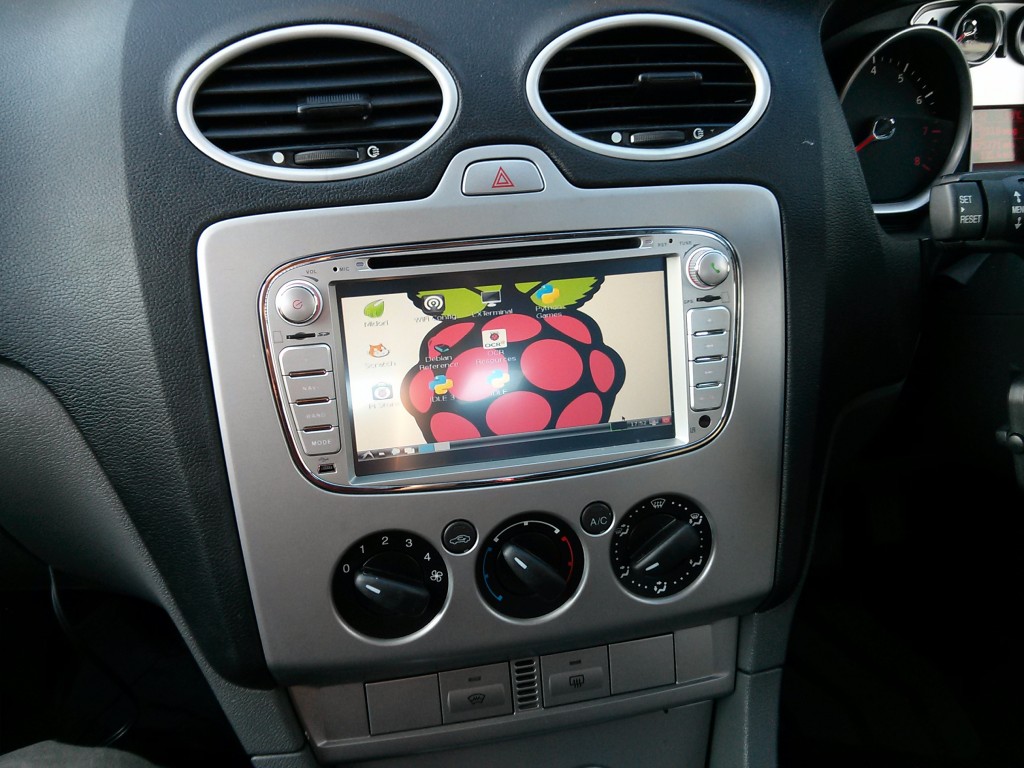 Raspbian running in the dash of a Ford Focus Last century I spent weeks researching car computers. I wanted mp3s, videos and access to Notepad on the road. I wanted my car to respect and love me, just like KITT loved David. I wanted it to shout, “Right on tiger!” when I achieved an optimum MPG and to flash up encouraging messages like, “Hello Clive, might I say that you are driving very handsomely today” on a heads-up display. Sadly it was never to happen. The reality was that you needed a PC the size of a coypu in the boot; an industrial 12/240v inverter; a 15″ CRT monitor strapped to your dash; and hawseholes in your bulkheads. And after a week of constant rebooting halfway through Captain Sensible’s Happy Talk, your hard drive failed because of the vibration and your battery discharged for good. (I gave up and bought a 32Mb Diamond Rio and a hi-tech cassette adapter instead.) Back in the 21st century, Derek Knaggs at Flamelily I.T has made the thing of my dreams: a low cost, low maintenance, general purpose car computer. There are other Pi-based car computers about but we especially liked this one because it’s simple, cheap and it looks like a factory fit. Very smart.  A quick swap of SDs and Raspbmc meets all of your multimedia needs The Raspberry Pi is stored in the centre console and all wires routed underneath. Audio is fed through the aux socket of the car’s radio so no additional hardware is needed for this. A wifi dongle provides internet connectivity on the move via a mobile phone hotspot. 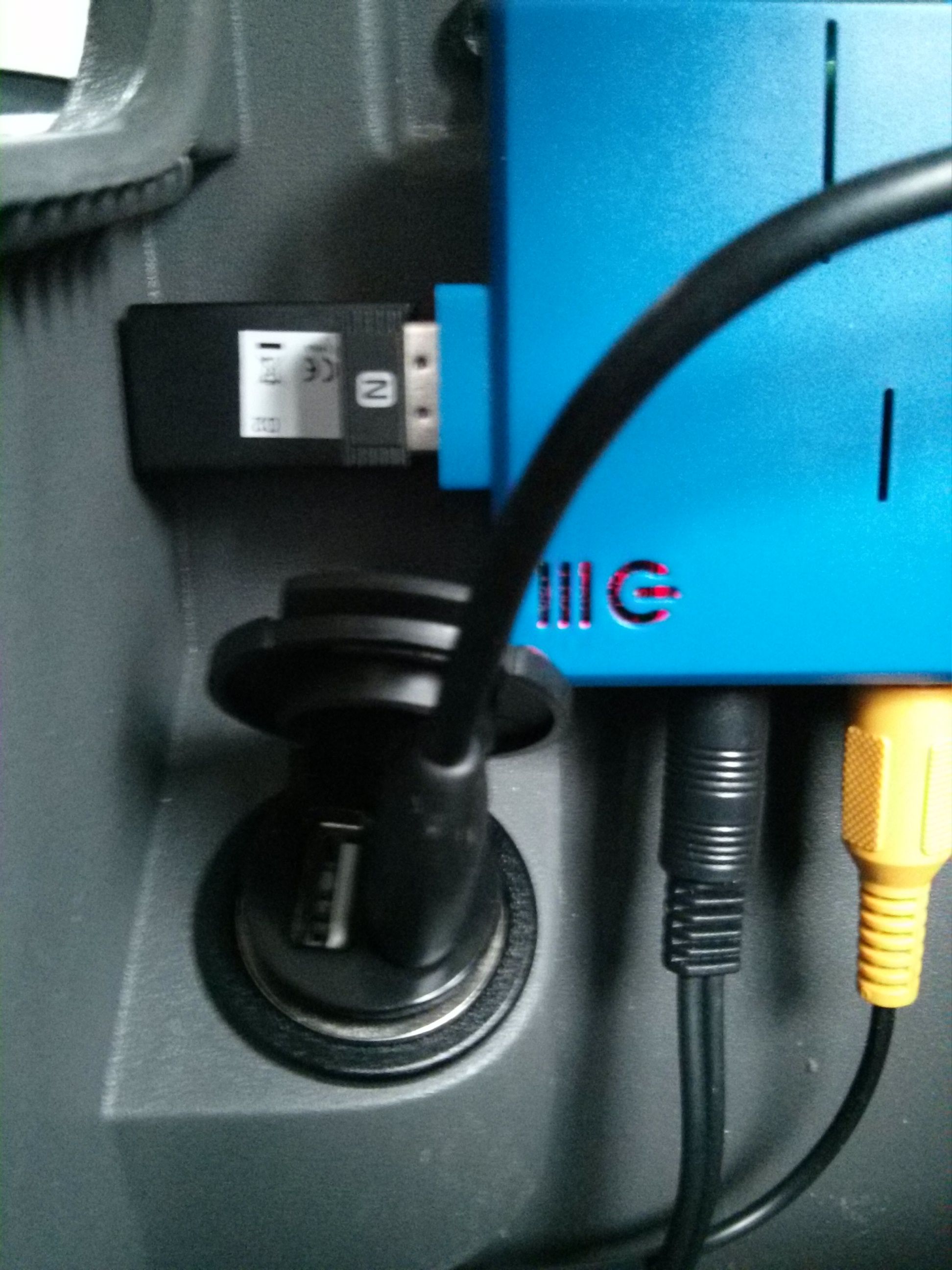 Neatly tucked away in the console — note the wifi dongle for internet on the move. Full details including a shopping list are on Derek’s blog. I’m off to make one. |
Join the Hall of Fame: Become a Digital Library Champion!
|
It's springtime and love is in the air! As you know, all of us here at OverDrive love digital media and we absolutely love our library partners. Large or small, public or educational – no matter the size or type of library, we love you all.
The Digital Library Champions contest is just another way for us to show you some love, in the form of content credit, a new tablet or eReader, a shiny plaque and adoration from your peers.
What does it take to become a Digital Library Champion? You have to share our passion for eBooks and audiobooks. We want to find the cheerleaders, the innovators and the success stories. We're looking for digital media marketing mavens! There are many chances to win with categories honoring the most creative and effective marketing campaigns: Inside the Library, Outside the Library, Online, through the Test Drive program and for our schools and colleges, in the classroom. We'll also select a grand prize winner to win the OverDrive Allstar Award for exceling in multiple categories.
Need some inspiration? Check out our winners from the past on our new Pinterest board, Hall of Fame: Digital Library Champions. Many librarians and even Library Journal have already been repinning and sharing promotional ideas from our past winners!
Your library could be the next to enter the Hall of Fame and win fabulous prizes – all you have to do is enter. The contest ends Tuesday June 11th so make sure to submit your entry form soon! Find all the details in the Digital Library Champions contest launch blog post. Send us entries, comments and questions to outreachcontest@overdrive.com.
Don't miss your chance to become a Digital Library Champion!
Melissa Marin is a Marketing Specialist at OverDrive.
 |


Google Play Magazine App Updated, Gets a New UI
| Google has introduced some new changes to its Play Magazine app, which now has been bumped up to version 2.0. The change comes on the back of a similar effort towards Google Play Music and its Play Store, both of which received their respective updates recently. As part of the enhancements brought about at the Play Magazine, the app now sports a cleaner and organized look and the interface looks brighter. A new slide out bar has been introduced to switch views from Read Now, Library, and Shopping mode. Purple has emerged as the theme color for the Play Magazine, though it still lacks features such as bookmarking, copy and paste, or highlighting.
Google Play Magazine App Updated, Gets a New UI is a post from: E-Reader News |

Amazon Appstore and Kindle Fire HD Tablets Now Available Globally
| Amazon announced today that they have opened the doors of their Android appstore to nearly 200 countries worldwide. Previously it had only been accessible to those in the United States since launching in early 2011, and Japan and parts of Europe since fall 2012. This is good news for international tablet users because Amazon’s appstore [...] |
Barnes and Noble Kicks Off Summer Program for Young Readers
| Public libraries and bookstores around the country are rolling out their summer reading programs in an effort to help students retain the progress they’ve made throughout the school year. While educators are all too familiar with the so-called “summer slide,” programs that encourage reading comprehension and exploration can have a valuable impact on students’ ability levels when they return to school in the fall. This summer, Barnes and Noble is once again encouraging participation in its summer reading program by offering prizes and free books to students who participate. Aimed at students in grades one through six, the program, Imagination’s Destination, runs from May 21st through September 3rd and offers unique incentives throughout the summer weeks. "Our Summer Reading Program encourages children to read for pleasure, inspiring a lifelong love of reading. It's so much fun to see a child's face light up when they turn in their completed journal sheet and get to choose a free book from the store display," said Sarah DiFrancesco, Director of Business Development for Barnes & Noble, in a statement unveiling the program. "Our stores partner with their local schools and libraries to get the word out in the community. Educators and librarians love the program, too, because they also want to encourage children to read during the summer months. Add our special promotions with Roald Dahl and Dan Gutman books and the best lineup of summer skills workbooks, and Barnes & Noble is truly the best destination for summer reading fun, learning and savings." Educators also have special promotional tools and items that can be shared with their students during these last few days of the current school year in the Summer Reading Activity Kit. More than just announcements for the program, these tools help students engage in active reading by asking them to transfer the words on the page to higher order thinking and characterization, and can actually serve classroom purpose throughout the school year. Information for both parents and teachers can be found in a special educators’ section at bn.com/summerreading.
Barnes and Noble Kicks Off Summer Program for Young Readers is a post from: E-Reader News |

Kindle Fire HD and Amazon App Store Expands to Hundreds of Markets
| Amazon has just announced that they are now making its Kindle Fire HD 7 and 8.9 tablets available in over 170 different countries. The company also mentioned that its Android App Market will be available in over 200 countries. The Kindle Fire HD WIFI tablets will be available to pre-order starting today. The first shipment will be dispatched on June 13th and the international crowd will find a lot more viability in accessing content with the entire app store now available. To celebrate this move, Amazon is giving a few apps away for free on May 23-24. Fruit Ninja and Cut the Rope Experiments could be incentive for people to gravitate towards these devices. App Developers will have the ability in hundreds of new markets to submit Android apps into the Amazon store. Amazon curates it fairly vigorously, and not everything is accepted, like Google Play. Recently, Amazon announced its virtual currency, Amazon Coins. This allows for micro transactions within the apps and can even be used to buy a paid version of an app. "Kindle Fire HD is the #1 best-selling item in the world for Amazon since its launch, and we’re thrilled to make it available to even more customers around the globe today," said Dave Limp, Vice President, Amazon Kindle. "Not only does Kindle Fire feature advanced hardware, it's also a service. When combined with our content ecosystem, great email and browsing and top-rated customer service, we hope people around the world will agree that Kindle Fire HD is the best tablet for an incredible price." Amazon is in the business of severely discounting the hardware to make up for digital sales. Over a million ebooks are currently in the system and in the last year Amazon has started to offer exclusives. Amazon Prime members get a free ebook every month for buying into the $79.99 package, which also gives free movies and free shipping. Kindle Fire HD and Amazon App Store Expands to Hundreds of Markets is a post from: E-Reader News |
