| Indie author Rachael Lucas has landed a deal with Pan MacMillan that covers publishing three of her books as well as an ebook. The titles covered include Sealed with a Kiss which will be launched in paperback form in May 2014. This will be followed by a sequel of it which will be released during Christmas 2014 along with a novel slated for a release in the Spring of 2015. Lucas' Sealed with a Kiss has seen over 70,000 downloads and has made it to among the top 10 Kindle titles. The story dwells on the topic of romance, friendship and rescued seal and is set on a remote island in Scotland. “I fell hook, line and sinker for Rachael’s writing from the first page. She writes with a warm, natural humour and creates characters that you feel you’ve spent years with, not just chapters,” said Senior commissioning editor Caroline Hogg explain the motive behind the deal.
Pan Macmillan Signs Up Multi-Book Deal With Self Published Author Rachael Lucas is a post from: E-Reader News |
Saturday, November 16, 2013
Pan Macmillan Signs Up Multi-Book Deal With Self Published Author Rachael Lucas


Kobo Aura vs Barnes and Noble Nook Glowlight
| Kobo and Barnes and Noble both have new six inch e-readers that will be vying for you attention this holiday season. These devices feature illumination technology that have been refined over the course of a few generations for each company. Today we compare the Barnes and Noble Nook Glowlight and the six inch Kobo Aura. The big difference between these two e-readers is the fact Kobo uses a five point capacitive display screen and the Nook runs a rather old Neonode IR that was popular a few years ago. This allows for Kobo Aura users to enjoy more pin point procession when navigating around or turning the pages of a book. The glowlight technology is fairly similar on both units, but I think the Aura edges the Nook out again. In the video below we compare eBooks, PDF files and other written content. The objective is to provide you with the same content right next to each other. If you are thinking about buying or upgrading to either of these readers this is the video for you. Kobo Aura vs Barnes and Noble Nook Glowlight is a post from: E-Reader News |

Book Discovery Enhanced with Stumleupon for eBooks
| There are millions of self and traditionally published out there and trying to discover the next good read is something everyone is focusing on. A new website launched today that is billing itself as the Stumbleupon for eBooks and at the click of a button presents over 10,000 eBooks. Developer Raimonds Plavenieks launched the site only today and has gained a ton of traction with hundreds of users online and 10,000 eBooks added. Authors can automatically submit their books into the discovery engine by Tweeting @stumblary with your teaser and link to the book. Books can be added from a myriad of websites such as Amazon, Barnes and Noble, Smashwords and Kobo. Raymond cites the reason for launching the platform as “ a fun experiment in recommending books.” The entire project is a bit of a lark with authors encouraged to submit ideas for features directly to Ray. Considering how much money is being sunk into discovering digital books by major publishers, this is a unique way to go about finding the next great read. Book Discovery Enhanced with Stumleupon for eBooks is a post from: E-Reader News |

Publishers Pleased with First Children’s Book Fair Held in China
| The first Children’s Book Fair held in China ran from 7th till 9th November and publishers who had been part of the inaugural edition of the fair report to having made a killing at the event. Publishers had to themselves two days before the fair was thrown open to the public which was marked by hectic activity. This also proved to be a golden opportunity for the publishers from the west and elsewhere in the world to interact directly with the public and their Chinese counterparts, something that they had to rely mostly on agents to get going. “It has been phenomenal: overwhelming at times. I have been in back–to-back meetings since I arrived. I planned to have 40–50 meetings but I have had about double that. I could have sold rights 10 times over if I was able to,” said Andrew Sharp, groups rights and digital director for Hachette Children's Books while speaking to ‘The Bookseller’. “The culture is very much that children read to learn but I have sensed that this fair is trying to get out the message of reading for pleasure,” said Sharp saying the focus has been more on fiction and picture books. “What this has really done is given us an opportunity to meet Chinese publishers,” Sharp further added. Abdul Thadha, founder of Leicester-based Sweet Cherry Publishing echoed similar feeling saying: “There was massive interest from librarians who wanted to buy books in different languages, which is a bonus I wasn’t expecting. Picture books have been of the main interest. I haven't signed any deals but I have got so many leads that I can’t help but think there will be a lot to come from it.” He also added: “I think this show has been absolutely brilliant. Those who have not come have missed out. I did not anticipate there would be this many publishers here . . . on the first day all my slots had gone, there was no time for lunch and I was meeting with publishers back to back. The only thing I would change for next year is to have more distributors here as there doesn’t seem to be any and obviously they are important." The Chinese publishers though weren’t as enthusiastic with the results they met, claiming there were less interest in their titles from UK publishers. This can be made for the words of Zhu Jing, foreign rights manager for Zhejiang Juvenile & Children’s Publishing House as revealed to The Bookseller: “We publish about 500 new titles a year, of which around 20% are imports. We do a lot of business with Dorling Kindersley in the UK. We really hope to sell more titles into the UK but right now we don't have much understanding of what the young readers are looking for or interested in. We have been to the London Book Fair, Frankfurt and Bologna and tried different agents to sell titles to the UK but it hasn’t been very successful so far.” The first Children’s Book Fair held in Shanghai saw attendance of publishers such as Publishers Association, Hachette Children's Books, HarperCollins, Nosy Crow, Top That!, Windmill Books and Brown Bear Books, World of Books, Digital Leaf, Sweet Cherry Publishing and Small World Creations, along with several other from around the world.
Publishers Pleased with First Children’s Book Fair Held in China is a post from: E-Reader News |

Pottermore Debuts on Tablets and Smartphone Devices
| The Harry Potter interactive website Pottermore is now available on mobile connected devices such as tablet PCs and smartphones. Up until now, the same was limited to just web browsers on traditional computing devices such as notebooks or desktops. Good to see the same transcending to the new age devices such as tablets which has emerged the most preferred device for personal computing needs. Pottermore though didn't reveal which platforms the site is compatible with except that it has got 'leading tablet devices' covered. This should include iOS and Android platforms at the least. As for the site itself, Pottermore has been found to be just as responsive and interactive as it has been known to be when accessed via a browser on a PC. Sure the smaller screen of a smartphone can't make up for the all the fun that the site provides for when viewed in a bigger display of a PC or even a tablet, though nevertheless, its availability in a smartphone provides a greater penetration than that was possible when it was exclusive to web browsers to be viewed on PCs. As with the site to be made accessible via mobile devices, there is also a huge demand for a Pottermore app and the good news here is that sources – though unconfirmed – have announced a collection of apps is already under development.
Pottermore Debuts on Tablets and Smartphone Devices is a post from: E-Reader News |

Barnes and Noble Nook Glowlight vs Simple Touch Reader with Glowlight
| Welcome back to another popular installment of the Good e-Reader Video Comparison Series! Today we look at the first e-Reader to use front-lit technology with the Barnes and Noble Simple Touch with Glowlight against the second generation Nook Glowlight. If you have the older model and want to see what all of the fuss is all about with the newer reader, you want to watch this video. Today, we directly compare the two e-readers against each other with the same book, magazine, PDF File and show you the entire digital reading experience. You can get a sense of the strengths of each model and even witness a nighttime reading test in action. Both e-readers have similar specs, they have six inch IR display and feature an e-ink screen. The newer Nook has 1024×768 for the resolution, whereas the older model has 800×600. There is also enhanced tech underneath the hood to eliminate the full page refreshes you are used to and instead the Nook Glowlight provides a more seamless experience. Barnes and Noble Nook Glowlight vs Simple Touch Reader with Glowlight is a post from: E-Reader News |

Amazon Kindle Paperwhite 2 vs Nook Glowlight
| Welcome to another Good e-Reader comparison video! Today we take a look at two of the latest generation e-readers that will be vying for your attention this holiday season. The Barnes and Noble Nook Glowlight just came out last week and the Kindle Paperwhite 2 has been available for the last three weeks. We directly compare eBooks, magazines, newspapers, PDF Files and show you how the glowlight looks. The Kindle Paperwhite 2 and Nook Glowlight both have comparable hardware specs on paper. They have six inch screens with 1024×768 for the resolution and both solely rely on the touchscreen to interact with content. The Kindle has a capacitive touchscreen, while the Nook has Neonode IR Touch. This gives the advantage to Amazon because you can pinch and zoom, while you cannot on the Nook. The Kindle has a 1GHZ processor whereas the Nook has 800 MHZ. When you take them both out of the box for the first time you have 2 GB of memory on each one to load in your own books and purchase content. Amazon Kindle Paperwhite 2 vs Nook Glowlight is a post from: E-Reader News |

Derek Jeter Starts Jeter Publishing in Partnership With S&H
| Getting into book publishing business isn't generally the most preferred post-retirement plan that most sportsmen would opt for though Derek Jeter, that is exactly what he had set his sights on. The New York Yankees shortstop and captain has already got on to the act, having sealed a deal with Simon & Schuster that would act as a partner to his own firm, Jeter Publishing. Jeter spent the most of this year nourishing injuries that had limited him to feature in just 17 games. However, that also provided him enough time to introspect what he'd like to achieve once he hangs up his boots. “I've had a lot of time to myself to think,” he said. “The whole last year has been sort of a blur. Being away from it for so long gave me the opportunity to think about what the future may hold after baseball.” As for his getting into the publishing business, Jeter explained that saying he has always harbored interest in business and content which made enough sense to set up Jeter Publishing. “I've always had an interest in business, and my interest in business has really expanded over the years,” Jeter said. “And I have an interest in content. So this gives me the opportunity to really combine the two. And it gives me the opportunity to curate and share interesting stories and share content with the public.” Among the first titles that Jeter Publishing wishes to release will be ‘Derek Jeter guide to baseball’, which is hardly surprising. Jeter also added the book will be updated every year. Among the other titles forthcoming from Jeter Publishing include children's titles, picture books as well as adult fiction, middle grade fiction, biographies among others. “I understand how important content is this day and age,” Jeter told reporters for the Daily News. “You get an opportunity to share people's stories–it doesn't necessarily have to be baseball–that I find interesting, I'm happy I get an opportunity to do it. I'm looking forward to it. This is my publishing imprint. It has my name on it. I'm going to try and make everyone proud.” Jeter though said his number one priority right now is to bow out of the game on a high. The 40 year old has recently been signed for one year in a deal worth $12million. Meanwhile, Jeter Publishing will have a working relationship with Wicked Cow Entertainment, a firm ‘that manages strategy for sports and entertainment brands and will be looking for “brand extensions” for books.’
Derek Jeter Starts Jeter Publishing in Partnership With S&H is a post from: E-Reader News |

Barnes and Noble Nook Glowlight Review
| Barnes and Noble has just released their second generation glowlight e-Reader and has dropped the “Simple Touch” naming convention. The Nook Glowlight has a design that is entirely unique and features a piece of rubber that circulates the device in a bid to minimize the damage from dropping it. The company has refined the lighting technology that allows you to read in the dark and can now give Amazon and Kobo a run for their money in terms of clarity. How does this device perform under real world conditions when reading newspapers, magazines, eBooks and other content? Is the new design a boon or bane for the average customer? Is this worth the upgrade if you own previous Nook e-Readers? Today we look into all of these issues and more to give you the definitive answers. Hardware The Barnes and Noble Nook Glowlight features a six inch IR touchscreen display with a resolution of 1024 X 758-pixel and 212 PPI. This is a huge upgrade from the previous generation Nook that only had 800×600 for the resolution. Under heavy tests we noticed that the blacks were deeper in cover art and the way fonts look when you maximize their levels. The Glowlight technology that allow you to read in the dark has been dramatically enhanced. B&N still continues the philosophy of bucking the major industry trend of putting the LED lights on the top of the device, instead of the bottom. Overall, the light is now almost pure white, where the NST with Glowlight would often have a blue hue to it. The entire Good e-Reader review team think that that the new model has 75% brighter and clearer lighting. We did notice some drawbacks with the way light was handled. When you have it above 65% in brightness you tend to notice a layer of grey film at the very top of the screen. This is where the 5 LED lights are positioned and point downwards. To turn the light off you can access it in the settings menu or hold down your finger on the home button for two seconds. The settings menu itself is at the top right hand corner and the Nook screen is sunken, much like the Kindle is. You will often have to try and few times to hit the settings menu to control the brightness. Underneath the hood is a 800 MHZ processor and 256 MB of RAM. There are 4 GB of internal memory that you can use to store purchases made from the bookstore. When you take it out of the box for the first time and power it on, there is only 2.1 GB available. If you like to load in your own PDF Files or eBooks there is only 500 MB reserved for user files. Unlike prior models of the Nook line of e-Readers, there is no expandable memory via SD in the Nook Glowlight. The specs on paper are very much akin to most other e-readers on the market by Sony, Amazon, Kobo and most of the indie companies. The Nook Glowlight has a full piece of rubber that circles the entire length of the e-Reader. You can take it off, but it exposes some of the assemblies and the motherboard is showing. It also is a bit jagged in parts, so you don’t want to do this. This was one of the most oddest design choices ever in e-Readers. Why they did this is beyond me, they don’t even offer different colored bumpers to buy to customize your device, which I would have done. I realize the essence of the rubber is to protect your device from drops, as the weight of it would change the momentum to land on its side, rather then face down. Really, how many people are reading when they are walking down the sidewalk or in a position to truly damage their e-readers from big falls? We run a drop test on the previous generation Nook Simple Touch and it was fine after dropping it from five feet in the air on concrete. Battery Life is on this device is somewhat consistent with other e-readers on the market. You will get two months of battery life out of a single charge and you power it up by hooking it into your computer with the USB cable. Barnes and Noble has elected to not bundle a wall charger, so you will have to buy your own. In the end, the overall resolution and glowlight enhancements are the main drivers to upgrade to this device if you own one of Barnes and Noble’s earlier devices. Text and pictures look way better and the light is more evenly distributed across the screen. The physical construction of the device has a bit to be desired for and I quite frequently found myself starting to peel off the rubber when holding the device. It is not held in place very tightly and easily comes off. Software Many uninformed tech sites cited that the Android 2.1 OS that comes bundled on the Nook Glowlight to be old and outdated. It is true that its an older version but to the average user no one cares. You certainly would not gain any compelling benefits of a recent version of Android because B&N heavily skins their UI, so you wouldn’t even know. The UI has been really simplified on this version of the Nook. You no longer have to tap the home button to bring up all of your quick options, instead they are persistently at the bottom of the screen. Library, Store and Search are the only three options available. The settings, social and other functionality is now at the top right hand side of the screen. No one really changes their settings on a daily basis or adjusts the lighting every few minutes, so I dig the fact its neatly tucked out of the way. The main library shelf has not received an upgrade and you can sort your collections by newspapers, eBooks, documents, and even an “Everything else” option which shows your apps and other content you may have purchased using the Nook HD line of tablets. This is actually their “cloud” option, but everything listed in here is a bit of a tease because you can’t even use it. You can also do a cover art few, or a list few, fairly basic stuff and nothing advanced of note. If you have the Nook Simple Touch or the Nook Simple Touch with Glowlight most of the menus and sub-menus look exactly the same. There are no exciting software enhancements of note. Things are organized a bit differently and I think its more intuitive now than before. The Store experience right now is quite buggy and we reached out to Barnes and Noble for comment. If you are reading a book and select “more” it brings you to the store. In the past, there were options to change your e-reading experience from the stock portrait view to landscape. If you go into your settings menu and click on LENDME titles, you would think it would bring you into the section of the Nook store with titles you can share with your friends, nope, its the same stock store. If you try clicking on any eBook you can’t actually click on it to get the book description and even to buy it. Instead, you have to login to the Nook website and sync your content directly. Finally, if you click on Social and try and enter passwords to connect up your Facebook or Twitter account all of the password fields are blank when you enter text. I ran into the situation where I knew the password I entered was correct but there was no place holder symbols to let me know how many characters I typed. When I scrolled up the page the it for a second showed me the password in plain text but then quickly disappeared. Maybe we have a bum unit, maybe its the software acting up, maybe its the fact we live in Canada but could buy content on our other Nooks, likely the device was rushed out too fast, who knows. In the end, most e-reader companies release a new model every year and some have some cool new software features that offer a compelling reason to upgrade. Kobo unveiled “Beyond the Book” which is their answer to Amazon X-Ray. Amazon announced GoodReads integration and Kindle Freetime for their e-readers, both are not available yet, but will be soon. Sony and B&N generally remain fairly consistent with slowly refining core elements of their device but not introducing any new software enhancements that make users turn their heads around and take notice. e-Reading Experience Barnes and Noble has always maintained an elegant e-reading experience and not providing a ton of advanced options to confuse their customer base. When it comes to reading you are mainly using EPUB and PDF Files. EPUB is what the Nook store sells and you can load in your own PDF’s. The Amazon Kindle Paperwhite 2 and Nook Glowlight have similar text augmentation features when it comes to changing the size of your font, line spacing, margins and font size. If you hold your finger down in the middle and select text you are able to customize your changes and it dynamically updates. There are six different fonts, 7 different font sizes and 3 different ways to edit margins and line spacing. When inside a book you can make highlights, look words up in a very basic dictionary, share a specific passage with your friends on Facebook or Twitter. You hold down your finger on a word to drop an anchor and then can select an entire sentence or page of text. You can load in your own books on the Nook and have access to all of the functionality as books purchased from B&N. One thing I noticed about the reader is the lightning fast page turns! You do not have full page refreshes at all. We turned 100 pages and did not even experience one refresh. I don’t know what Barnes and Noble did to make this happen but its pleasant. The last two Nook readers did one every six pages and every single page you turned tended to blur the text. The Nook Glow is the best reader to date for the company in terms of not taking you out of the immersive reading. The PDF experience on the Nook Glowlight is lacklustre to say the least. You cannot pinch and zoom on this unit like you can on the Kobo Aura or Amazon Kindle Paperwhite 2. Instead, you will have to chance the size of the font to initiate a reflow. This is much akin to the old way that Sony used to do things by relying on you to switch up your Zoom level. The page numbers change depending on this. Our DND Monsters Manual was around 280 pages but on the first level of zoom changed to 600 pages and 3rd 800 pages. You also don’t get a preview window that helps orient you on where in the document you actually are. This is likely the weakest part of the Nook e-Reader and likely a deterrent to anyone looking to purchase one. Finally, you can purchase magazines and newspapers via the Nook ecosystem but you can think of them as eBooks. Aside from the cover art everything is basically the Nook Edition, and allows you to augment the text size, font type and add notes. Anything you can do in a standard eBook you can do in either of these. Wrap Up – Is it Worth It? If you have the Nook Simple Touch or the Nook Simple Touch with Glowlight this is worth the upgrade if you read a ton in the dark and if font clarity matters to you. Aside from those two things this reader is very much the same as previous generations in terms of the hardware. The lack of SD card is a black mark on this device, because it does not allow you expandable storage to load in more content. PROS Resolution is on par with Kobo Aura and Kindle Paperwhite 2 CONS PDF Experience is Woeful Rating: 7.5/10
Barnes and Noble Nook Glowlight Review is a post from: E-Reader News |


Friday, November 15, 2013
Smashwords Adds Dropbox Delivery for eBook Reading
|
Interestingly, this new feature will be compatible with ebooks that consumers have already purchased and stored in their libraries, making the virtual storage application a cloud-based access-anywhere portable library. Readers simply have to click the Send to Dropbox button that will appear next to their titles. According to a blog post on the announcement by CEO and founder Mark Coker, “Each time you purchase an ebook at Smashwords, we'll automatically transfer up to three file formats – epub, mobi and PDF – to your Dropbox account. File format availability is determined by the author or publisher. You'll find your files in Dropbox's "Apps/Smashwords" folder. You can transfer previously purchased books to Dropbox by clicking the Send to Dropbox button in your Smashwords Library.”
Smashwords Adds Dropbox Delivery for eBook Reading is a post from: E-Reader News |

Kindle Fire HDX Alternate Launchers and Wallpapers
| Amazon’s Kindle Fire HDX tablets come with software based on Google’s Android 4.2 operating system. But you would never know it by using the HDX tablets because Amazon has customized the software in a number of ways to better reflect their products and services instead of Google’s. The software for the HDX tablets is called […] |
Digital Comics Bargains for November 15, 2013
| Just in time for the holiday travel season, we have a ton of great digital comics deals. Load up your e-reader now, and you’ll be good until the holiday gift cards come in. Indie publisher Top Shelf is having a big digital sale across all platforms—that’s comiXology, Kindle, Nook, Kobo, and Comics Plus. The sale includes steep markdowns on two of the most acclaimed books of the year, Rep. John Lewis’s March, the first volume of his memoir of the Civil Rights movement, and Rob Harrell’s Monster on the Hill, an all-ages tale (set in a delightful alternate Victorian England) of a monster who can’t quite sum up the energy to be scary any more. Pick up the two of them plus Diana Thung’s delightful Splendour in the Snow and you’ll get a couple of cents back from your virtual sawbuck. There’s plenty here for all tastes: Alan Moore, Eddie Campbell, Jess Fink, Jeff Lemire, Harvey Peckar—you can’t go wrong. Here’s another cross-platform sale: Superman comics by Grant Morrison, on comiXology, Kindle, and Nook, for 99 cents an issue. This includes his much-loved All Star Superman, a good starting point if you’re new to superhero comics or maybe just haven’t read Superman in a while; it’s one of those comics that you don’t have to be a hard-core comics fan to enjoy. There’s been a lot of talk about women in comics lately (just Google it!) so it’s nice that comiXology is stepping up with a Women of Marvel sale on titles with strong female leads, such as She-Hulk, Spider-Woman, and Captain Marvel, all for 99 cents each. Over at Dark Horse, they’re marching to a different drummer, literally, with a selection of rock and roll comics for 99 cents each. Check out a couple of Gerard Way’s Umbrella Academy miniseries or his The True Lives of the Fabulous Killjoys (with art by the always awesome Becky Cloonan), or maybe Orchid, by Tom Morello (Rage Against the Machine). Digital Manga is having an Autumn Sale with 25% off 15 different manga titles; be warned that some of them are adult manga and the link may be NSFW. But there are also some teen-friendly yaoi titles and Harlequin romances available at good prices. The best price of all, of course, is free. So check this out: You can get a free bio-comic about Alan Moore, in which writer Gary Millidge strings together panels from different Moore comics to tell the writer’s life story. You’ll have to download the Sequential app, which is iPad-only, but go ahead as it’s a nice app and they have some interesting free content (including a collection of lost Neil Gaiman comics) and they are also marking down some of Moore’s comics. Finally, you can stay home on Black Friday, Cyber Monday, and all those other shopping holidays and pick up some free digital comics from DC—they will be giving away the first issues of a number of their digital-first series, including Batman ’66 and Adventures of Superman, but just one a day, so check the list and mark your calendar. Digital Comics Bargains for November 15, 2013 is a post from: E-Reader News |

Can you hear me now? Audiobook checkouts hit the roof in 2013
| Audiobooks are on fire! In the past year, OverDrive mp3 audiobook checkouts have gone through the roof, growing 127% from November 2012 through October 2013. Total checkouts exceeded 13 million just in 11 ½ months. Last month saw more than 1.4 million checkouts, and this month is on pace to double last year's November checkouts.
Millions of others agree, highlighted by an average 8 percent month over month increase in audiobook checkouts. Libraries and schools across the world are stocking up on titles from OverDrive Marketplace to make sure they have the audiobooks their patrons and students want.
Want to see what all the noise is about? Go to search.overdrive.com to browse our catalog of mp3 audiobooks, and get listening!
Heather Tunstall is the Public Relations Specialist at OverDrive.
 |

PiePal: order a pizza at the push of a button
| Here’s a Friday night quickie (no, we’re not nipping off to the pub unfortunately—we’re getting ready for tomorrow’s Manchester Raspberry Jam). Ordering pizza can be such a chore. At the very least you have to pick up the phone and shout, “Bring! Pizza! Here!” At worst it can actually involve going outside and all that that entails. The fine folks at iStrategyLabs have put paid to this nonsense with PiePal, a one button pizza ordering system. PiePal was designed in SketchUp and printed on a MakerBot Replicator 2. Inside, the Raspberry Pi hooks into the API of Domino’s online ordering system to automatically order your favourite pie when you press the button. 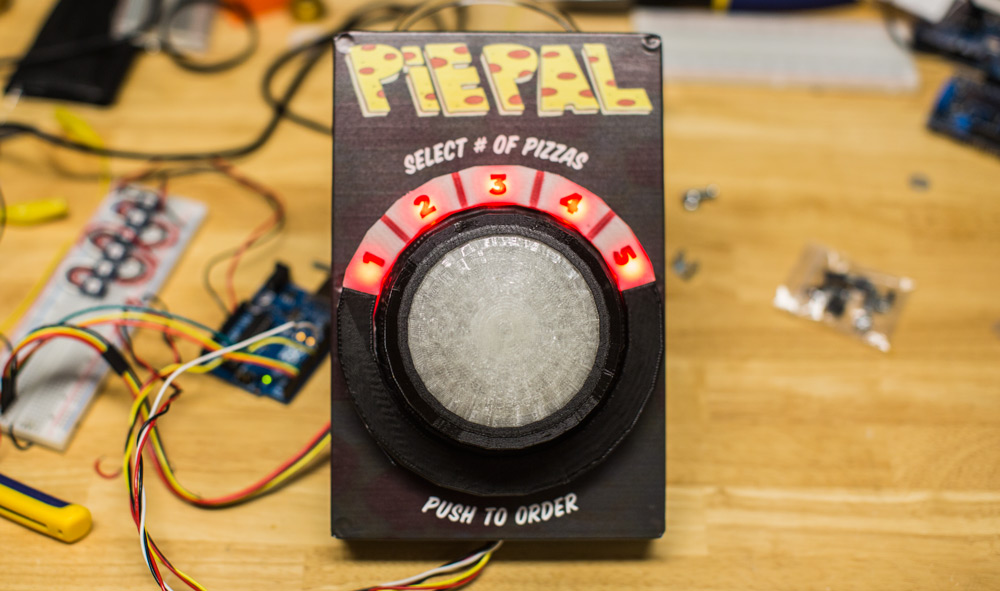 Press the button. You know you want to. If this has tickled your taste buds–or, indeed, your fancy–you can sign up as a beta tester. Now: how to stop people—who have gone to sleep on your floor a bit worse for wear—waking up at 3am with the munchies and mashing the PiePal like a crazed lab rat while repeatedly grunting, “Peeeeee-ZAAAAHH! Peeeeee-ZAAAAHH!” |
Pubslush Takes Crowdfunding to Books, Launches New Blog
| Crowdfunding has become a widely popular method for startups to secure the funding they need to launch their conceptual services or products while generating much-needed buzz about their pending product. A small number of diverse platforms have begun bringing the same support structure to books, including Pubslush, whose founder Amanda Barbara spoke to Good e-Reader about the growing popularity of readers being invested in a book from the beginning. “What makes us so very different from some of the other crowdfunding platforms out there is not just that we’re ‘books only’ and that we’re trying to create a community where authors, readers, publishers, and industry professionals interact, but the best thing about us is that we offer small funding, letting authors set a minimum and a maximum goal. Every little bit helps an author, but about 95% of our authors are going to publish no matter what. It enables them to test the market pre-publication and create a buzz.” One feature that instantly sets Pubslush apart from the typical crowdfunding model is the buy button: “Once an author has been successful and the campaign is over, on a lot of other crowdfunding sites the person never comes back. They receive their money and they walk out the door. With Pubslush, however, we keep the book live on our site and readers can still comment and we switch the support button to a buy button, and we drive traffic over to Amazon when they book is available for sale. It creates a community and lets our authors continue to have a presence on Pubslush.” Pubslush goes on to support the authors once the book is live, assisting with all-important marketing and promotion, keeping readers engaged through book interaction, personalization and education, and more. And unlike some crowdfunding sites, Pubslush has one of the lowest percentages among the similar platforms in terms of what portion of donations go to keeping the site running. While other platforms like Kickstarter and IndieGoGo might have a much larger reach, Pubslush steers itself towards readers who want to specifically support a book instead of letting an author’s campaign get lost among the various offerings. “Crowdfunding is all about driving traffic to your book,” continued Barbara, “so whether you’re one of 200,000 projects going on at Kickstarter or you’re on Pubslush, you’re going to be responsible for raising your own funds. Working with a company like us lets you have dedicated followers in place.” The site recently launched two new versions of the process, Pubslush Pro and Pubslush Custom, along with a new blog which went live this week. “Readers do enjoy being a part of the discovery process, they like that they were able to fund a book and bring it to life. If the author is really diligent about keeping the reader a part of the process, you see the excitement.”
Pubslush Takes Crowdfunding to Books, Launches New Blog is a post from: E-Reader News |

Apple iPad Mini with Retina Display vs iPad Air
| Welcome to yet another installment of the Good e-Reader Video Comparison Series! Today we check out the Apple iPad Mini with Retina Display and the Apple iPad Air. Over the course of the video we check out the reading experience with eBooks, magazines, newspapers, and comic books. As an added bonus we look at audio/video to see if the aspect ratio difference is noticeable. Many people own the first generation Apple iPad Mini or prior models of the iPad. Quite often the burning question is “should I upgrade?” and “is it worth it?” This video mainly focuses on the e-reading experience because we know more people then ever before are consuming a wide array of written content on their iDevice. The Air and Mini are almost exact mirrors of each other when it comes to the overall hardware. The resolution is 2,048 x 1,536 on both models, the Air has 264 ppi while the Mini has 326 ppi. They have the same 1.3 GHZ Dual Core processor and 1 GB of RAM. The only other major difference is the aspect ratio for watching movies and the lack of a 128 GB storage option on the Mini with Retina. This video puts the exact same content side by side, giving you an indication on how graphic heavy content looks, as well as the standard eBook. Apple iPad Mini with Retina Display vs iPad Air is a post from: E-Reader News |

Apple iPad Mini vs Apple iPad Mini 2 with Retina Display
| Welcome to another Good e-Reader Comparison video! Today we check out the latest generation Apple iPad Mini with Retina Display and the Apple iPad Mini 1. Over the course of our review we focus on the e-reading experience to see if the high resolution display makes a difference. We compare the same comic, magazine, newspaper, and eBook side by side. As an added bonus we show you the same HD video to test how they handle it. The iPad Mini with Retina has a 7.9 inch screen with a resolution of 2048 x 1536 pixels. This is the exact same resolution as the 9.7 inch Apple iPad Air and really shines with HD content. The first generation Mini has only 1024×768, which means the new one doubles it. During our tests we found that black text really pops out and looks less pixelated. There is also a stark difference with image heavy content like magazines and comic books, but looks exactly the same with newspapers. As far as video goes, we did not notice a huge difference with content from Netflix, but did with HD videos purchased from iTunes. Apple iPad Mini vs Apple iPad Mini 2 with Retina Display is a post from: E-Reader News |

Thursday, November 14, 2013
Calvin and Hobbes eBook Debuts at Amazon, B&N and iTune
| Calvin & Hobbes, the famous comic series has finally entered the digital realm. This applies to three titles as of now: The Indispensable Calvin and Hobbes, The Essential Calvin and Hobbes, and The Authoritative Calvin and Hobbes which makes the up the most read and treasured titles of the comic strip. The three volumes which has been priced $13 also covers the majority of what the comic strip offered for the ten years (1985 – 1995) it had been in existence. The titles have made their debut at the Amazon, Barnes & Noble, and the Apple iTunes. Unfortunately, the Google Play Store is not among the recipient as yet which means a sizeable community will be kept out of all the fun. The comic strip has been seen in numerous newspapers all over the world even in digital form though this is the first time that it will be available as an ebook.
Calvin and Hobbes eBook Debuts at Amazon, B&N and iTune is a post from: E-Reader News |

iPad Mini with Retina Display Hands on Review
| When the original iPad Mini was released last year most people lamented the poor resolution. This issue seemed to have been solved with the advent of the iPad Mini with Retina Display that just came out yesterday. How does it stack up against up against the first generation and is it worth it to upgrade? We dive into the e-Reading experience and show you how magazines, comics, graphics novels, newspapers and eBooks look. Hardware – The Difference Maker The iPad Mini with Retina has a 7.9 inch screen with a resolution of 2048 x 1536 pixels. This is the exact same resolution as the 9.7 inch Apple iPad Air and really shines with HD content. The screen itself was a huge upgrade over the original and in head to head tests anything that is graphic heavy really excels. Underneath the hood is a duel core A7 1.3 GHZ processor, 1 GB of RAM, quad-core GPU and a new 64 bit architecture. The Mini has varying degrees of internal storage and you can opt for a 16, 32, 64 GB depending on your needs. It is important to note that HD content tends to fill up your device very quickly. The average HD comic by Comixology has increased to over 100 MB per issue, and magazines are sometimes much larger. I found that my 16 GB model would constantly run out of space with 50 comics loaded on it. So if you do a ton of online streaming for music and video, you should be OK with a smaller model, but if you download a bunch, consider the 64 GB edition. Aside from the processor and resolution not much has changed from the first generation iPad Mini. You still have the front facing 1.3 MP camera and rear facing 5 MP camera. The stereo speakers next to the lightning connector have also remained consistent. The positioning of the speakers are somewhat odd as most movies tend to play better in landscape mode. When you are holding it with both hands it tends to muffle the sound. The iPad Mini with Retina no longer feels out of date when you look at the specs on paper. Apple products are seldom about what is on the back of the box or on Wikipedia. It is all about the 475,000 tablet optimized apps in the store and tremendous first party support. The most obvious competitors of the iPad Mini is the Kindle Fire HDX and Google Nexus 7. They are all a full one inch smaller and cost around $170 less than the $399 iPad mini. The most noticeable differences when comparing the Kindle and Nexus to the iPad Mini is when you are watching films. Anyone can easily distinguish between a 7-inch, 16:9 or 16:10 screen and a 7.9-inch, 4:3 screen. You have more than 33% percent more pixels on the iPad mini than the Nexus 7 and Kindle. In the end, the resolution simply makes video and graphic heavy content really shine. The GPU and hardware underneath the hood will insure that anything the iPad Air can handle, this one can too. I used to use the Mini casually for short spurts of content consumption while commuting and rely on my iPad 4 for marathon movie sessions or playing serious games. No longer, the Mini will be my replacement for everything. Software – The Apple Ecosystem iOS 7 has its own idiosyncrasies when you compare it against Android. The Keyboard has not really changed over the years and five finger multi-tasking can be hit or miss. Apple has introduced pseudo livewallpapers with animation effects, but severely lack in interactivity. Still, iOS 7 has more features once you can get past the cartoony icons. I like the ability to swipe upwards from the bottom of the screen and be able to turn WIFI off and augment other core features. I also like when you are multitasking you can simply swipe upwards to close an app, which feels similar to Android. The Apple ecosystem is the entire draw about buying the iPad Mini with Retina. Most HD videos purchased from the iTunes store look really good and put it right on par with the iPad Air. The Mini no longer plays second fiddle in the entire gaming and multimedia experience. e-Reading Experience – Good Things in Small Packages When you open the Mini for the first time you are greeted by the iBooks app. This is the only bookstore on the iPad that allows you to purchase books within the app. Amazon, Sony, Barnes and Noble, Kobo and all other major booksellers disabled the ability to buy eBooks within their apps because they did not want to give Apple a percentage of every single sale. This really hinders the customers ability to easily buy from their favorite merchant. Instead you have to jump through a bunch of hoops to buy content via the website and then sync it to the app. The iPad Mini with Retina on a core eBook level really makes the text stand out. When comparing the Mini 1 against the Mini 2, the text really pops out and looks less pixelated. You would figure how difficult is it to make a white background and black text. On a hardware level, it is all about the resolution in this regard. When it comes to magazines purchased from the Apple Newsstand and Comics purchased from Comixology the Retina Display shines. Graphic heavy content really shines. Most magazines these days from the newsstand actually have iTunes integration. For example, Rolling Stone magazine has a built in music player that allows you to play tracks right in the magazine and if you want to buy it, you are automatically directed to the store to buy it. This makes it more intuitive to do something very unlike any other ecosystem. Comixology delivers comics in their CMX-HD format, which increases the size of the files from 60 MB to over 150 MB. This is the big advantage of Apple staying consistent with their resolution and size of their hardware. The iPad has always been 9.7 inches and the Mini 7.9. The last three generations of the iPad has maintained the exact same resolution and now the Mini has participated in that trend. This allows content delivery platforms to optimize everything for the same resolution and two different screen sizes. This is Apple’s greatest advantage and allows people who love to read graphic novels, manga, comics and magazines a better experience than Android. Wrap up If you have the first generation Apple iPad Mini you owe it to yourself to upgrade to the latest iteration. The resolution and hardware underneath the hood really makes your day to day tasks load faster and look better. At Good e-Reader we normally focus on the overall reading experience and this is one of the most portable and lightweight tablets we have ever reviewed. It remains very pocket friendly and will last all day long with the 10+ hour battery. If you do roam around a lot you might want to spend the extra cash and get a model with a cellular connection. People may not want to invest the $400 needed to buy the entry level iPad Mini with Retina and opt into purchasing the Nook HD+, Amazon Kindle HDX or the Nexus 7. There are viable and compelling reasons to walk down the road of Android but if you are a reader, you want to avoid these. It comes down to the content delivery systems and the sheer number of Android tablets with varying screen sizes and resolutions. Magazine, Manga, Comic and Newspaper publishers cannot possibly optimize HD content for all of these different models and delivery it properly. This is the failing of the Kobo Arc 10, that has the highest resolution in the business but lack of HD content kills it dead. You spend the big money on a tablet to make everything look awesome, if the comic you bought was optimized for a tablet that is 800×600, it doesn’t matter how awesome your Android tablet is, it won’t look as good as the iPad. PROS Amazing Resolution CONS Expensive Rating: 9.5/10
iPad Mini with Retina Display Hands on Review is a post from: E-Reader News |


Judge Dismisses the Google Search Case
| In a decision eight years in the making, a US District Court dismissed the case Authors Guild v. Google, upholding the status of the fair use doctrine brought up in the case. The decision has been hailed by libraries and their partner organizations, in light of Google’s tireless efforts to establish a searchable book database through scanning of millions of titles, many of which are housed in secure collections due to their rarity. "It has become an invaluable research tool that permits students, teachers, librarians, and others to more efficiently identify and locate books," Judge Chin wrote, referencing an amicus brief submitted by the Library Copyright Alliance. "It has given scholars the ability, for the first time, to conduct full-text searches of tens of millions of books. It preserves books, in particular out-of-print and old books that have been forgotten in the bowels of libraries, and it gives them new life.” While no one argues the clear benefits to Google’s efforts, especially in terms of book access for the underserved literary demographics and those whose impairments prevent them from enjoying the same textual access that other readers have, the Authors Guild fought the effort claiming copyright infringement, especially in terms of the estates of previous rights’ holders. Judge Chin heard further remarks in support of the dismissal, outlined in a press release today: "It facilitates access to books for print-disabled and remote or underserved populations. It generates new audiences and creates new sources of income for authors and publishers. Indeed, all society benefits." "ALA applauds the decision to dismiss the long running Google Books case," said Barbara Stripling, president of the American Library Association. "This ruling furthers the purpose of copyright by recognizing that Google's Book search is a transformative fair use that advances research and learning." "This decision, along with the decision by Judge Baer in Authors Guild v. HathiTrust, makes clear that fair use permits mass digitization of books for purposes that advance the arts and sciences, such as search, preservation and access for the print-disabled," said Carol Pitts Diedrichs, president of the Association of Research Libraries. "I echo the comments of my colleagues that this ruling, that strongly supports fair use principles, enables the discovery of a wealth of resources by researchers and scholars," said Trevor A. Dawes, president of the Association of College & Research Libraries. "Google Books also makes searchable literally millions of books to students and others with visual disabilities. This is a tremendous opportunity for all our communities." The effects of Judge Chin’s decision stand to have another impact in another similar case, Authors Guild v. HathiTrust.
Judge Dismisses the Google Search Case is a post from: E-Reader News |
