| Everybody knows that you have to be careful for malware and adware when installing apps, especially from lesser known sources. Unfortunately, the security firm Avast is now telling us that we are just as vulnerable to these security threats when downloading apps from the Google Play store –even those with millions of downloads. The latest discovery involved a series of advertisements posing as warning messages that were displayed to end users when they unlock their Android devices; the culprit in that case being a card game app called Durak that boasts 5 to 10 million installs to date. Originally brought to Avast’s attention by way of comments in their user forums, the firm was able to find this same malicious software in over a dozen apps, each with different developers (with more apps being researched and confirmed to be infected as I write this). The worst part of malware is how clever it can be –many won’t even display ads for days or weeks following installation (in some cases not until you have rebooted your device)… when you consider how many apps and settings you change over that kind of time period, tracking down the source can be very difficult. Once the ads do display, the warnings are hard to ignore (often scaring you with suggestions that your smartphone is filled with pornography, infected by a virus, or out of date with required security patches). After the warnings is a call to action which tends to result in more malware-infected apps being installed once a user clicks through (and in worse-case scenarios, even sends SMS messages to your contacts trolling for sensitive information and personal data). In some cases, the adware and malware were providing links back to legitimate apps by trustworthy developers –which likely points to other motivation, such as credit for new user referrals. It goes without saying that these security threats are a violation of Google’s Terms of Service (and they have suspended apps that are known offenders)… but the fact that they got through to the Play Store in the first place means that you can never really let your guard down. A video detailing the behaviour, look, and feel of the adware in question is linked below.
Avast Finds Adware In Android Apps with Millions of Downloads is a post from: Good e-Reader |
Tuesday, February 3, 2015
Avast Finds Adware In Android Apps with Millions of Downloads


2014 Q4 Results Suggest Phablet May Be Killing the Tablet
| Video killed the radio star, and phablets may be killing tablet sales (if the results of a study by research firm Canalys can be believed). According to their statistics, worldwide tablet shipments have dropped 12 percent year-over-year to just 67 million units overall during Q4 2014 –Apple saw an 18% loss, while Samsung recorded a 24% decline. During this same period, larger format smartphones like the iPhone 6 Plus were tremendously successful. Some of the change is being attributed to bargain pricing from competitors (with Amazon moving 4 million units and Lenovo shipping 3.7 million units, totalling over 11 percent of the tablet market share together)… but other theories seem more likely. It may be that Apple shrinking the size of their laptops is adding portability competition for the iPad lineup –but it’s probably their border-crossing smartphones that are to blame. Users see smartphones as more feature-rich and mission-critical –so if they have to choose a single device to upgrade, they will win every time. It’s also true that phablets represent a compromise between getting tablet functionality without actually having to carry one with you everywhere (particularly as they relate to users who would have chosen smaller sized tablets like the iPad Mini). There is one more theory of course: technology is getting too good. Cameras in the last few generations of tablets and smartphones are good. Speed for mobile devices is good. Plus or minus a few ounces of weight isn’t a compelling reason to upgrade. These reasons and more add up to users looking toward new accessories and apps than to expensive upgrades –many of us already have tablets, and they are plenty good enough. 2014 Q4 Results Suggest Phablet May Be Killing the Tablet is a post from: Good e-Reader |

Onyx M96C 9.7 inch e-Reader Released
| Large screen e-readers are quite rare these days, as the industry seems to be firmly behind devices that are six inches in size. People who rely on reading complex PDF documents or need some extra screen real estate will certainly want to take a look at the new Onyx M96C 9.7 inch e-reader. The M96C features a capacitive touchscreen display which allows you to interact with the device with your fingers, whereas the older M96 relied on an accompanied stylus. The resolution is 1200×825, which makes it solid for reading documents that are image heavy, such as manga. Underneath the hood is a 1 GHz Freescale CPU with 512MB RAM, 4GB internal storage, and a microSD card. You will be able to connect up to the internet via WIFI and connect up external devices via Bluetooth. Onyx has done a fine job these days at releasing e-readers that have an open version of Android. This allows users to install their own apps, which makes it versatile to be able to deal with the ecosystem of your choice. Its running Android 4.0 out of the box but there is an upcoming update to enhance it 4.4. This e-reader does not have Google Play as an avenue to download apps. The company released numerous devices in 2014 that had it preinstalled, but likely it was an unsanctioned version. Rather than draw the ire of Google, Onyx is relying on their users to install their favorite app store instead. We recommend our own App Store, as it features a dedicated e-Ink section. The Onyx M96C costs 350 euros, which is around $425 US. This e-reader is certainly more viable than the Kindle DX, and worth considering if you need a large screen for your day to day reading. Onyx M96C 9.7 inch e-Reader Released is a post from: Good e-Reader |

4 New Manga Series Available via Shonen Jump
| On Monday, February 9th, Viz Media’s digital magazine, Weekly Shonen Jump, announced that it will begin it’s next round of "Jump Start" with 4 new series’ beginning with Toshiako Iwashiro’s ( Psyren, now published in North America) Kagamigami (Mirror God) in issue 11. Based on Iwashiro’s one-shot Shikigami Twilight Days, which ran in Shonen Jump last year, will premier in Japan on the same day. In the manga, "Famous detectives (!?)" Mako meets the mysterious boy Kyōsuke. Viz Media launched the "Jump Start" intiative in North America last September. Under this project, Viz’s digital English version of Weekly Shonen Jump will run the first three chapters of "almost every single" new series that debuts in Shueisha’s original Shonen Jump magazine in Japan. Other titles that will be premiering in Shueisha’s Weekly Shonen Jump in oncoming weeks in Japan will include Yūki Tabata’s (Hungry Joker) Black Clover, Yuu Miki’s Kaizou Ningen Roggy and Utsumi Yuusuke’s (Gado-den) Urban Battle Satellite. After next Monday’s launch of the three chapter preview for Kagamigami, in the English edition digital edition of Weekly Shonen Jump, will begin the launch of the simul-publication of 2014’s Jump hit, My Hero Academia which was recently a Manga Taisho Award nominee. The manga following a boy with dreams but no super powers in a world where super powers are the norm. 4 New Manga Series Available via Shonen Jump is a post from: Good e-Reader |

Fuji Television Launches New Digital Manga Service
| Fuji Television has launched a new digital manga service for residents of Japan. Customers who subscribe to Fuji TV on demand will get access to over 50,000 single issue and graphic novels that they can read online or via EBLIEVA app for smartphones and tablets. Fuji is running a series of commercials on their online streaming service that is hyping their new manga initiative. They are trying to convince users that once you finish watching the anime you can go and pick up the manga edition for maximum immersion. Fuji Television Launches New Digital Manga Service is a post from: Good e-Reader |

HarperCollins to Publish Sequel to To Kill a Mockingbird
|
The book, titled Go Set a Watchman, will feature an adult Scout and will be set in the 1950s in the same semi-fictitious town of Maycomb, Alabama. Interestingly, the time period of the book will be roughly the same setting as the era in which Lee actually wrote the book, as Watchman was written before Mockingbird and put aside. As fate would have it, Lee’s publisher was originally taken with the childhood stories the adult Scout was telling in the manuscript for Watchman, and thus the book that readers around the world have come to love was born. By some accounts, the original manuscript for Mockingbird also did not include any mention of the chilling Tom Robinson case, but that the author revised the book and used the infamous case as the catalyst for many of the events in the book. The saga of the Watchman manuscript is almost as intense as any work of bestselling fiction can be. The manuscript was found in a secure location at HarperCollins’ offices, apparently paperclipped to a typed copy of Mockingbird’s manuscript. When the publisher became aware that this was actually the original story that Lee had penned, the deal for publication eventually followed. Go Set a Watchman will be released in the US on July 14th, but hopefully devoted ebook fans will not have to wait as long for the digital edition of this book as they did for the ebook of Mockingbird, which was released July 8, 2014, some fifty-four years after its original publication. HarperCollins to Publish Sequel to To Kill a Mockingbird is a post from: Good e-Reader |

5 Takeaways from ALA Midwinter
|
1) Equality matters: In every sense of the word, librarians strive for equality. They want authors of every nationality and background to have a platform to be heard. It is essential that diverse collections of titles be made available for patrons to access. They also continue to believe that reading materials should be accessible for every member of the community regardless of age, background or upbringing. 2) Ease of use matters: Librarians strive to make sure they can assist everyone who walks through their doors, be they a digital native or someone who has just purchased their first-ever e-reading device. With so many devices out there, it's essential to librarians that the process of using these devices to access their resources be as easy as possible. While demoing OverDrive Read (our browser based reading option), streaming video and instant audiobooks (coming soon), I heard from countless librarians how much they appreciated the ability for their patrons to simply start using these materials right from their OverDrive website. Regardless of how easy an app is to use, it will always be easier to simply see a title and start enjoying it, and this saves librarians countless hours troubleshooting devices they may have never used before. 3) LeVar Burton remains awesome: One of the many highlights of the speaking sessions at ALAMW15 was Reading Rainbow and Star Trek legend, LeVar Burton. LeVar regaled the crowd with stories of the importance of reading. He stated that he believes his love of reading came because, "My mother not only read to me, but in front of me as well." You can pass on a passion for reading simply by showing your passion. He also reiterated the essential importance of libraries when he stated, "Libraries do one thing that no other institution does and that's provide access to all." 4) Librarians use libraries too! Something that truly speaks to the fact that being a librarian is more than just a job is the fact that librarians are truly the power users of libraries themselves. It is because of this that we proudly say that librarians (including those on our staff) are the best people to ask when looking for a book recommendation. In fact, there's a little slogan I've started saying around the office: The best book recommendation engine in the world is librarians! 5) Winter storms are no match for the power of librarians: While giving a presentation on what's new and coming soon from OverDrive, I thanked the librarians for toughing out the massive snowstorm to join us. One of them simply replied, "We've dealt with budget cuts, layoffs and people saying libraries are dying and yet we're still here. A little snow won't slow us down." Ladies and gentlemen, I give you the greatest collection of people in the world: librarians.
Adam Sockel is a Marketing Communications Specialist and is, frankly, sick of snow right now |

Kindle Convert Software Creates eBooks from Your Print Content
|
Amazon has taken that idea to heart, and now offers a downloadable app that lets consumers scan their print books or documents and convert them to Kindle format. Called Kindle Convert, the app is available now for $19.00, but only currently in the US and to consumers with a legitimate billing address in Amazon’s system. According to the announcement, “Kindle Convert is a software application that allows you to convert scans of your personal books and documents into high quality Kindle books. You can convert your most treasured books, documents and keepsakes into Kindle books. “Kindle Convert books and documents enjoy many of the same features you love about Kindle books including adjustable text size, worry-free storage in the Amazon cloud, Whispersync of last page read, highlights and notes, and a built-in dictionary to look up the definition of any word. Kindle Convert preserves all the things that make your books and documents unique, such as hand-written notes, autographs, photos and images. Kindle Convert books maintain the look and feel you love about your print books.” There are a number of reasons consumers may benefit from a process like this one. One of the chief complaints of the early ebook adopters was that their favorite out-of-print titles were not available in digital formats, and they couldn’t enjoy the portability and protection that e-readers offered. Many devoted readers also have print editions with handwritten notes in the text, autographed pages, and more, and can now enjoy seeing those annotations on their screens while they read. Critics will immediately question the validity of an app that makes it even easier to scan and pirate out-of-print content, but as anyone in the industry can tell you, it doesn’t take a $19 app to enable piracy. In some regards, the scanning process could even be seen as a hurdle that makes it almost not worth the time. As the Kindle Convert editions are intended for personal consumer use and not uploadable to Amazon, and at the risk of a taking a head-in-the-sand approach, piracy is a reality in digital publishing, but Kindle Convert won’t increase or decrease it.
Kindle Convert Software Creates eBooks from Your Print Content is a post from: Good e-Reader |

Monday, February 2, 2015
Google Designing a Taxi Service to Compete with Uber
| One sure sign that you have a good thing going is Google wanting to one-up you on it. Such is the case with news that Google is looking to compete with Uber by offering a low-cost taxi service –signalling an end to the relationship the two companies shared with Google Ventures having invested $258 million into the idea back in 2013. How can Google do it better? Possibly with a partnership with their autonomous car program. With their foot already in neighbourhoods, Google would be able to use autonomous cars to offer inexpensive and quick trips to their clientele –not to mention the fact that using driver-less cars would eliminate some of the personal safety concerns currently being raised by critics of Uber’s business model. It doesn’t look like Uber is going to just sit back while all of this happens –the company recently began a relationship with Carnegie Mellon University that has resulted in the creation of the Uber Advanced Technologies Center (designed to have a focus on R&D). These and other details are purely speculative at this point, but it seems safe to assume we will see continued reinvention of the ages-old taxi concept.
Google Designing a Taxi Service to Compete with Uber is a post from: Good e-Reader |

Microsoft’s Updated Outlook App Overtakes Gmail in iTunes
| Downloading Microsoft’s updated Outlook app for iOS devices made me feel more than a little nostalgic; once upon a time the word Outlook was basically synonymous with email, but in the past few years, Gmail took over in that capacity. Well times have changed again, with iOS charts showing Outlook is back on top. Wondering why you’d want to use Outlook when iOS 8 just brought a number of updates to Apple’s native mobile email client? If you ask me, it’s all about unification (with a few decades of experience sprinkled in too). Key features of Microsoft’s mobile Outlook app include: inbox management (with automatic triage that puts important email front and centre, swipe gestures, and scheduling for delayed handling), built-in calendar (no more switching back and forth between your email and your calendar making it very easy to schedule meeting times and appointments), and attachment management (view and send files from your email, OneDrive, and Dropbox with a few taps… even if they aren’t already on your device). Last year Microsoft purchased the popular mobile email management app, Acompli –the signature of which can be seen clearly through this updated version of Outlook. Even if their reign ends up being short-lived, any time at the top of the app charts qualifies as a win for Microsoft as they make a name for themselves in the mobile app marketplace (it is also good news for those users who are not anxious to be tied down to any one particular mobile platform). If you aren’t satisfied with the way your email is currently handled across your iOS devices, download Microsoft Outlook for free now and see if it better meets your needs. Microsoft Outlook Preview is also available for Android devices, and is being met with equally good reviews to the iOS version.
Microsoft’s Updated Outlook App Overtakes Gmail in iTunes is a post from: Good e-Reader |

Vine Brings Kid-Friendly Videos to iOS with New App
| Vine is probably best known for bringing us the kinds of videos that make us laugh (or cringe, or tilt our heads) –but many of them aren’t kid-friendly (or work-friendly for that matter). Add to that, the fact that there are few things kids seem to love more than a silly video; fortunately for parents, Vine Kids is now available as a special version of the app that keeps all content family-friendly. Vine Kids is the product of Vine's Hack Week, which provides time for Vine employees to work on personal pet-projects –even beyond carefully curated content, the app also received a UI makeover that is colourful and appealing for a younger audience. Using Vine Kids is also easy, letting children navigate through videos with simple swipe gestures and reloading selections with a tap. Even if you aren’t excited by the idea of entertaining your kids with quirky videos, apps of this type represent an shift in thinking –mobile devices aren’t just for adults and business-people any longer. With more young people than ever using smartphones and tablets unsupervised, it is critical that parents and guardians are able to control their content. Currently Vine Kids is only available as a free download for iOS devices –but if it takes off, there is hope it will be launched for Android and other mobile platforms.
Vine Brings Kid-Friendly Videos to iOS with New App is a post from: Good e-Reader |

Kindle Convert Turns Your Paper Documents and Print Books Into Kindle Books
| Amazon has released of a new program called Kindle Convert that is designed to allow customers to convert everything from scans of personal documents, notes, images, keepsakes, and print books into professional quality Kindle ebooks. The Kindle Convert software is available for immediate downland at Amazon and is being offered on Windows computers running Windows […] |
Australians Love Affair with eBooks Continues
| eBook sales have flattened out or even begun to decrease in North America and the UK. This isn’t the case in Australia though, where in the last two years the industry has seen rapid growth. In the 12 months to September 2014, 7.0% of Australians aged 14+ bought at least one eBook via the internet in an average three months. Australians aged between 35 and 49 are the most likely to have bought eBooks, with 9.1% doing so in an average 3 months, slightly up from the previous year (8.7%). During the same period, the proportion of this age group that read a book (either fiction or non-fiction, print or digital) increased from 55.0% to 56.7%. The proportion of Australians aged 18-24 buying eBooks online in any given three-month period has also increased, from 3.9% in 2013 to 5.1% in 2014 — despite being the only age group to have seen a decrease in reading incidence (from 55.3% to 53.3%). Meanwhile, the 65+ age group showed a growing willingness to adopt this new technology, with the proportion purchasing eBooks rising from 4.1% to 5.4% — a higher proportion than some of the younger age groups that have grown up in the digital age. Reading books in general also increased among this older demographic, from 64.5% to 67.1%. Australians Love Affair with eBooks Continues is a post from: Good e-Reader |

Text to Speech in e-Readers Receives Another Setback
| Text to Speech functionality in popular e-reader brands such as Kindle, Kobo, and Nook have received another major setback. The FCC has granted all major companies another exemption that expires in early 2016. This means that neither of these brands have to include audio to make the devices accessible to people suffering from vision problems. Since 2013 all of the major North American and overseas e-reader companies that sell their devices in the US have not had to make their devices accessible to the blind or have folks who have dyslexia. The FCC has been granting a series of waivers that grants immunity to the Twenty-First Century Communications and Video Accessibility Act of 2010. This is a major setback to people who have vision problems and are looking to make an affordable investment in e-ink technology. The FCC is quite happy to perpetually relegate e-readers to being exclusively developed and marketed to people who have zero vision problems. The lack of text to speech in e-readers is a barrier to having them in the classroom. Because they are not accessible to all students, you never hear about pilot projects to bring Kindles into schools and everyone is focusing on multimedia tablets. The e-reader industry as a whole has lost most of its innovative spirit, the vast majority of companies that were around from 2007 to 2011 are not around anymore. There was some truly interesting e-paper technology that could have changed the game, such as Bridgestone e-paper, Liquavista, LG, Mirasol, Pixel QI, and Plastic Logic. The reason why most of these companies abandoned the e-reader space, was because all of the notable players were risk adverse. After bringing the entry level price from $399 to $99 for an e-reader, the price could never dramatically increase again. Companies these days are focused on the cheapest possible devices to appeal to the widest audience. This comes at the expensive of features like text to speech, which is seen as an unnecessary expense. Text to Speech in e-Readers Receives Another Setback is a post from: Good e-Reader |

Reticare Ocular Protective Sheet Review
| Many people buy screen protectors for their tablets and smartphones because they want to protect their devices against the rigors of nature and day to day activities. Most of them were made to preserve the lifespan of your gadget, but Reticare is more concerned with saving your eyes. The Reticare ocular protective sheet took twelve years of research and over 100 scientists were involved in its creation. Electronic devices powered by LED could damage the retina in an irreversible manner. In-vitro tests have shown that when LED light is exposed to the retina for 36 hours using a circadian cycle the cells in the retina sustain damage. It has been proven that when you place the Reticare protective sheet over electronic devices screens the survival rates of retina cells increase up to 83%. Reticare is hyping a few key points with their screen protector. It is supposed to reduce sleep disorder caused by over exposure from LED screens and protects the retina from overexposure of blue light. It also eliminates headaches, dry eyes, eye irritation, etc. Today, in the video below we review this product. It has a small yellow hue to the screen and really lowers the brightness of pure whites. Many of our the most popular e-reading and news apps all have black text on a bright white background. This screen protector really tones down the brightness of the white background, making it easier to read the text. I can see this product being useful if you do the majority of your digital reading in low light conditions or in bed.
Reticare Ocular Protective Sheet Review is a post from: Good e-Reader |

OverDrive and HP collaborate to provide eBooks to students on new devices
| OverDrive and HP are working together to bring eBook and digital audiobooks to K-12 classrooms. HP recently announced Education Edition tablets and notebook, designed specifically for classroom learning and 1-to-1 education plans, will be preloaded with the HP School Pack*, a suite of instructional tools to help teachers and students learn more efficiently. These tools include the popular OverDrive app to help students connect with their local and school libraries to promote reading and literacy. As an added bonus, these tablets will come preloaded with a variety of eBooks and audiobooks specifically curated for HP Education Editions. "The highly-rated OverDrive app already used by millions of students provides a wide range of reading material for classwork, test preparation and entertainment," said Don Fabricant, General Manager of Education and Chief Sales Officer at OverDrive. "We are thrilled to work with HP to offer pre-installed eBooks and audiobooks – and more on the HP School Pack website – as part of their Education Editions for easy access for students and teachers." "Working with OverDrive to deliver millions of eBooks and audiobooks to students and their families will help increase learning," said Gus Schmedlen, VP of Education, HP Printing and Personal Systems group. "With OverDrive, we are able to connect to libraries around the world to extend access to vital educational content on our all-new HP Education Edition PCs." The HP Education Edition notebook and tablets will come pre-loaded with dozens of eBook and audiobook titles, including classics such as Alice in Wonderland, A Tale of Two Cities, Wuthering Heights, The Count of Monte Cristo and Macbeth. More than 100 titles will be made specially available under this arrangement, from which students and educators using the HP devices will have exclusive, and free, access. OverDrive has seen increased growth in the K-12 space in the past year, with nearly 12,000 schools and districts incorporating the OverDrive service into their learning technology plans by creating a custom digital library of curriculum-based and recreational eBooks and audiobooks. With the OverDrive app pre-loaded on HP Education Edition devices, even more students and educators will have access to digital content through OverDrive, selected specifically for educational environments. For more information about the OverDrive service for schools, visit www.overdrive.com/schools.
*HP School Pack on the HP Pro Tablet 10 EE is not preinstalled and is planned to be available as preinstalled software in March 2015 and will not be available as an over the air update or upload on prior products sold before the pre-installation date. |
The Indie Author Dream: Fact or Fiction?
|
Authors who do the work of crafting a great book, following through with professional, quality publishing services, and then dedicate themselves to their marketing efforts are the happiest in the long run according to their definitions of success. What has long been overlooked in the process, though, is the definition of success itself. Simply garnering a traditional publishing deal was once the measure of literary acceptance, but outsiders looking in were largely ignorant of how little actual income that deal can translate into. More and more authors of both publishing processes are finally adopting a more realistic, genuine definition though, and that is the ability to work as a full-time writer. It’s not about retiring to a beach house and writing while sipping cocktails, but more like the ability to get their bills paid and have a comfortable lifestyle while doing what they love. And let’s face it, whether it involves writing or not, that sounds like most people’s definitions of success. One author has outlined his personal steps for how he achieved this updated definition of a successful writing career. Alex McKechnie provided the information in a podcast, the transcript of which can be found here. One of the top complaints that continues to stigmatize self-published works is quality, and two of McKechnie’s five tips actually speak directly to that issue. The first tip, in fact, is the need to write a high-quality, engaging book, while later he discusses the need for professional support in all the various details of the work. He goes on to explain the need for building relationships with both readers and those who can help promote a book, like book reviewers. Some of the predictions for the industry in the coming year included Mark Coker’s stance that the number of indie authors is going to shrink as the ones who don’t take it seriously as a career path fall to the wayside. That should result in an automatic increase in the quality of work, while also helping ease some of the alleged “glut” of content being published.
The Indie Author Dream: Fact or Fiction? is a post from: Good e-Reader |

Competition in the Digital Library Content Market
|
OverDrive, whose ebook borrowing app continues to be the top-rated large-scale lending app by iOS and Android users, has enjoyed a fairly solid run as not only a content provider to academic and public libraries, but also in other ways. The company has pioneered ebook lending innovation, worked to bridge the gap between the libraries and the publishers, and introduced higher-than-ever numbers of not only ebooks, but digital audiobooks, foreign language titles, and more. But a recent announcement from ProQuest seems to state that the company is going after the library market in an even more focused way, seeking to become “the ‘go-to’ ebook source for librarians and users.” While ProQuest is by no means a new player in the library space, it has until now been largely associated with research technology, and less with ebooks. According to a press release from ProQuest about the new platform, ProQuest Ebook Central: “Designed using the strengths of the EBL and ebrary platforms, ProQuest Ebook Central will feature a user-centered design that will improve ebook research and management experiences from end to end. Product engineers are working in close collaboration with researchers and librarians to create an exceptionally responsive resource.” The new platform will focus on a better experience for library patrons–especially with regard to the device compatibility–as well as easing some of the workload on librarians. “The patron interface for ProQuest Ebook Central and the ProQuest Ebook Central Reader™ will be based on ebrary’s fresh, modern reader. It will span the breadth of patron requirements, from discovery to reading to bookshelf. The reader was recently redesigned, setting a new standard for operability for all users. Device-neutral, the reader offers a robust experience for online reading. “The librarian portal—ProQuest LibCentral™—will be based on EBL’s popular, newly rebuilt LibCentral administrative module. It will support discovery, selection, acquisition, customizable management and analytics of ebooks. LibCentral offers a powerful set of tools to simplify the workflow surrounding ebooks; from streamlined acquisition to customizable administrative tools, support for all access models, real-time usage and expenditure analytics as well as built-in interoperability with key vendors.” While the program has been in the works for some time, the company expects to launch in beta in the near future. “ProQuest will announce in early 2015 the launch of a beta program for ProQuest Ebook Central. A stepped rollout of the fully integrated platform will follow. The ProQuest ebooks team will be employing a consultative, step-by-step launch for the new platform, working closely with libraries to ensure a seamless transition for all ebrary and EBL customers and users.” This announcement comes at a time when consumer-library engagement is more important than ever. Libraries are seeking new ways to remain relevant in the point-and-click purchasing era, and are relying on digital offerings like ebooks, digital magazines, and digital newspapers that can be accessed through a remote app to keep their patrons engaged.
Competition in the Digital Library Content Market is a post from: Good e-Reader |

Raspberry Pi 2 on sale now at $35
| Let’s get the good stuff out of the way above the fold. Raspberry Pi 2 is now on sale for $35 (the same price as the existing Model B+), featuring:
Because it has an ARMv7 processor, it can run the full range of ARM GNU/Linux distributions, including Snappy Ubuntu Core, as well as Microsoft Windows 10. 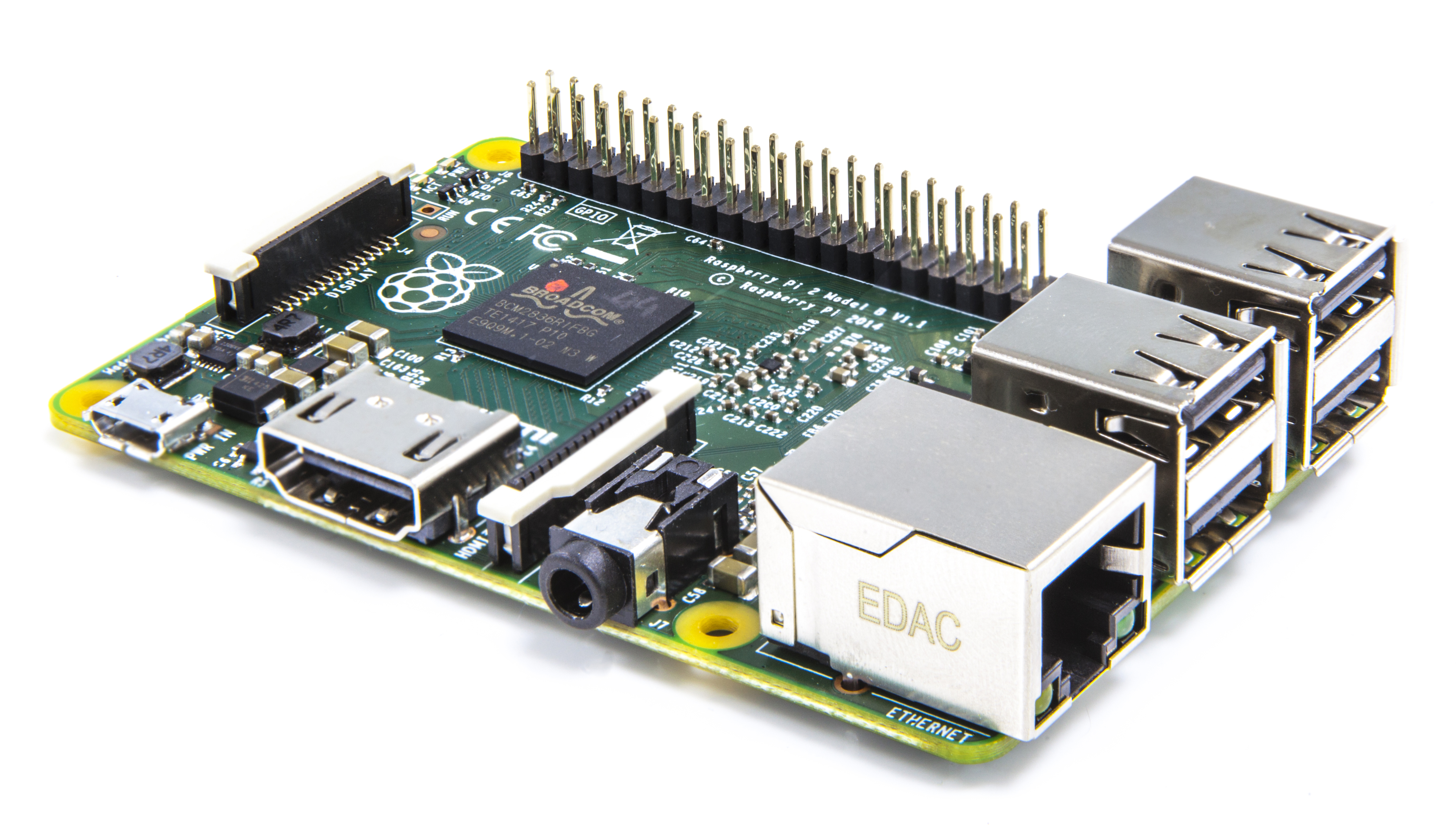 Raspberry Pi 2 BCM2836 and Raspberry Pi 2Since we launched the original Raspberry Pi Model B, back in 2012, we’ve done an enormous amount of software work to get the best out of our Broadcom BCM2835 application processor and its 700MHz ARM11 CPU. We’ve spent a lot of money on optimising a wide variety of open-source libraries and applications, including WebKit, LibreOffice, Scratch, Pixman, XBMC/Kodi, libav and PyPy. At the same time, the Raspbian project, run by Peter Green and Mike Thompson, has provided us with an ARMv6-compatible rebuild of Debian with hardware floating point support, and Gordon, Dom and Jonathan have spent thousands of hours working on the firmware and board support to make Raspberry Pi the most stable single board computer in the world. It’s worth going back and trying out an old SD card image from 2012 to get an idea of how far we’ve come. Nonetheless, there comes a point when there’s no substitute for more memory and CPU performance. Our challenge was to figure out how to get this without throwing away our investment in the platform or spoiling all those projects and tutorials which rely on the precise details of the Raspberry Pi hardware. Fortunately for us, Broadcom were willing to step up with a new SoC, BCM2836. This retains all the features of BCM2835, but replaces the single 700MHz ARM11 with a 900MHz quad-core ARM Cortex-A7 complex: everything else remains the same, so there is no painful transition or reduction in stability. First silicon arrived last year, as we can see in this professionally shot video from bringup night: Once we were confident that BCM2836 was performing as expected, James designed a series of prototypes, before we settled on the Raspberry Pi 2 Model B that launches today. This has an identical form-factor to the existing Raspberry Pi 1 Model B+, but manages to pack in both the new BCM2836 and a full 1GB of SDRAM from our friends at Micron. All of the connectors are in the same place and have the same functionality, and the board can still be run from a 5V micro-USB power adapter. Raspberry Pi 2 is available to buy today from our partners element14 and RS Components. Remember you’ll need an updated NOOBS or Raspbian image including an ARMv7 kernel and modules from our downloads page. At launch, we are using the same ARMv6 Raspbian userland on both Raspberry Pi 1 and 2; over the next few months we will investigate whether we can obtain higher performance from regular ARMv7 Debian, or whether we can selectively replace a small number of libraries to get the best of both worlds. Now that we’re using an ARMv7 core, we can also run Ubuntu: a Snappy Ubuntu Core image is available now and a package for NOOBS will be available in the next couple of weeks. Windows 10For the last six months we’ve been working closely with Microsoft to bring the forthcoming Windows 10 to Raspberry Pi 2. Microsoft will have much more to share over the coming months. The Raspberry Pi 2-compatible version of Windows 10 will be available free of charge to makers. Visit WindowsOnDevices.com today to join the Windows Developer Program for IoT and receive updates as they become available. FAQsWe’ll keep updating this list over the next couple of days, but here are a few to get you started. Are you discontinuing the Raspberry Pi 1 Model B and B+? No. We have a lot of industrial customers who will want to stick with Raspberry Pi 1 for the time being. We’ll keep building Raspberry Pi 1 Model B and Model B+ as long as there’s demand for it. Both these boards will continue to sell for $35. What about Model A+? What about the Compute Module? Are you still using VideoCore? Where does the “6x performance” figure come from? CreditsA project like this requires a vast amount of focused work from a large team over an extended period. A partial list of those who made major direct contributions to the BCM2836 chip program and Raspberry Pi 2 follows: James Adams, Leo Azevedo, Jonathan Bell, Alex Bradbury, Dom Cobley, Steve Cook, Dave Collins, Phil Elwell, Gordon Hollingworth, Andrew Holme, Tammy Julyan, John Kelly, Walter Kho, Yung-Ching Lee, Gert van Loo, Ian Macaulay, Paul Manser, Simon Martin, Luca Di Mauro, Akshaye Sama, Andrew Scheller, Serge Schneider, Mark Scoones, Shawn Shadburn, Paul Sherry, Mike Stimson, Stuart Thompson, Roger Thornton, Madhu Thottupura, James Turner, Nidhi Varshneya, Andrew West. If you’re not on this list and think you should be, please let me know, and accept my apologies. If you’re in front of a computer at 9am GMT and for a while after, you can watch us announcing the Raspberry Pi 2 live, and submit questions for us. |
Sunday, February 1, 2015
What is an e-reader?
| There is a ton of confusion in the journalism and research industry on an e-reader actually is. The vast majority of people think that if you can can read an e-book on something, it makes it an e-reader. Mainstream media such as the BBC and Thompson Reuters often release stories on how a tablet and an e-reader is the same thing. Their reports are crafted in such a way that it convinces people that an iPad or an Android tablet is an e-reader, just because you can read books on them. This is certainly not the case. e-Reader technology is quite different than a smartphone or tablet on a fundamental level. e-Readers for the most part employ technology from e-Ink. This is as close as you can get to mirroring real paper. Power is not generated unless the screen is being refreshed in some capacity, whether its turning a page or accessing the settings menus. Unlike LCD tablets, e-readers do not have light emitting from behind the screens into your eyes. Instead, they have small LED lights on the bottom of the bezel, that project light evenly across the screen. e-Readers also have tremendous battery life, with the average unit lasting a month or two. Tablets utilize LCD technology that have light emitting from behind the screens into your eyes. The display is basically being generated at around 60 HZ, and flashes so fast that it is not perceivable by your eyes. Have you ever watched the news or a television show where they are interviewing someone sitting in front of a computer and their monitor is flashing constantly? This is because the camera and the computer screen both are refreshing at different rates and this is what you are staring at all day. Tablets do not really do a good job at reading in low-light conditions or at night. Some e-book apps have nighttime reading mode, which makes the background black and the text white. There has been many reports issued over the years on how reading at night causes the suppression of melatonin. This is why people who spend a lot of time staring at their tablets or computer monitors tend to be considered night owls. In the video below, we demonstrate the main differences between an e-reader and a tablet. Hopefully this dispels any misconceptions that people may have regarding the two technologies.
What is an e-reader? is a post from: Good e-Reader |
