| Who knew that the tech community would be buzzing excitedly about the things Microsoft was up to these days –but it's happening. This time, it is because they have released a suite of MSN-branded mobile apps designed to run on Android and iOS devices. Timing for the launch makes good sense when you consider that Microsoft recently remodeled their MSN.com portal site (which serves to point users to their other services like Outlook.com, Skype, and Bing). Some of the apps are particularly impressive, with the ports adding platform-specific tie-ins (like MSN Health and Fitness on iOS working directly with Apple's HealthKit platform); unfortunately some obvious opportunities were missed, with many reviews already pointing out that there isn't a weather widget to work with the Android version of the MSN Weather app. Many features are ready to be enjoyed, including: synchronization across platforms (so you can maintain state between your various devices) and full customization options (so you can identify and organize the information provided by each app according to your personal interests). Curious to see what Microsoft has been up to? Download any or all of these new (and free!) Android apps:
Are you impressed by Microsoft's efforts to carve out their piece of the mobile marketplace? Do you think their mobile apps are good enough to compete (and dominate) against the competition? Microsoft Introduces a Half-Dozen MSN-branded Apps for Android is a post from: Good e-Reader |
Monday, December 15, 2014
Microsoft Introduces a Half-Dozen MSN-branded Apps for Android


Blizzard’s Hearthstone Heroes of Warcraft Available For Android
| Even if you have never played a game in your life (mobile or otherwise), chances are good that you have heard about Blizzard. Maintaining their position as crowned kings of the video game world, Blizzard has hit another home-run with Hearthstone Heroes of Warcraft (their their free-to-play trading card game). With an invitation to pick up your cards and thrown down the gauntlet, Hearthstone Heroes of Warcraft promises fast-paced (and whimsical) game play that requires deliberate and calculated scheming to succeed. Powers found within your deck enable you to "sling spells, summon minions, and seize control of an ever-shifting battlefield," no matter whether you are a novice or experienced player (thanks to intuitive and engaging introductory missions, though I should also be including words like addictive in this list). Like most other Blizzard games, your assets will be tied to your Battle.net account –so you can play Hearthstone Heroes of Warcraft on any of your devices interchangeably. If you haven't yet watched the official trailer for Hearthstone Heroes of Warcraft that was released earlier this year, take a few minutes to watch it [linked below] and whet your appetite. Unfortunately for some of you, this release is limited for the time being –but those of you in Canada, Australia, and New Zealand should download Hearthstone Heroes of Warcraft for Android (which include access to an additional 120 new cards thanks to the recent Goblins vs Gnomes expansion). Everybody else will be able to play it "in the coming days," but an exact release date hasn't been announced. Blizzard's Hearthstone Heroes of Warcraft Available For Android is a post from: Good e-Reader |

Microsoft Opens Up Preview for Cloud-Based Presentation App Sway
| Nobody is more surprised than I am that Microsoft is doing so well in the software game these days. Once upon a time the tech giant was so focused on operating systems that they had neglected just about everything else (which has really shown in their sales and reviews in recent years). Fortunately, they have new leadership with a seemingly fresh focus: apps, apps, apps (web-based as well as mobile). Their latest entry into this market is Sway: an online tool aimed to help you create presentation documents. Sway is built for the cloud, and adds to the company's efforts in converting Office into a newly-successful, centrally-hosted, subscription-based product. When the Sway preview began 10 weeks ago, Microsoft wait-listed a large number of the users requesting access (apparently there were over 175,000 requests to join across 1 million unique visitors –very good conversion numbers). There is a method to their madness in adding more beta-testers (essentially): they want feedback, and it actually sounds like they are willing to listen to it; existing user requests have seen the addition of features like: undo and redo, bulleted lists, direct text editing on the canvas, easier reordering, colour picking and pallette diversity, and PDF import. Microsoft has promised that mobile apps supporting Sway will be available in due time (and in reality, there is an iPhone app already, but it's limited to users in New Zealand and very much in its infancy), but for now hitting the Sway website using any browser on your PC, Mac, or tablet will do the trick. Whether you are excited to try Sway, or question what you might do with it, one thing is certain: Microsoft is doing their best to reinvent their signature Office product line and so far, they are doing with a certain refined software elegance. If you want to see Microsoft's full vision for Sway, take a few minutes and watch their promotional video linked below. Microsoft Opens Up Preview for Cloud-Based Presentation App Sway is a post from: Good e-Reader |

Amazon Fire TV Finally Delivers HBO Go
| Amazon Fire TV has been getting pretty good reviews from users and critics alike, but a few things have been missing… most noteably (for many) is the absence of HBO Go. Thankfully this has been remedied and HBO subscribers can stream their favourite content from the network's movies and TV catalog on the Fire TV (though the Fire TV Stick won't have suppose until the spring of 2015). Amazon was eager to release a statement regarding their HBO Go addition:
If you are a subscriber, you can still access HBO Go for Android if you haven't grabbed yourself an Amazon Fire TV just yet (of course, if you have been meaning to, now is a good time –Amazon has reduced the price from $99 to $79 until December 28). Does this announcement make you more likely to pick up a Fire TV device? Is there something that Amazon is still missing? Amazon Fire TV Finally Delivers HBO Go is a post from: Good e-Reader |

Zoe Sugg Debut Novel Outsold JK. Rowling and E. L. James
| Zoe Sugg may not be a household name, unless you have teenage daughters. The 24 year old amasses millions of views on each video she posts on Youtube and has just published her first book. Girl Online is a YA romance novel and has sold a staggering 78,000 copies in her first week. This has seen her surpass the first Harry Potter and 50 Shades of Grey book in the same period. Zoe started her YouTube channel in 2009, primarily aimed at beauty tips and fashion advice. She is playful and has a candid approach that is absolutely infectious with her teen audience. Zoe has more than six million YouTube followers, and two million Twitter followers. Recently she took home the Best British Vlogger Award at the 2013 at the BBC Radio 1's Teen Awards, but also won the Nickelodeon Kid's Choice Award earlier this year. When any book sells a ton of copies in a short period of time, there is normally drama that ensues. In Zoe's case she has been getting a ton of flack from the media about having the book ghost written for her. Penguin, her publisher outsourced the actual writing to Siobhan Curham—an established author of both YA and adult fiction. The three sides sat down over the period of a few weeks and bantered back and fourth about the logistics. The Girl Online Book is not an autobiography, but does borrow heavily from Zoe and her day to day activities. The young writer has been getting lambasted in the media for failing to explicitly state that she did not write the book alone, despite thanking Curham in the acknowledgments of Girl Online for having been with her "every step of the way". Despite the online backlash that erupted against Sugg, Curham had stayed quiet on the controversy. But on Wednesday, Curham posted a defense of both herself and Sugg to her blog. Writing that she had signed on to help Sugg with the book not to become "famous" or "rich," Curham said that she'd agreed because she loves writing and "helping others write books." She did, however, note that it wasn't an entirely enjoyable process, saying "I did have some issues with how the project was managed. Issues which I expressed on more than one occasion. Issues which I'm afraid I'm not allowed to go into. And issues which have nothing to do with Zoe. I've seen at first hand how caring and considerate Zoe is. I've been very impressed with how she finds ways to use her (completely unexpected) fame to help others, whether that be through her vlogs, blogs, books or becoming a digital ambassador for the mental health charity MIND." I honestly think the media is more fixated on the inner workings of the publishing world, than actually talking about the book. It is more interesting to stir up controversy and crucify a young girl for doing what people only dream of, starting a successful business, amassing millions of followers and publishing a book. Zoe Sugg Debut Novel Outsold JK. Rowling and E. L. James is a post from: Good e-Reader |

Wakie App Turns Strangers Into Alarm Clocks
| It was only a matter of time before social media found another use beyond sharing cute pictures of kittens and the grandkids along-side 140-character pearls of wisdom: cue Wakie. We all accept that alarm clocks are a necessary evil, with most of us using our smartphones to interrupt our peaceful slumber. What if I told you that a perfect stranger could take care of this for you by placing a phone call at a pre-arranged time? Wakie can and will. My fascination with this app started as amusement (with terms to describe users like 'sleepies' to identify people waiting on a call to wake them up), and progressed quickly to some kind of strange addiction. Using the service is free, and your account makes it possible for Wakie to match you with people ready to place the call. The service is as anonymous as you let it be (so be careful)… you input your mobile phone number (but the app uses this information behind the scenes to patch users together without divulging the real details for anybody on the call), you get to choose a username (which should ideally be easy to pronounce, even for those whose English may not be as good as yours) and shouldn't include your last name. If you happen to miss their call (or sleep through it somehow), be careful that your voicemail message doesn't divulge anything you wouldn't want a stranger to know. Once setup is complete, you set an alarm just like you would in any other smartphone app (complete with a backup if you choose). At the designated time, your phone will ring. Prefer to make the calls rather than receive them? Choose to wake sleepies and the app will alert you when somebody is ready for you. What you say is up to you, but Wakie encourages you to be respectful and enforces a 60-second time limit (so no awkward goodbyes). If somehow there isn't anybody available to make the call to wake you up, the automated system will pick up any slack (though my experience is that there is never a shortage of people willing to interrupt your sleep). Wakie has been available for Android since earlier this fall, but iPhone users only got access this week. So far Wakie has delivered over 30 million wake up calls to 1.5 million users –you should be one of them! Wakie App Turns Strangers Into Alarm Clocks is a post from: Good e-Reader |

Archie Comics Will Get Rebooted in 2015
| Archie has been chasing Betty and Veronica through the halls of Riverdale High school since 1941. Not much has changed over the years, but starting in 2015 the entire Archie comic book line will be rebooted. Jon Goldwater took over as chief executive and publisher of Archie Comics five years ago, from his father that founded the company in 1939. He has been evaluating the entire Archie line of comics, digital comics and graphic novels to get a sense on what the public wanted. Afterlife with Archie was very dark in its overtones and capitalized on the obsession with zombies in our culture. Life with Archie also was more mature, as it featured Archie in his later life and much publicized death. These comics sold very well, bookstore sales have increased 736%, and direct-market sales, which include those in specialty stores like comic book shops, rose 226% Starting in early 2015 the entire Archie comic book series will be rebooted with a new creative team, featuring Mark Waid and Fiona Staples. Mr. Waid said his primary goal was to return Archie to a modern audience, which included restoring the contemporary attitudes that the teenagers of Riverdale had lost. Not much is known yet on the exact formula that Archie will employ. The only hints that were dropped was that it would be fresh, modern and the teens would face most of the same issues as they face nowadays. The traditional Archie digests will still be published, but the company priority right now is on the reboot and making it more modern. Archie Comics Will Get Rebooted in 2015 is a post from: Good e-Reader |

Amazon Optimizes iPad App for Kindle Unlimited
| Amazon may not be selling eBooks in their iPad or iPhone Kindle app anymore, but there is a new reason to open it up again. If you are a Kindle Unlimited subscriber, the app has now been optimized so you can browse over 700,000 eBooks, borrow them and immediately start reading. The new Kindle reading app update for iOS is certainly one of the largest in recent memory, in terms of cool new features and overall enhancements. Whether you listen to audiobooks, want to find out more about an author or tend to lurk around GoodReads, there is something for everyone. It is important to keep in mind that Unlimited is only available in the US, UK and a few European markets, not everyone will be able to browse for eBooks or take advantage of the 30 day free trial. Check out the full change list below. Book Browser (for iPad): Kindle Unlimited subscribers can now browse over 700,000 books, including popular titles such as Lord of the Rings series, Harry Potter and Flash Boys: A Wall Street Revolt, and start reading immediately, without leaving the app. Tapping on a book cover displays a detail page that provides information about the book, including the book description and customer reviews. Book Browser also provides customers with the ability to search for any title from Amazon's entire catalog of Kindle books, where they can view book details, download a sample, or add it to a wish list. You can start a 30-day free trial of Kindle Unlimited to get the most out of Book Browser by visiting amazon.com/kindleunlimited. Welcome experience: New customers can get started reading right away! By selecting favorite genres, rating books you've read, and choosing books you want to read, you will get personalized book sample suggestions (powered by the Goodreads recommendation engine) to download and read for free. Goodreads integration: Goodreads customers can now share reading progress updates, highlights, and more from inside the Kindle book they are reading. Once connected (click on the Settings icon in the bottom right hand corner of the Library or Home page, then click on Social Network and select Goodreads to link accounts), customers can share reading progress updates using the new [g] button in the reader controls; share quotes on Goodreads, Facebook or Twitter; or rate and review a book on Goodreads and Amazon from the "Before You Go" screen at the end of a book. For more details and screenshots, see the Goodreads blog post at goodreads.com/blog. Next In Series Information: Customers finishing a book in a series like A Game of Thrones can learn about the next book, A Clash of Kings, and instantly add it to their wish list from the "Before You Go" screen. Book Detail Pages in the Library: By customer request, book details can now be viewed by long pressing a book cover in the library and selecting "Book Details." Customers can now see a synopsis of the book, Amazon reviews, and more. Audible Progressive Play: Start playing audiobooks as they're downloading (no need to wait for the entire download). Audiobooks can be played once you've downloaded past your current reading location. Amazon Optimizes iPad App for Kindle Unlimited is a post from: Good e-Reader |

Kindle Sales Roundup – December 15th
| There are a bunch of Kindle deals to start off this week as Amazon appears to be making a final push for the busy holiday shopping season. One of the best deals is the Kindle Paperwhite. It’s marked down to $99. As I’ve been saying since the Kindle Voyage review, the Paperwhite is a much […] |
Kobo eBook Readers on Sale
| Kobo has been making a lot of changes to their website recently. They’ve also got some of their ebook readers on sale right now. Once again the Kobo Aura is marked down to $99 from $139 both at Kobo.com and Chapters. The Kobo Aura has a high resolution 6-inch E Ink Pearl screen, a frontlight, […] |
Controlling Telescopes with Raspberry Pi and Mathematica
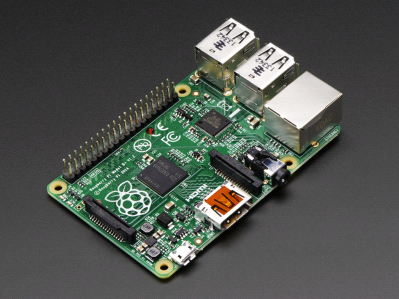
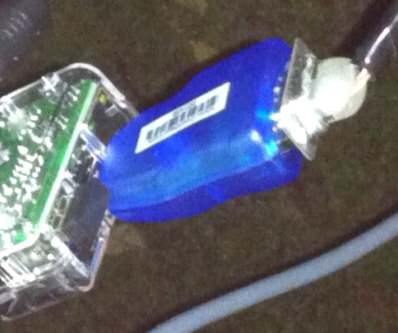
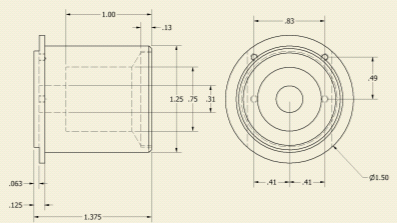
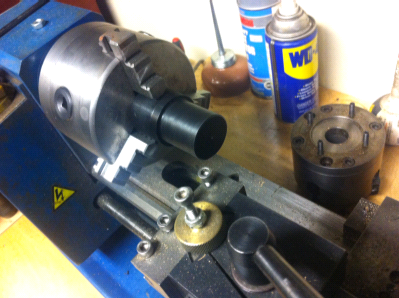
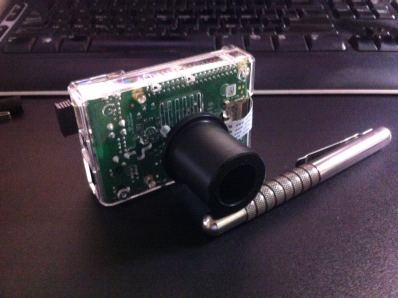
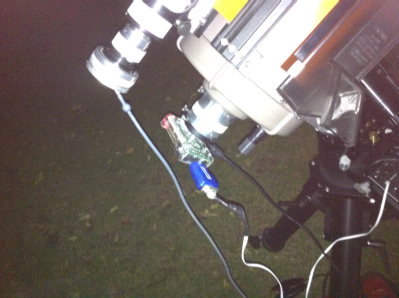
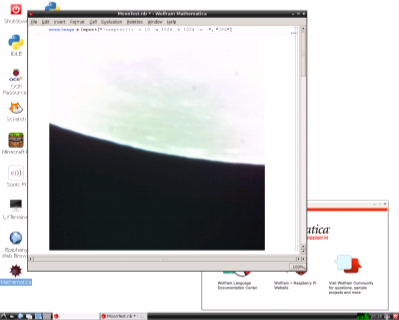
| Eben: Here’s a guest post from Tom Sherlock, describing how he’s been able to control a telescope using a Raspberry Pi, Mathematica and the Wolfram Language. As an amateur astronomer, I’m always interested in ways to use Mathematica in my hobby. In earlier blog posts, I’ve written about how Mathematica can be used to process and improve images taken of planets and nebulae. However, I’d like to be able to control my astronomical hardware directly with the Wolfram Language. In particular, I’ve been curious about using the Wolfram Language as a way to drive my telescope mount, for the purpose of automating an observing session. There is precedent for this because some amateurs use their computerized telescopes to hunt down transient phenomena like supernovas. Software already exists for performing many of the tasks that astronomers engage in—locating objects, managing data, and performing image processing. However, it would be quite cool to automate all the different tasks associated with an observing session from one notebook. Mathematica is highly useful because it can perform many of these operations in a unified manner. For example, Mathematica incorporates a vast amount of useful astronomical data, including the celestial coordinates of hundreds of thousands of stars, nebula, galaxies, asteroids, and planets. In addition to this, Mathematica‘s image processing and data handling functionality are extremely useful when processing astronomical data. Previously I’ve done some work interfacing with telescope mounts using an existing library of functions called ASCOM. Although ASCOM is powerful and can drive many devices associated with astronomy, like domes and filter wheels, it is limited because it only works on PCs and needs to be pre-installed on your computer. I wanted to be able to drive my telescope directly from Mathematica running on any platform, and without any special set up. Telescope Serial Communication Protocols I did some research and determined that many telescope mounts obey one of two serial protocols for their control: the Meade LX200 protocol and the Celestron NexStar protocol. The LX200 protocol is used by Meade telescopes like the LX200 series as well as the ETX series. The LX200 protocol is also used by many non-Meade telescope mounts, like those produced by Losmandy and Astro-Physics. The NexStar protocol is used by Celestron telescopes and mounts as well as those manufactured by its parent company, Synta, including the Orion Atlas/Sirius family of computerized mounts. The full details of these protocols can be found in the Meade Telescope Serial Command Protocol PDF and the NexStar Communication Protocol PDF. A notable exception is the Paramount series of telescope mounts from Software Bisque, which use the RTS2 (Remote Telescope System) protocol for remote control of robotic observatories. The RTS2 standard describes communication across a TCP/IP link and isn’t serial-port based. Support for RTS2 will have to be a future project. Since Mathematica 10 has added direct serial-port support, it’s possible to implement these protocols directly in top-level Wolfram Language code and have the same code drive different mounts from Mathematica running on different platforms, including Linux, Mac, Windows, and Raspberry Pi. Example: Slewing the Scope Here’s an example of opening a connection to a telescope mount obeying the LX200 protocol, setting the target and then slewing to that target. Open the serial port (“/dev/ttyUSB0″) connected to the telescope: theScope = DeviceOpen["Serial", {"/dev/ttyUSB0", "BaudRate" -> 9600, "DataBits" -> 8, "Parity" -> None, "StopBits" -> 1}]; First we need a simple utility for issuing a command, waiting for a given amount of time (usually a few seconds), and then reading off the single-character response. ScopeIssueCommand1[theScope_, cmd_String]:= Module[{}, DeviceWrite[theScope, cmd]; Pause[theScopeTimeout]; FromCharacterCode[DeviceRead[theScope]] ]; These are functions for setting the target right ascension and declination in the LX200 protocol. Here, the right ascension (RA) is specified by a string in the form of HH:MM:SS, and the declination (Dec) by a string in the form of DD:MM:SS. ScopeSetTargetRightAscension[theScope_,str_String] := ScopeIssueCommand1[theScope,":Sr"<>str<>"#"]; ScopeSetTargetDeclination[theScope_,str_String] := ScopeIssueCommand1[theScope,":Sd"<>str<>"#"]; Now that we have the basics out of the way, in order to slew to a target at coordinates specified by RA and Dec strings, setting the target and then issuing the slew command are combined. ScopeSlewToRADecPrecise[ theScope_, ra_String, dec_String]:= Module[{}, ScopeSetTargetRightAscension[theScope,ra]; ScopeSetTargetDeclination[theScope, dec]; ScopeSlewTargetRADec[theScope] ]; We can also pass in real values as the coordinates, and then convert them to correctly formatted strings for the above function. ScopeSlewToRADecPrecise[ theScope_, ra_Real, dec_Real]:= Module[{rah,ram,ras,rastr,dd,dm,ds,decstr}, rah=ToString[IntegerPart[ra]]; ram=ToString[IntegerPart[Abs[FractionalPart[ra]]*60]]; ras=ToString[IntegerPart[FractionalPart[Abs[ FractionalPart[ra]]*60]*60]]; rastr=rah<>":"<>ram<>":"<>ras; dd=ToString[IntegerPart[dec]]; dm=ToString[IntegerPart[Abs[FractionalPart[dec]]*60]]; ds=ToString[IntegerPart[FractionalPart[Abs[ FractionalPart[dec]]*60]*60]]; decstr=dd<>":"<>dm<>":"<>ds; ScopeSlewToRADecPrecise[theScope, rastr, decstr] ]; Now we can point the scope to the great globular cluster in Hercules: ScopeSlewToRADecPrecise[theScope, AstronomicalData["M13","RightAscension"], AstronomicalData["M13","Declination"]]; Slew the scope to the Ring Nebula: ScopeSlewToRADecPrecise[theScope, NebulaData["M57","RightAscension"], NebulaData["M57","Declination"]]; And slew the scope to Saturn: ScopeSlewToRADec[PlanetData["Saturn","RightAscension"], PlanetData["Saturn","Declination"]]; When the observing session is complete, we can close down the serial connection to the scope. DeviceClose[theScope]; Please be aware that before trying this on your own scope, you should have limits set up with the mount so that the scope doesn’t accidentally crash into things when slewing around. And of course, no astronomical telescope should be operated during the daytime without a proper solar filter in place. The previous example works with Mathematica 10 on all supported platforms. The only thing that needs to change is the name of the serial port. For example, on a Windows machine, the port may be called “COM8″ or such. Telescope Control with Raspberry Pi One interesting platform for telescope control is the Raspberry Pi. This is an inexpensive ($25–$35), low-power-consumption, credit-card-sized computer that runs Linux and is tailor-made for all manner of hackery. Best of all, it comes with a free copy of Mathematica included with the operating system. Since the Pi is just a Linux box, the Wolfram Language code for serial-port telescope control works on that too. In fact, since the Pi can easily be wirelessly networked, it is possible to connect to it from inside my house, thus solving the number one problem faced by amateur astronomers, namely, how to keep warm when it’s cold outside. The Pi doesn’t have any direct RS-232 ports in hardware, but an inexpensive USB- to-serial adapter provides a plug-n-play port at /dev/ttyUSB0. In this picture, you can see the small wireless network adapter in the USB socket next to the much larger, blue, usb-to-serial adapter. Astrophotography with the Pi Once I had the Pi controlling the telescope, I wondered if I could use it to take pictures through the scope as well. The Raspberry Pi has an inexpensive camera available for $25, which can take reasonably high-resolution images with a wide variety of exposures. This isn’t as good as a dedicated astronomical camera, because it lacks the active cooling needed to take low-noise images of deep sky objects, but it would be appropriate for capturing images of bright objects like planets, the Moon, or (with proper filtering) the Sun. It was fairly easy to find the mechanical dimensions of the camera board on the internet, design a telescope adapter… …and then build the adapter using my lathe and a few pennies worth of acetal resin (Dupont Delrin®) I had in my scrap box. The normal lens on the Pi camera was unscrewed and removed to expose the CCD chip directly because the telescope itself forms the image. Note that this is a pretty fancy adaptor, and one nearly as good could have been made out of 1 1/4 plumbing parts or an old film canister; this is a place where many people have exercised considerable ingenuity. I bolted the adaptor to the side of the Pi case using some 2-56 screws and insulating stand-offs cut from old spray bottle tubing. This is how the PiCam looks plugged into the eyepiece port on the back of my telescope, and also plugged into the serial port of my telescope’s mount. In this picture, the PiCam is the transparent plastic box at the center. The other camera with the gray cable at the top is the guiding camera I use when taking long exposure astrophotographs. Remotely Connecting to the PiCam The Pi is a Linux box, and it can run vncserver to export its desktop. You can then run a vnc client package, like the free TightVNC, on any other computer that is networked to the Pi. This is a screen shot taken from my Windows PC of the TightVNC application displaying the PiCam’s desktop. Here, the PiCam is running Mathematica and has imported a shot of the Moon’s limb from the camera module attached to the telescope via the adapter described above. It’s hard to read in the above screen shot, but here is the line I used to import the image from the Pi’s camera module directly into Mathematica: moonImage=Import[ "!raspistill -ss 1000 -t 10 -w 1024 -h 1024 -o -", "JPG"] This command invokes the Pi’s raspistill camera utility and captures a 1024×1024 image exposed at 1,000 microseconds after a 10-second delay, and then brings the resulting JPEG file into Mathematica. One problem that I haven’t solved is how to easily focus the telescope remotely, because the PiCam’s preview image doesn’t work over the vnc connection. One interesting possibility would be to have Mathematica take a series of exposures while changing the focus via a servo attached to the focus knob of the telescope. Conclusion Mathematica and the Wolfram Language provide powerful tools for a wide variety of device control applications. In this case, I’ve used it on several different platforms to control a variety of astronomical hardware. |

A geek’s guide to geeky holiday gifts (part 1)
| Looking for the right gift for the techie in your life? Perhaps I can help you out. See, here at OverDrive, I get my eager little hands on tons of new tablets and eBook reading devices every year–often right after they release. If you combine that experience with my natural, nerdy In short, I'm here to give you my advice on what tablets, eBook readers, and even phones are particularly good at media consumption (eBooks, audiobooks, movies, etc.). The end goal: to help you with your holiday shopping. This will be a two-parter. Today's post will give a little background, but cover mostly tablets and eBook readers. Tomorrow, you'll get part 2, which includes some less expensive options, "phablets," and some parting words of wisdom. A bold new era (the background I mentioned)This year is a bit unique because there's a new-ish device type that you should probably consider when purchasing gifts for a lover of media consumption. Have you ever heard of a phablet? It's a cross between a tablet and a smartphone, which basically means: "giant smartphone." They're not as good as a tablet (in my book) for reading, but if you only want to lug aroundone device, then a phablet might be just the thing. Personally, my go-to device for reading books or watching movies while traveling is still my tablet. That being said, I'm going to try to cover a somewhat broad range of devices so you can pick the one that works best for the people on your list. Unleash the tablets!My top pick: Nvidia SHIELD tabletThe Nvidia SHIELD tablet is pretty awesome. It's $299 of high-end, 8", HD glory. It has killer specs (with an Nvidia Tegra K1 SoC), and even includes front-facing stereo speakers (which every tablet should have). The screen, while not necessarily the best out there, is still pretty darn good, so reading for extended periods isn't a problem. In fact, the most common complaint that I've seen is this: "it's made out of plastic." I would argue that sometimes plastic is the better choice, and doesn't always feel "cheap." The real beauty of the Shield tablet is this: at $299, you're not paying a super-premium price, but you're getting a premium tablet (plastic and all). I'm not the only one that thinks so either, most review sites give the Shield Tablet high marks.
|
 obsession with technology, then you get me: your friendly neighborhood tech advice geek.

Sunday, December 14, 2014
Spanish Publishers Don’t want Google News to Shut Down
| The main media lobby behind Spain's new intellectual property law, which caused Google to announce that it was to close Google News in Spain, has backpedaled and proclaimed it wants the Spanish government and European competition authorities to intervene to stop Google shutting down the service. New legislation requires every Spanish publication to charge services like Google News for showing even the smallest snippet from their publications, whether they want to or not This has prompted Google to shut down the service on December 15th for every newspaper, blog and online journal originating in Spain. The Spanish Newspaper Publishers' Association issued a statement Friday night, stating that Google News was "not just the closure of another service given its dominant market position", recognizing that Google's decision: "will undoubtedly have a negative impact on citizens and Spanish businesses". Major media publications stand to gain the most with Google News shutting down, as the general public will have fewer choices to discover start-ups and small news outlets. It looks like the majority of small and medium sized companies are ramping up their efforts to try and get Google to remain open for business, as the aggregation service is pivotal for new users and to monetize their websites with online advertising. When it comes down to it, the media lobby organization bit off more than it could chew. They want the best of both worlds, lots of search engine traffic, but want Google to conform to their narrow views. Spanish Publishers Don’t want Google News to Shut Down is a post from: Good e-Reader |

Saturday, December 13, 2014
Amazon Brings Kindle Unlimited to France and Brazil
| Amazon has been steadily adding more counties to their Kindle Unlimited ebook subscription service since it first launched in the United States this past July. Now Kindle Unlimited has become available in both France and Brazil. That makes seven countries that now have access to KU. The other five include the United States, United Kingdom, […] |
Friday, December 12, 2014
Amazon Kindle Unlimited Launches in France
| Amazon Kindle Unlimited is an all you can read platform for a low monthly price. Five months after its launch in the United States, the Amazon platform has expanded to France. The Unlimited program currently has 20,000 French language titles, which is fairly paltry compared to the 200,000 Amazon currently sells. This goes to show that for the most part, publishers are wary of giving their content away with low returns. In addition, there are 700,000 English eBooks. Amazon is hyping a number of bestsellers included in Unlimited, such as the Harry Potter saga, the series I stop by Eyrolles, Rush by Maya Banks, The Wheel of Time by Robert Jordan and Grandma in Nettles by Aurélie Valognes. English include The Hunger Games and Life of Pi. Until January French customers can try out the Unlimited program for €1 and after the promotional period is over, it will cost €10 a month. I don’t think e-Book subscription systems, like Kindle Unlimited is sustainable, except as loss-leaders. Oyster and Scribd rely on venture funding in order to keep their businesses afloat. Their losses today can only be turned into profits tomorrow if they pay publishers and authors less per "read" (which on average is $2) or if they substantially increase their monthly fee to their users or they maintain a high number of subscribers who don't use their services much. Amazon Kindle Unlimited Launches in France is a post from: Good e-Reader |

The Maritime Industry Embraces eBooks and Digital Newspapers
| The Maritime industry is not the first thing you would think of when the conversation of digital books and newspapers comes up. There are over 70,000 cruise, cargo, oil rigs and military vessels in operation globally. The vast majority of staff that keep these operations running properly are workers from the Philippines, Malaysia, Russia and India. Many of the corporations that bankroll everything are putting a new emphasis on crew welfare and retention by investing in digital. Commercial vessels really need to keep their crew entertained so they don’t jump ship to the competition. Companies spend a lot of money training them and are heavily invested in keeping them happy. Sadly, in a world full of streaming movies and audio services, it doesn’t work when it comes to being entertained on the high seas. If the crew wants to download small bits of content they have to insure their parent company is dealing with satellite internet providers such as VSAT and IMTECH. Internet access is purchased in blocks, where ships have very specific limits on how much data is available. In order to download eBooks, magazines or newspapers they have to be accessed in off-peak hours, when the internet is more reliable and not congested. Satellite obviously, is not indicative to downloading lots of content and new companies are meeting the challenge with innovative solutions. If you are a crewman on a military submarine or apart of the US Air Force, your options to access leisure content is severely hampered. Internet access is certainly not the norm, due to security concerns, which traditionally made reading eBooks unfeasible. This has prompted the US Navy and Air Face to partner with Findaway World for the NERD and Aero e-Readers. The devices are shipped out with hundreds of eBooks and audiobook titles. There is no USB port or wireless internet access, so they are about as locked down as you can get. The US Navy also has established ties with Overdrive since 2007 for their Knowledge Online initiative. There is currently 400 titles, with heavy emphasis on foreign language and graphic novels. Foreign language learning audio books are consistently one of the highest circulating subjects in the Navy's collection, and the addition of eBooks in more than 10 languages was highly anticipated. Popular graphic novels, such as "The Time Machine" from Stone Arch books, and best-selling "Dummies" books for investing, grant writing, and small business, are also available to download. Vancouver based PressReader currently has a catalog of over 3,000 newspapers and magazines. They have developed a new offline system that will allow vessels to download content in non-peak hours and distribute it to smartphones and tablets via a shipwide WIFI network. Maritime companies are starting to select publications that are relevant to the nationalities of their workers and getting the top three or four titles from those countries. This would allow a boatswain from the Philippines to get free access to the Manila Times, UNO Magazine, and Daily Inquirer to read at their leisure. Providing perks like free newspapers and magazines gives workers and officers a taste of home, without having to spend any of their own money, its the corporate cash after all that pays for it. Getting your staff to read safety guides, regulations, weather reports and orientation information is a trial and tribulation. The print editions are often destroyed in the heat and humidity or easily get lost. This has given digital distribution a new emphasis, and PressReader Offline supports the ability for companies to upload their documents in PDF form, to be downloaded to tablets and phones on-demand. The entire commercial maritime industry and military is trying to take advantage of the digital revolution. Crew are normally aboard for months at a time and things can get rather tedious. Can you imagine if you had the same 100 song playlist on repeat for months at a time? No matter how cool it is, it gets redundant. This is why everyone is turning to e-Books, digital magazines and newspapers to break the tedium. The Maritime Industry Embraces eBooks and Digital Newspapers is a post from: Good e-Reader |

Where Should You Self-Publish an e-Book?
| One of the top concerns on most indie authors minds is what company to self-publish with. There are some strong benefits with throwing down exclusively with Amazon, but others want a more global reach for their content. The Publishing Service Index has just released their annual December report, which lists all of the companies out there that specialize in self-publishing. It goes into great detail on their overall reach and how many people have published with them. The most significant change to this report is that that Amazon Kindle Direct Publishing has slipped to third and also reflects the growing discontent self-published authors have with the introduction of Amazon Unlimited and recent communications regarding the new VAT law in Europe for 2015. Also, not on the list at all is Kobo Writing Life and Barnes and Noble Nook Press. As much as these companies are trying to promote the service, authors simply are bypassing them altogether. DIY – Do-it-yourself bespoke services Where Should You Self-Publish an e-Book? is a post from: Good e-Reader |


Dr. Seuss e-Books Available via Overdrive
| Overdrive has just unveiled their new Dr. Seuss e-Book collection that is available to Canadian and US libraries. The big selling point is that these titles are available in EPUB3, but none of the content has interactive elements. If you are expecting multimedia enhancements, prepare to be let down, these e-Books all just have fixed layouts. Dr. Seuss titles, published by Random House Children's Books, include some of the most beloved children's titles of all time. Titles include The Cat in the Hat, Green Eggs and Ham, The Lorax, How the Grinch Stole Christmas, Oh the Places You'll Go! and many more. See the complete list and sample an excerpt here. "No children's collection is complete without Dr. Seuss, and now public and school libraries can have these popular titles as eBooks," said Karen Estrovich, director of collection development at OverDrive. "We're excited to make these available in EPUB3 fixed-layout, as the author intended, to preserve the original flow and experience that we all are familiar with." Dr. Seuss titles are available on a one-copy per-user basis in OverDrive Read, OverDrive's browser-based reader. Once the title is checked out in OverDrive Read, there is no app to install and the title becomes instantly available in the browser without downloading. Dr. Seuss e-Books Available via Overdrive is a post from: Good e-Reader |

How to take Screenshots on the Kindle Voyage
| The ability to take screenshots is not just relegated to phones or tablets, but your Kindle Voyage too. It is rather simple to take a screenshot of anything displayed on your screen. Today, we show you exactly how to do it in another Good e-Reader Video Tutorial. Taking screenshots just needs you to click on opposing corners on the very edge of the touchscreen. You need to ideally do it on the top right and bottom left, or vice versa. When you take a screenshot the screen will briefly flash, there is no confirmation message. If you want to access your list of screenshots, you simply need to plug your Voyage into your PC with the USB cable. All pictures are on the root drive, so you don’t need to go hunting for it. How to take Screenshots on the Kindle Voyage is a post from: Good e-Reader |

Christmas shopping guide
| Christmas is coming, and we’re all panicking because we haven’t bought all the presents yet. (My Dad’s difficult.) Waking up at 3am in a cold sweat because you don’t know what to buy the Raspberry Pi fan in your life? Sweat no longer: we’re here to help! Raspberry Pi kitsIf you want a Raspberry Pi on its own, you can buy it from one of our manufacturing distributors, from our Swag Store, and from many other vendors. There are also some great kits available if you want to get all the extra bits and bobs you’ll need in one box. We sell a starter kit containing a lot of goodies: it’s £75. If all the extras in there make things a bit rich for your blood, check out The Pi Hut’s kit, which doesn’t have the shiny PiBow case, the special bag, the stickers or the keyboard or the mouse, but has everything else you’ll need. It’s £42. Specialist starter kits for people wanting to use their Pi as a media centre, or focusing on using the camera board, are available from CPC in the UK, or MCM in the United States. BooksThere is now a terrifying number of books available on the Raspberry Pi – check out the electronics or computing section of your local bookshop. Some of our favourites are: The Raspberry Pi User Guide – this book’s written by our very own Eben Upton and by Gareth Halfacree; it’s the canonical guide to the Raspberry Pi, from the person who created it. This link goes to the latest edition, which covers things we’ve done this year like the Model B+. Sticking with the “books wot we wrote” theme, here’s Carrie Anne’s Adventures in Raspberry Pi. Aimed at kids aged 11 and up (younger kids will still get a lot out of it, but we recommend Mum or Dad lends a hand), we think it’s the biggest seller of the Raspberry Pi books so far this year; and we highly recommend it. If you’re an adult who doesn’t mind the branding, Raspberry Pi for Dummies is a superb guide to the device and what you can do with it. It’s good for beginners, but it’ll take you a long way – much further than you might guess from the title! You can find many, many more Pi books at Amazon. Add-on boards and funOne of my favourite add-ons of the year was a late entrant: it only came out last week. Pimoroni’s Skywriter is a motion and distance sensor HAT for your Pi – and you can do this sort of thing with it (click the button to turn the sound on). It’s £16. Pimoroni’s other add-on boards are among our very favourites: Pibrella is only £10, and offers you lots of inputs and outputs; we use it a lot in our own teaching sessions. It’s a fantastic way to get started with electronics: it’ll allow you to make noises, flash lights, drive motors and much more. The Unicorn HAT is just magic. And it’s £18. That’s all we have to say about it. Babbage the Bear is our mascot, and he’s had a very busy couple of years, going to near-space, having a camera stuck up his bum and becoming an Internet of Things device, and being cuddled by lots of small children. You can buy him at our Swag Store. He’s £9. Today, we’re launching a NEW accessory for Babbage: the Babbage Backpack Game Kit. For £8.10 you can buy a cute little backpack for Babbage, filled with everything you’ll need to make an electronic memory game and instructions (no soldering required) – a perfect stocking-filler and a really great little project for electronics beginners. Plus, it makes Babbage look super-chic.
Ryan Walmsley set up his own business to make and sell electronics more than a year ago, and he’s still only 18. The RyanTeck Budget Robotics Kit is fantastic – it’s affordable at only £24.49, and contains everything you need to get started with robotics – all you need to add is a Raspberry Pi. Pi&Bash is another new offering, this time from Piventor. THIS BOARD REQUIRES SOME SOLDERING, so it’s not ideal for first-timers. But it’s really good fun if you do fancy getting the soldering iron out, with traffic light LEDs, push buttons, a little backlit LCD screen, a thermometer, and digital and analogue inputs and outputs. It’s only £23.
The CamJam EduKit is the perfect stocking filler at only £5. It’s available from The Pi Hut, and it’s my absolute favourite learning kit of the year, coming bundled with worksheets to get you building electronics projects from scratch – or at least it was until the CamJam EduKit 2: Sensors came out last week, for a simply ridiculous £7. The Sensors kit contains everything you need to make a bedroom burglar alarm, a tea-temperature-tester, a device to test whether the light in your fridge really goes off when you shut the door, and much more, with worksheets. It’s a wonderful, wonderful, versatile little kit, and we think that the CamJam team and The Pi Hut have done an amazing job in getting it out for such an affordable price. Finally, for those not worried to get a soldering iron out (soldering is easy – it’s really worth having a go), you can get an entire Christmas tree for your Pi for only £6. I saw several of these in action at the Cambridge Raspberry Jam last weekend; great for a festive addition to your workbench. Here’s one on a Model A+.
|


