| On Saturday, something rather special happened in Cambridge. Tim Richardson and Mike Horne, who run the regular CamJam, were holding a special event: a robotics Raspberry Jam, with competitions for attending teams who had built their Pis into a robot. Eben and I were judging. Someone had parked some reindeer outside. The Raspberry Pi robots in attendance varied from the minuscule: To the terrifyingly large and whizzy. Two hundred competitors and spectators turned up. I was a bit busy running around tweeting from my phone and asking penetrating judgey questions with a clipboard to take any video, but happily Matthew Manning from Raspberry Pi IV Beginners was there to cover the whole day. If you’ve ever wanted to watch a Raspberry Pi robot navigate an obstacle course full of polished pebbles and see-saws, now’s your chance. One of the best things about working at Raspberry Pi is being able to get to know the amazing community that’s grown up around the device. The number of kids attending as competitors and as viewers on Saturday made us incredibly proud: and it was good to see some of the young people’s teams winning in the individual categories. (Big congrats especially to Team Vector, a school group who made my favourite robot in the Most Innovative section, with its modular 3d-printed case which could be altered to maximise the robot’s chances in each event; and to eight-year-old Amy, whose soldering is neater than the soldering of some people I know with much bigger hands.) Here’s MrUkTechReviews’ video of the day’s events: I know that more video and a podcast are on their way from the event, so this post will be updated with more as the week goes on. Mike’s also working on a complete table of times and winners, which will likely go live on Wednesday; we’ll add a link when it’s up. Enormous thanks to Mike, Tim and all the team of Jam Makers for making this event go off with a real bang. If you’re looking to take part in something like this yourself, check out the Raspberry Jam page, where you’ll find details on upcoming Jams across the world (there are usually fewer in December than there are in other months because of that thing with the tree and the turkey that happens at the end of the month), and information on how to set up your own. We hope to see you at one soon! |
Monday, December 8, 2014
PiWars – Cambridge Jam. With robots.


How Kobo Leverages their Biggest Fans to Make Firmware Better
| Kobo is an anomaly in the e-reader world because they perfectly blend ease of use, for the general public and super advanced options for the hardcore readers. The Toronto based company simply did not get to this point overnight and unlike their competition, they frequently speak with the general public, programmers and beta testers. If you have ever used a Kobo e-reader, likely you are familiar with the ability to change the type of font you want your e-Book to use. Advanced users know that if you are not happy with the stock fronts that the e-readers employ, there is a special directory where you can upload your own. Its these types of options that makes the Kobo brand especially appealing to a broad audience. The first Kobo e-reader came out in March 2010 and by September their lead programming team had established themselves on the MobileRead forums. If you have never heard of this website before, it is basically an online community where folks from all over the world congregate to talk about the latest news and share tips with each other. The Kobo team has been leveraging this community in order to solicit feedback on ideas they have for future firmware updates. Hardcore users can also talk directly to some of the senior programmers to give their take on new coding conventions or to present comprehensive analysis on problems they see with existing firmware, or just to give advice on how to make the software better. The Kobo team also uses the people who contribute great ideas to test the functionality of the firmware, as its been developed, so all of the bugs can be worked out. Kobo has an ulterior motive with crowd-sourcing ideas and suggestions to improve their product. Their programming team is smaller than Amazon and Barnes and Noble and they rely less on focus groups, saving them money. This assists them in lowering company costs in this specific department so they can focus more on promoting the product and international expansion. The global e-Book market is big business and has recently been valued at $14.5 billion dollars and is expected to reach more than $22 billion by 2017. Amazon controls roughly 70% of the North American and European digital book sales, while Kobo is sitting pretty in second place. How Kobo Leverages their Biggest Fans to Make Firmware Better is a post from: Good e-Reader |

Sunday, December 7, 2014
Kids Experiencing Massive Problems with Book Discovery
| Book discovery is a pressing issue in the print and digital world. Major online stores are hard pressed to keep up with the sheer amount of new content being published on a daily basis and the brick and motor locations tend to focus on bestsellers and adult content. Kids have the hardest time in discovering new authors and new books to read because no one exclusively caters to their needs. I remember when I was a kid most of the books that I found where part of the Scholastic Book catalog that my parents would order and when the book fair came to my school, they would all be waiting for me. My literary pursuits did not go beyond the latest Hardy Boys mystery or what the local grocery store had in the young adults section. There was certainly no blitz media campaigns that modern books enjoy, such as the Hunger Games, Maze Runner, or Harry Potter, which most kids have read. The books listed above are all fine examples of the types of content that kids are devouring at a record pace. It helps that Hollywood as loaned the assist by turning these all into amazing films that even adults have seen in droves. The big problem is where do kids go next after reading the books or watching the films? Will they discover Ender’s Game or read the Divergent series? Online stores have very basic recommendation engines “if you liked this, check out these titles”, but brick and motor stores don’t make it easy at all. Scholastic is trying to make sense of the concerns that kids aged 6-18 are facing when trying to find the next great read or what they look for in books. 73% of this demographic said I would read more, if I could find more books that I liked, while 70% want books that make me laugh.
Kids Experiencing Massive Problems with Book Discovery is a post from: Good e-Reader |


Saturday, December 6, 2014
Free Whispersync for Voice Audiobook: The Phantom of the Opera
| Amazon and Audible are giving away The Phantom of the Opera this month as the free Whispersync for Voice audiobook and Kindle ebook combo. They seem to be stuck on darker stories ever since Halloween for these monthly freebies. Seems kind of like an odd choice given the time of year. I was fully expecting […] |
Kobo Adds Reviews to Website and eReaders with Firmware Update 3.12.0
| Kobo has started rolling out a new software update for the Kobo Glo, Kobo Aura, Aura HD and H2O. The new firmware is labeled as version 3.12.0. Like usual you can wait for it to automatically download and install over Wi-Fi or you can download it from the direct links to Kobo firmware thread at […] |
New Zealand Libraries Loan out 800,000 e-Books in 2013
| New Zealand libraries started to invest in digital books in 2011 when 40 locations started to deal with Overdrive in metropolitan areas such as Auckland, Wellington and Christchurch. At the same time, a local initiative developed by library and educational book supplier Wheelers implemented its own system homegrown e-book lending service with Tauranga and Hamilton library districts. Library patrons have really started to embrace the concept of digital as more than 800,000 e-Books were borrowed from library databases in 2013, up from about 350,000 in 2012 Executive director of Public Libraries New Zealand Tim Antric said despite the popularity of e-Books, a market would always exist for traditional printed books. “There’s a comfort in sitting down and reading a traditional book, even if we look at kids today there’s still a passion for that paper book. Tim also said more people than ever were going to libraries, with more than 37 million visits recorded last year. New Zealand Libraries Loan out 800,000 e-Books in 2013 is a post from: Good e-Reader |

Friday, December 5, 2014
The Global e-Book Market Valued at $14.5 Billion
| The global e-Book market has been valued at $14.5 billion dollars and is expected to reach more than $22 billion by 2017. These figures are courtesy of Kobo who published their inaugural Book Report. "The advances that we're seeing year-over-year are incredible, with more publishers, users and new technology changing the face of the industry at an unprecedented pace," Kobo chief content officer Michael Tamblyn said in a statement. What type of e-Books are customers reading the most globally? Overall, Canadians find romance to be the most engaging genre, with 62%completion, followed by fantasy (60%) and mystery (59%). Romance is also the most engaging genre in Italy (74%), the Netherlands (67%) and Great Britain (62%), while the French (70%), Australians and New Zealanders (64%) and Americans (44%) prefer a good mystery. What's more, according to Kobo's data, Canadians love nothing more than to curl up with a good book in the cold winter months. Over the 2013 holiday season, they read almost 300 million virtual pages. 16 million of which were read on Christmas day alone. The Global e-Book Market Valued at $14.5 Billion is a post from: Good e-Reader |

Bookeen Cybook Muse with Frontlight Review
| Bookeen has just released a new e-reader that seemingly came out of nowhere, with no fanfare or advance hype. The Cybook Muse with Frontlight gives users the ability to read eBooks in many different formats and read in the dark. It allows you turn pages with both the touchscreen and manual buttons. Is this e-reader a valid investment? Hardware The Cybook Muse has a 6 inch screen allowing for easy reading in all conditions, while reducing the size of the e-reader by 17% in comparison to its predecessor, the Cybook Odyssey. The resolution is 1024 x 758, and has 213 DPI, which is fairly conventional. Underneath the hood is a 800 MHZ Freescale processor and 4 GB of internal storage. It does have support for an MicroSD card, so you can simply insert one in to store thousands of additional titles. Speaking of eBooks, there is a built in store loaded on the two e-readers, with over 100,000 books. You need to register an account with Bookeen and another one with Adobe. The Cybook Ocean has the physical page turn keys flush with the bezel, whereas the Muse has more convention page turn keys that protrude upwards. This is appealing towards people who have used older e-readers and want to upgrade to something more modern. Software Bookeen has been using the Linux operating system for their complete line of e-readers for a number of years. This e-reader is fairly basic and does not have a ton of advanced features to boggle the minds of people new to digital reading. The homescreen comprises of the book you are currently reading with a progress bar of how much of it is remaining. Underneath that is a small carousal with all of the eBooks in your library with their cover art being displayed. If you click on any of the book covers it will automatically launch the e-reading app. I think overall the Cybook software is fairly robust, it is super stable and never prone to crashing. One of the downsides is that there is no internet browser bundled on it, so you won’t be able to visit your favorite websites. e-reading experience Bookeen handles the core e-reading experience fairly conventionally, but most of its advanced features are a bit complicated to access. If you are buying this reader to just read books and not make highlights, annotations, look words up in the dictionary or use the keyboard, you are fine! If you want to do any of these things, be prepared to jump through a ton of hoops. You can customize your e-reading experience by hitting the home key and then selecting the settings menu. There are options to change the font size, eight different font types, line spaces or margins. This is normally the most accessed reading features and anything you augment is dynamically changed on the screen. PDF Viewing is a solid experience on the Muse you can pinch and zoom and get a particular frame or image showing up correctly. There is also a "reflow" mode, which will strip away all of the images and CSS elements, giving you more of an eBook experience. Depending on the extensiveness of the PDF file you are viewing, reflow can be hit or miss. Wrap up If you want to find out what we thought of this e-reader and if its a viable investment, check out our unboxing and video review. Bookeen Cybook Muse with Frontlight Review is a post from: Good e-Reader |

The Nexus 9: no, it’s not an iPad, but is that bad?

The Nexus 9 is taking a lot of heat in reviews around the web. The most common complaints are that the build quality isn't great, and the battery life is less than ideal. I've been using a Nexus 9 as my primary tablet for the past week or so, and I'm going to attempt to give you the most objective review I can. Keep in mind, I'm human, and I definitely have preferences (biases) that'll come through, but I'll do my best. The competition: Apple's iPad Air 2 Most reviews are comparing the Nexus 9 to the new iPad Air 2, but there are a few things that a lot of reviews leave out, and I think that's a bit unfair. Despite that, I do agree with the majority of the online reviews in this: the build quality on the iPad is a bit better. About the build quality … Personally, I don't like the aluminum on an iPad. Before you call me crazy, consider this: aluminum is a relatively soft metal, but more importantly, the finish on an iPad is slippery. I want something grippy on the back of my tablet, and I don't want to have to buy case to make it grippy. That being said, the iPad Air 2 doesn't flex, and feels very solid. There are a lot of reports of the Nexus 9 having a flexy back. The one I'm using doesn't seem to have this, so I'm wondering if it's a quality control issue on the assembly line. The Nexus 5 had a speaker problem on the first run, but they fixed it, and the speaker sounds much better now. Maybe this will get the same treatment? Overall, while I'm not floored by the build quality of the Nexus 9, I have no problems with it either. The back is grippy, the screen is Gorilla Glass, and it has a nice weight to it without being too heavy. A note on pricing and storage Another thing I think a lot of review sites get wrong is this: "The iPad Air 2 is only $100 more!" Yes, it's true that the 16 GB Nexus 9 is $399, and the 16 GB Air is $499. Yes, that's $100. Here's the problem: I really don't think you should be buying a tablet with 16 GB of memory on it anymore. Sure, you can get yourself some cloud storage, but not all internet connections are created equal. You may not always have Wi-Fi or cellular coverage, and international rates? Don't get me started. For something that's great for watching videos and playing games (both of which can take up over 1 GB of space), 16 GB just isn't enough–especially when a big chunk of that space is taken up by the OS (meaning you can't use it). So, I would argue that the 32 GB and 64 GB models are the lowest storage options you should consider. The 32 GB Nexus 9 is $479, and the 64 GB iPad is $599. That's a difference of $120, and it's a direct comparison of the models I'd actually suggest buying. The Nexus 9 does not offer a 64 GB model and the iPad doesn't come in 32 GB, which bothers me, so it's not exactly an apples-to-apples comparison. But again, if you're going to buy a new iPad, it should be 64 GB. If you're going to buy a Nexus 9, it should be 32 GB, and that's $120 cheaper. OK, no more comparisons–it's all Nexus from here Despite some light bleeding around the edges more than it should, the screen is pretty great–not the best out there, but not too shabby at all. The volume and power and buttons are too far recessed into the metal edge of the device and don't have enough travel. The speakers sound pretty darn good for a tablet. I'd call them comparable to an iPad, but that's just my subjective ears talking–I don't have audio testing equipment. The area in which the Nexus 9 may shine is under the hood. On paper, the Tegra K1 SoC (System on a Chip) is a 64-bit beast. Possibly the most powerful platform out there right now. I say "may" and "possibly," because this an in-house attempt from Nvidia to design a (mostly) brand new chipset. The Tegra K1 simply hasn't been in the wild long enough for us to know how it's going to hold up. It might be flaky, or it might be awesome. My experience with the Nexus 9's hardware is that it's been really fast, and I'm extremely happy with the performance. Others are reporting bugs, but I think that's more on the software side of things … Oh, and about the software The Nexus 9 ships with Lollipop (Android 5.0), right out of the box. There's only one problem with that: there are some lingering bugs to work out. In fact, if you open your shiny new Nexus 9, turn it on, and connect it to your Wi-Fi, you'll find out there's a software update waiting for you. Install it! It'll improve your battery life and stability. More updates are already on the way to further improve these problem areas. The 4:3 screen throws a bit of a monkeywrench in the works for the software too. See, most Android apps are optimized for a 16:9 or 16:10 screen. That can cause text or graphics to run off the screen occasionally. As more 4:3 Android devices come out (and they likely will), I think a lot of those problems will go away, but you should be aware of it. All of that being said, Lollipop is gorgeous. It's fast, it's smooth, and the animations really make it feel polished. I'd give Google a month or two to work out some of the bugs that are specifically affecting the Nexus 9, but I really think you're going to like this new, sweet OS. (See what I did there?) My only complaints about the new "material" design are: the white background in the app drawer and the new home, back, and recent app icons. Those are just my aesthetic preferences though, and others might really dig 'em. Overall, I'm a big fan of Lollipop! So, is it good? The answer to that question is yes … mostly. Personally, I'd like to see the price point be $350 for the 16GB model, and $400 for the 32GB. That'd be much more reasonable, assuming they get the relatively minor bugs worked out. The back-flexing problem, I'm guessing, is a manufacturing flaw, not a design flaw–something that can be fixed by improving the quality control at the factory. The battery-life complaints can likely be mitigated a bit through software updates. Using this tablet, for me, has been pretty painless for the past week or so, and I'm considering recommending one for my mom. Really, it's good! One of the best Android tablets you can buy right now, in fact. I don't think you'll regret buying a Nexus 9, especially with how well Google supports Nexus devices through software updates. However, if you prefer the widescreen aspect ratio like I do, you might like the Nvidia Shield tablet or the Galaxy Tab S–both great tablets, and in the case of the Shield tablet, you can even save some money (it's $299). Full disclosure: I personally think the Shield tablet is pretty amazing. It may be marketed as a gaming tablet, but it's really a great all-around device. Heck, [Nvidia is absolutely kicking tail when it comes to supporting the device with software updates too](http://www.androidpolice.com/2014/11/18/hands-shield-tablets-lollipop-update-nvidias-giving-google-run-money/! |
Wheels and a sandwich
| If you’re at tomorrow’s PiWars robotics Jam in Cambridge, you’ll meet this little fellow, built by Gert from an A+, with a trailer constructed from a Compute Module baseboard PCB that nobody was using. He made it with a specific purpose in mind: to deliver jam sandwiches to me from the other side of the office. Why, you ask? When we were developing the Raspberry Pi back in 2011, a regular class of comment in these parts was: “Why doesn’t it have a quad-core processor/a Gigabyte of RAM/more USB ports etc etc?” The canonical response was: “And wheels and a sandwich?” It’s nice to see that Gert treats my bad-tempered expostulations as prophecy. We’re calling him TOAST•E. Come and meet him at PiWars tomorrow! |

Putting out feelers: Compute Module Symposium
| It’s been a few months since we originally announced the Compute Module. Now we’re beginning to see orders from industrial customers, and designs incorporating it hitting various crowd funding websites, we thought it might be time to have a get-together to share a little! The Compute Module is not a consumer product. It was developed specifically to help our industrial customers. There are a lot of businesses out there using standard Raspberry Pis inserted into their products: the Compute Module allows them to redevelop their products to be smaller and to address their task more specifically. Over the past few months we’ve seen new products being developed through the Raspberry Pi forums and on social media, and we thought it was about time to think a little more seriously about how we can help. The other day I was talking with the team at ARM about their Connected Community, and it rang a bell with me about what we’re trying to do with the Compute Module on a slightly different scale. So I thought a developer symposium would be a great way to get people who are interested in the Compute Module together to discuss their projects and designs. So we’re putting out a call for participation/presentations/papers. We want to invite people who are using the Compute Module in their own products to take part, and we will also give at least the following 30 minute presentations:
We’ll also be available during the symposium to discuss designs individually, and to help direct people in the right way of doing things. We have not yet set a date because we don’t know what demand will look like. So if you’re not interested in presenting please tell us what you would like to see from the event, and what you’d like to learn: we’ll see if we can incorporate that into the symposium. For presentations please send a short abstract (150 odd words will do) explaining what you’d like to talk about to gordon@raspberrypi.org. And let us know if you’d be interested in coming in the comments below too, so we can gauge interest. |

Thursday, December 4, 2014
Libraries Reinvent themselves in the Digital Age
| When people think of libraries they normally envision old ladies with cats eye glasses shushing everyone. The only sounds that are audible is the rhythmic clanking of ink based book stamps. Times have certainly changed with many libraries forgoing books altogether and focusing on digital. The vast majority though, have embraced digital to a substantial degree. A recent report by the Library Journal has stated that 95% of all US libraries have an e-book collection. That’s up from 89% in both 2013 and 2012, when researchers thought that adoption had plateaued for good. The average number of e-books carried was 20,244 by each library, but that of course was skewed toward large libraries. Medium sized libraries statistically had around 10,434 titles. The American Library Association every year holds an annual event that brings thousands of librarians and companies marketing services towards them. One of the biggest trends in 2014 was audiobooks, which have quickly become a billion dollar industry. The 3M Cloud Library disclosed that 50% of all the libraries they serve are very interested in an audiobook solution, while Baker & Taylor is seeing unparalleled demand. Audiobooks is a very interesting system for libraries, as many of the top distributors lean on 3rd parties for a full catalog of content. 3M and Baker and Taylor both do business with Findaway World, which is current market leader in production. Findaway has a catalog of over 40,000 titles and maintains production studios, narrators and crew in New York. Overdrive has their own internal solution, where they approach publishers directly. Hoopla is also a rising force due to their 13,000 titles with 1,000 added each month. Hoopla deals with over 100 libraries in the US and charges no licensing fees with setting up the system, which is quite appealing to the average library. Instead, the libraries adopt a pay-per-use system and set a monetary threshold on how much they want to spend each month. This is useful because the entire Hoopla catalog is integrated into the library, so they can quickly monitor trends and user engagement. I remember visiting libraries in my small town of Thunder Bay to kill time or to cultivate my love of reading. All of the locations had a very paltry selection of magazines and newspapers that were often yellow with age and in a state of tatters. Things are noticeably different in the digital age with new issues and back issues remaining in perfect condition for patrons to borrow. One of the leaders in this field is PressReader who has a robust system of 2,000 well-known newspapers and magazines including the Washington Post, Business Traveler, and ForbesDaily. One of the cool benefits that this company provides is a wireless hotspot so anyone visiting the library can connect to and download anything they want. The system for magazines and newspapers does well in a library setting like this because eBooks have a one user one use system, whereas PressReader gives unlimited access. Almost every major library in the US has a digital strategy in play, some have large collections and deal with many different companies to facilitate an avenue of content. Others are fairly small and often only do business with one or two companies at the most, due to budget and ILS concerns. Some libraries though, are bucking the trend and ditching print altogether. The BiblioTech library in Bexar County is doing something that no library in the US has ever done. Since last year, the organizers had a grand vision of an all digital library. Six hundred e-readers and over ten thousand eBooks will be available to loan when they launched a few months ago. The library is based in a predominately Hispanic, low-income neighborhood, where 75% of the population lacks Internet access, yet that's precisely why the $2.4 million facility was built there, said County Judge Nelson Wolff, who envisioned it when he had an epiphany after reading the life story of Apple founder Steve Jobs. "e-book readership was going up, more e-books were being produced, so we thought why not address that segment at probably one third of the cost … as opposed to building a big branch library," Wolff said last week. The success of the BibloTech library has prompted a series of non-profits in Omaha Nebraska to take over a closed Borders bookstore and convert it into a purely digital library. Mike McCarthy, a board member of Omaha nonprofit Heritage Services, said "All Omahans will benefit from increased access to all the good things technology can provide — the opportunity to learn, to explore and to create. This space will welcome everyone from our children learning to read and our grandparents applying for Social Security, to the emerging creative class who will develop the tools and products of the future, to our next generation of entrepreneurs." The future of libraries looks bright indeed. According to ALA Americans go to school, public and academic libraries more than they visit the movies and there are more libraries than McDonald’s fast food joints. The advent of digital is opening up an entirely new demographic of user and appeals towards the elderly and disabled that they can borrow digital content online, without having to visit the branch. Libraries Reinvent themselves in the Digital Age is a post from: Good e-Reader |

Digital Library to Open in Omaha Next Fall
| On the site of a closed down Boarders bookstore a grand vision of the future is occurring. The first ever digital library in Omaha Nebraska will open their doors next fall. It will not only loan out eBooks, digital newspapers and magazines but also have 3D printers and workstations for artists and video game developers. The former Boarders bookstore and acompanied parking lots at at 7201 Dodge St was purchased by the Community Information Trust, a private nonprofit. It will be gutted and wired for new technology. President of Heritage Services, an Omaha nonprofit that will renovate the building, says it won’t look like a bookstore when crews finish working on it. Mike McCarthy, a board member of Omaha nonprofit Heritage Services, said "All Omahans will benefit from increased access to all the good things technology can provide — the opportunity to learn, to explore and to create. This space will welcome everyone from our children learning to read and our grandparents applying for Social Security, to the emerging creative class who will develop the tools and products of the future, to our next generation of entrepreneurs." I think the most exciting element of this new digital library is that it is free to residents of Douglas County, and available for fees — $75 annually or $25 for four months — to people who live outside Douglas County. Omaha is not the first library to go purely digital and forgo carrying print books. Bexar County in San Antonio launched the BiblioTech library earlier this year. Patrons are able to access to over 10,000 eBooks and residents will be able checkout 600 E-readers, 9 laptops and 40 tablets to read them on. Digital Library to Open in Omaha Next Fall is a post from: Good e-Reader |

Emerging Digital Trends in the Hotel Sector
| Hotels are embracing digital in a big way, as they seek to distinguish themselves from the competition by offering compelling reasons to stay with them, over the competition. One of the emerging trends is taking advantage of the technology in your pocket. At select Starwood hotel brands around the world, guests will no longer have to fumble for their room key card at the bottom of their bag now that the chain has rolled out keyless technology that opens doors with the swipe of a smartphone. Starwood's SPG Keyless program is being called a first for the hotel industry and will roll out to 10 hotels around the world in markets like Beijing, Doha, Hong Kong, New York, and Singapore. Starwood is not the only company experimenting with being able to open your hotel doors with an app. HotelTonight has also developed a mobile app-enabled feature that allows guests to open their doors with a swipe of their phone which is being negotiated with hotels worldwide. One of the benefits about this automatic door entry program is that some hotels are bypassing the need to check in at the front desk altogether, except in regions that require an ID check at the front desk. This is actually drawing praise by Apple co-founder Steve Wozniak who recently stayed at an W Hollywood Hotel citing that “"And I didn't have to talk to anybody to do this.” Hotels are also turning to digital newspapers and magazines to offer guests the ability to read their own local papers, even if they are thousands of miles away. Recently Accor has announced that their entire chain of 3,500+ hotels across 92 countries have signed a deal with PressReader. "This is one of our biggest announcements yet and it demonstrates the direction we're going," said Igor Smirnoff, Chief Commercial Officer for PressReader. "We think this is indicative of a huge change in the way that newspapers and magazines are being consumed." The fifth annual Hotel Technology Conference in Singapore just spent the last few days discussing what type of advancements the hospitality industry will face in 2015. One of the most exciting things was Turning OFF and ON the lights and controlling Air-conditioning with the of apps. IT departments in major hotels are also looking at TV based motion and voice controls, and presence detectors to allegedly making it easy for the guests, while at the same time – controlling energy. The other key take away from the conference was the focus on wearable tech, such as smart watches, smart bands and how they can play a role in opening doors and automatically checking in and out. I think the big trend in the hotel sector in 2015 is to take advantage of the fact that guests bring their own smartphones and tablets with them. The challenge is being able to develop and market a range of apps to open doors, control the environment and bypass the check in counter to expedite the entire process. Emerging Digital Trends in the Hotel Sector is a post from: Good e-Reader |

Quick and Easy Holiday Marketing Tip: Naughty & Nice eBooks
| Have some fun this holiday season and highlight your diverse digital collection at the same time! These colorful graphics feature a "naughty" romance title side by side with a "nice" family-friendly eBook, showcasing that you have eBooks for all ages. Make your patrons smile with a little holiday humor and help point them to your digital library. Save your favorite graphics to use on social media sites, like Facebook, Twitter and Pinterest! You can also download all 6 designs and discover more holiday-themed marketing resources in the Winter (December-February) Promo Pack in the Partner Portal.
 |
Barnes & Noble and Microsoft Suspend Nook Partnership
| Barnes and Noble announced at a recent earnings call that they have ended their partnership with Microsoft. The nations largest bookseller will pay Microsoft $120 million in cash and stock. In 2012 Microsoft invested $300 million for a 17.6% stake in Barnes and Noble, to aid the ailing Nook division. The initial plan was to assist the bookseller in spinning off the Nook from the bookstore chain into two separate entities. Microsoft also wanted to integrate the Nook reading app into all Windows 8 devices and provide a valid eBook experience on Windows phones. Barnes & Noble said Thursday that its split with Microsoft would provide "a clearer path" to split the two businesses, which it said could take place by the end of August 2015. During a conference call with investors, Michael P. Huseby, Barnes & Noble's chief executive, said that ending the company's partnership with Microsoft would help clear the way for the split, and possibly invite new Nook partners. "This transaction gives us the flexibility to bring in a substantial partner in Nook," he said. Who exactly that partner is, or what they could bring to the table, remains to be seen. Barnes and Noble is trying to re-energize the company by axing most of the executive team that has been been with Nook from the very beginning. They are also trying to solve the consistent string of financial loses by closing under performing stores and have turned to Samsung to design and manufacture the Nook hardware, instead of doing it internally. Traditionally Barnes and Noble has not been doing that well during the nine week holiday season and has been offering a smorgasbord of promotions. To draw in book lovers and shoppers for Black Friday, Barnes & Noble stocked up on 500,000 signed copies from 100 prominent authors. The bookseller has also launched a Nook Trade in program that will give a $30 credit on a new Samsung 4 Nook tablet in exchange for the Nook 1st generation, Nook Color or Nook Tablet. Finally they have launched a specific Christmas Store in the US and UK to provide reading recommendations and holiday gift ideas. Barnes & Noble and Microsoft Suspend Nook Partnership is a post from: Good e-Reader |

Harrah’s Delivers Mobile Casino Playground to iOS Devices
| For anybody who has ever experienced the fun of a casino in Atlantic City or Las Vegas, it might be hard to imagine feeling that excitement while playing a game on your mobile device. Fortunately if you are located in New Jersey (whether you live there or just happen to be visiting), you don't have to imagine it thanks to Harrah's mobile casino games –where you have the opportunity to play and win with real money. To qualify, you must be 21 or older, and be able to verify your personal details by uploading the proper supporting documents. From there, the New Jersey Division of Gaming Enforcement will geo-locate you using the app to be sure you are physically in the state of New Jersey. Adding money to your account is simple, with deposits made by Visa, Mastercard, ACH, PayNearMe, Online Banking Transfer, Neteller or using Cash in person at the Caesars Atlantic City Cage –just keep your eyes peeled for promotions, which can add to your total by as much as 100% (up to $300, currently). When it is time to cash out, you can withdraw your funds by ACH (directly to your bank account), check, Neteller, or in person at the Caesars Atlantic City casino cage. Many of your favourite casino games are present and accounted for here, including: blackjack, roulette, slots, and video poker! Some of the games feature large, progressive jackpots –but all offer the chance to walk away with huge cash prizes. Because this isn't an app meant purely for entertainment value, game play is predictable –the layout is authentic and the rules are strictly enforced. Using the app is a pleasure, with colourful and highly details graphics –though even on newer iOS devices, the interface can be a bit slow to load and update so you will need to be patient. Money isn't the only thing you can earn using Harrah's mobile casino. Earn Total Rewards Tier Credits and Reward Credits for any online play, giving you the chance to increase your status and receive comps that can be used at any Total Rewards casinos around the world. I found it very reassuring that security is taken very seriously by Harrah's. In addition to being fully regulated and licensed through the state of New Jersey, you will receive reassurances like an email login notification each time your account is accessed (unless you specifically turn these notices off in your Harrah's profile). As an added measure, you can audit your entire betting history using the tools found in your account that shows an itemized list of each and every result. If you are outside of New Jersey, Harrah's mobile casino lets you choose to try each game and 'play for fun', where a scaled back version of the app starts you off with a cool $1000 of pretend money to use. Harrah's encourages you to game responsibly, and invites you to call 1-800-GAMBLER if you feel that you or somebody you care about has a gambling problem. Harrah's Delivers Mobile Casino Playground to iOS Devices is a post from: Good e-Reader |

B&N Buys Microsoft’s Nook Share; Nook Splitting off August 2015
| Barnes and Noble’s struggling Nook division has been widely publicized over the past few years. Microsoft invested over 600 million dollars in Barnes and Noble’s Nook Media division in 2012. Now that’s looking like a pretty awful investment decision on Microsoft’s part. Today it was announced that Barnes and Noble is buying out Microsoft’s 16.8% […] |
Trade In an Old Nook for $30 Credit Toward Galaxy Tab Nook
| Barnes and Noble has opened the doors on a new Nook trade in program from now through January 17th that lets customers trade in an old Nook for $30 off the price of a Nook-branded Samsung Galaxy Tab 4 tablet. There are a couple of significant points about the promotion. First, B&N is only accepting […] |
Take part in the Hour of Code
| At Raspberry Pi Towers, our magical helper elves* have been working around the clock to bring you some fantastically festive Hour of Code activities. 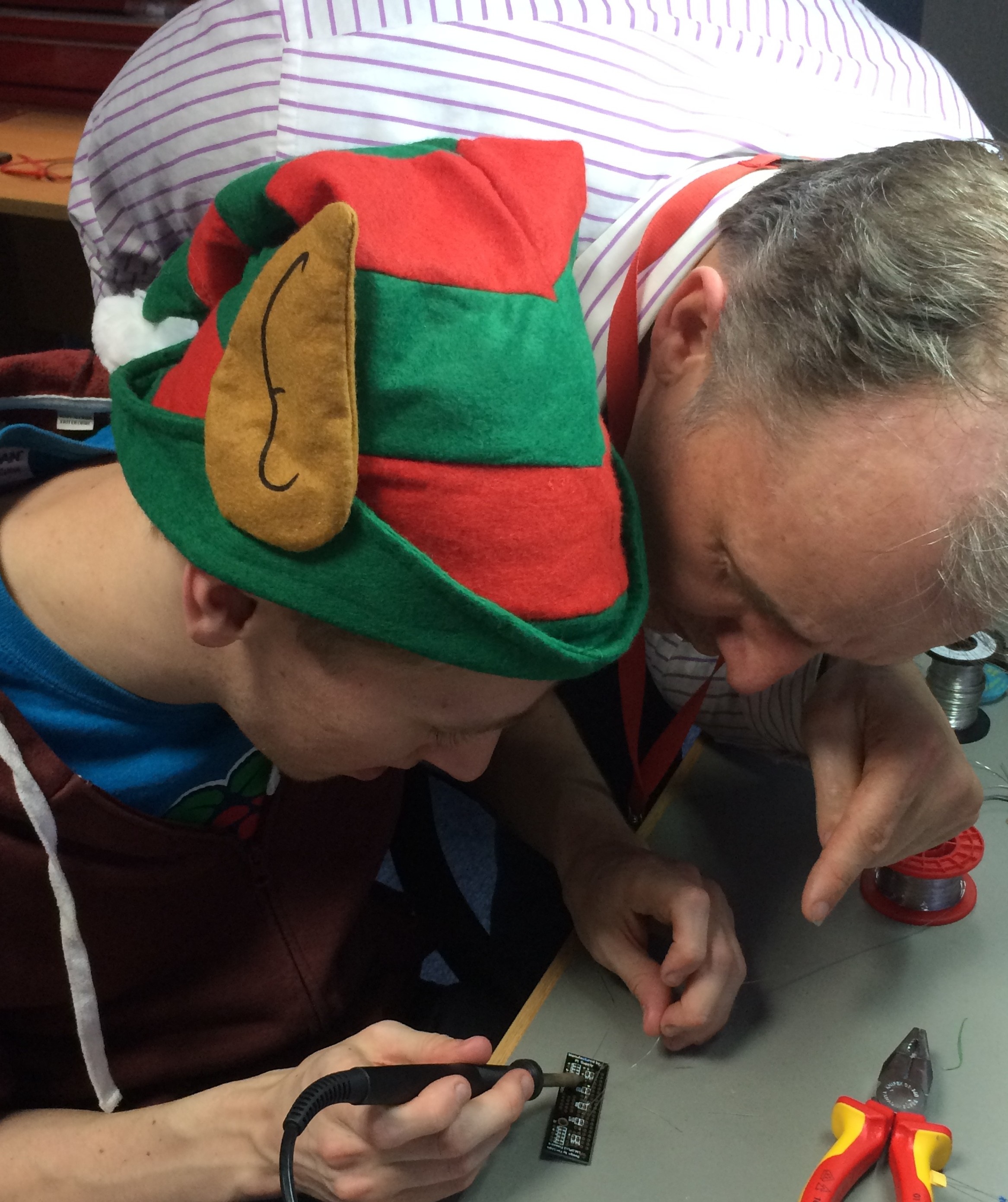 Raspberry Pi Elves Ben and Gert The Hour of Code is an idea launched in 2013 by Code.org – a non-profit organisation dedicated to expanding participation in Computer Science by making it available in more schools. Their vision is very similar to our own at Raspberry Pi:
To help support this initiative we have created a bumper pack of activities for beginners, and for those ready for something a little more challenging – and they can all be achieved in an hour. There's something for all ages and abilities in our tasty selection box, including quizzes, spinny flowers, Santa detectors, musical delights and even snowflake design. Put an hour aside, pull up a Raspberry Pi and tuck in! Clive’s Santa Detector
Ben and Rachel’s Raspberry Pi Music Box
Les Pounder’s Kids Ruby Quiz
Simon Johnson’s Sorting Hat Lesson Plan
Carrie Anne’s SnowflakesDraw snowflakes with code using Python Turtle. Great fun, and a fab way to start learning how to code with Python. In this activity you learn how to use a sequence of instructions to make shapes, how to use loops to repeat instructions, and how to store information in variables. See our Hour of Code page for more fun activities to try out. * No elves where harmed whilst creating Hour of Code resources or soldering. |

 No more propping your eyes open with matchsticks to try and catch Santa! This Scratch program uses a low-cost infra-red detector to set off an alarm when Santa sneaks into your room. It’s a great introduction to using simple sensors on the Raspberry Pi and can be adapted to lots of different projects.