| Capstone has added an array of colorful characters based on DC superheroes (and their pets) to its digital service for school libraries. Capstone is a children’s book publisher that has a robust line of graphic novels, both originals and reprints of DC’s all-ages properties. They also have two lines of chapter books based on DC characters, DC Super Heroes and DC Super-Pets, and they announced this week that they are making these books available as interactive e-books as part of the Capstone Interactive Library. These interactive e-books are designed strictly for school libraries: A one-time fee of $31.99 for the Super-Pets books and $33.99 for Super Heroes grants the school a license to allow every student to read it, in a variety of formats, on computers or mobile devices at school or at home. Unlike many digital library products, Capstone is not pretending that a digital book is the same as a print book—the license allows multiple readers to check out the book at the same time. And the book doesn’t expire, either—the license allows for unlimited checkouts. The books include audio tracks recorded by professional actors in addition to the text and full-color illustrations. "Our DC Comics brand of full-color chapter books offers readers the perfect introduction to DC Comics characters and are among Capstone's most successful and best-selling series. Librarians can expand their digital collection with the titles kids love without having to worry about hidden fees or circulation limits," said Matt Keller, Capstone's Chief Marketing Officer. Capstone Brings DC Super Heroes and Super-Pets E-Books to School Libraries is a post from: E-Reader News |
Tuesday, August 13, 2013
Capstone Brings DC Super Heroes and Super-Pets E-Books to School Libraries


Amazon Kindle Fire HD 7 vs Google Nexus 7 2013 – Tablet Comparison
| The Google Nexus 7 tablet got a refresh in hardware, with the second generation model that just came out. Many people these days are not just buying a 7 inch tablet to play games or watch movies, but use it as an e-reader. There are many advantages in going with a full color display, such as to read magazines, comics, replica newspapers or even reading apps, like Pulse. Today, we compare the Amazon Kindle Fire HD 7 and Google Nexus 7 2 in real world tests. The Amazon Kindle Fire HD 7 features a seven inch IPS display with 1,280 x 800 pixels. It offers an amazing viewing experience and the ability to watch 720p movies right on the unit. Underneath the hood is a 1.2GHz dual-core TI OMAP4460 processor and 1 GB of RAM, which makes accessing media, books, and other content very fast and easy. One of the best aspects of this model is the fact that it has twin stereo speakers with Dolby Surround Sound technology. It is seriously the loudest tablet I have ever used! The speakers themselves are on the back of the unit, but creep up the left and right sides. Even if the Kindle Fire HD is lying flat on its back, you still get amazing sound. When we conducted tests with the Kobo Arc, Playbook, iPad 3, and Acer Iconia A100, the Fire blew them all away. Sounds are clear and crisp whether you are listening to music, video, or audiobooks. It rivaled cheap external PC speakers in its ability to make the whole room swim in music. If you are a serious audiophile, this tablet is the device to beat for tablet audio functionality. The Google Nexus 7 second generation features a 7 inch full color touchscreen with a resolution of 1920 x 1200 pixels. This blows away most other tablets on the market, including the Kindle Fire HD 7 (1280 x 800 pixels) or the iPad Mini (1024 x 768 pixels.) If you watch HD videos or play really good games, you will notice an increase in screen quality. You get a solid boost in audio performance, with a speaker at the top of the bezel and one on the bottom. If the tablet is laying on a solid surface, you will still get great audio quality. Google decided against an Nvidia Tegra chip in the 2013 model, and instead did business with Qualcomm and their Snapdragon processor. The decision mainly went to a faster 1.5 quad core, which obviously can handle anything you throw at it. There is also 2 GB of Ram, which is double what the first model had. Over the course of this video comparison, we go over the overall e-Reading experience. It is important that we compare these two devices and see how they handle comics, newspapers, magazines, and eBooks. Finally, we wrap it up and run some video and audio tests. Sometimes with tablets, its not the specs written down on paper, but how do they really perform in real world conditions. We seek to really go in-depth with this comparison. Amazon Kindle Fire HD 7 vs Google Nexus 7 2013 – Tablet Comparison is a post from: E-Reader News |

Google Nexus 7 2 vs iPad Mini
| The Google Nexus 7 2nd generation tablet has just hit the streets and we had to visit 14 different stores because we can buy one. This is obviously an indication that most people are attracted to the quad-core processor and amazing resolution. How exactly does it compare against the iPad Mini, which tends to be one of the most popular tablets overall? In this comparison we check out comics, eBooks, magazines, newspapers, video and audio. The Google Nexus 7 second generation features a 7 inch full color touchscreen with a resolution of 1920 x 1200 pixels. This blows away most other tablets on the market, including the Kindle Fire HD 7 (1280 x 800 pixels) or the iPad Mini (1024 x 768 pixels.) If you watch HD videos or play really good games, you will notice an increase in screen quality. You get a solid boost in audio performance, with a speaker at the top of the bezel and one on the bottom. If the tablet is laying on a solid surface, you will still get great audio quality. In our comparison video, we see exactly how the hardware specs handle real world conditions. We put both devices side by side, showing you the exactly same content on each page. Google Nexus 7 2 vs iPad Mini is a post from: E-Reader News |

McDonalds Happy Meals in Portugal give Free eBooks
| Happy Meals in North America normally have little toys that tie into whatever new movie or television show is popular at the time. Not so in Portugal, where the fast food chain is feeding young minds with a new series of interactive eBooks. There are 12 to collect total and the most notable ones right now are The Major Cities of the World and The Wonders of Nature. Each of these interactive eBooks are able to be read on Android and iOS via the Happy Studio app. McDonalds Happy Meals in Portugal give Free eBooks is a post from: E-Reader News |

Gordon Hollingworth talks to the Orlando Sentinel
| Dr Gordon Hollingworth, our Head of Software, has been in Orlando visiting Familab, one of our favourite hackspaces. (I love it there – unusually, they’re in a big industrial unit, so they’ve got a lot of space for really big hardware. They’ve got cherry pickers, traffic lights, an industrial CNC milling machine and a lot of Lego.) The Orlando Sentinel went along to have a chat with him: here’s some video they took on the day. Really sorry about the autoplay; we know you all hate it, but the video player used here doesn’t give us the option to turn it off when the video is embedded. Gordon sent an email to the office mailing list from his phone while he was there, saying that the pinball machine you see featured in the video was the coolest physical project he’s seen done with a Pi so far. Think you can do better? Let us know! |
Viz Brings Manga to the Nook UK Store
| Viz Media announced earlier this year that they would make their digital manga magazine Shonen Jump available in five more English-speaking countries: United Kingdom, Ireland, Australia, New Zealand and South Africa. Now they have more news: They have launched eight shonen (boys’) manga series in the UK Nook store. The eight manga include their best-selling title, Naruto, along with One Piece, Bleach, Dragon Ball, Blue Exorcist, Toriko, Rurouni Kenshin: Restoration, and Nisekoi: False Love. And UK readers won’t have to wait for their next fix, as the release includes the entire run of each book up to the present volume. That’s 62 volumes of Naruto and 67 of One Piece. Here’s what Viz executive vice president and chief technology officer Gagan Singh had to say: “This is the first time these series will be available digitally anywhere outside of North America and we’re extremely excited to work with NOOK on this groundbreaking partnership to bring some of our best-loved Shonen Jump manga titles to avid manga readers across the United Kingdom. Moving forward, all new volumes for these series will also debut digitally in the U.K. NOOK Store on the same day that they come out in print in North America!” While Japanese licensors have traditionally put strict limits on manga licenses, region-blocking seems to be going the way of the dodo. The second-largest manga publisher, Yen Press, has a US-only iPad app, but its online magazine, Yen Plus, is available worldwide. Kodansha Comics, which is actually the American arm of a Japanese publisher, does publish digitally worldwide (even in Japan, as director of publishing services Dallas Middaugh told us recently). Vertical has a relatively small number of digital manga, all available on Kindle and Nook, and their first round of digital releases are available worldwide, according to marketing director Ed Chavez, although that may not always be the case in the future. Seven Seas and Udon Entertainment both distribute their manga worldwide via comiXology. Viz Brings Manga to the Nook UK Store is a post from: E-Reader News |

Indie Publishers Leverage Social Media Participation for Book Discovery
| One of the greatest changes to the publishing arena that has come about as part of the recent digital revolution is the access that readers have to authors through social media. It’s considered commonplace now for authors to have an online presence that includes fan interaction. Even for self-published authors, the going mentality is that an online presence and a fan base built through social media are crucial steps to take before a single word is published. But one of the interesting entities to leverage fan interaction and a customer base through social media has become the publishers themselves. Whether an imprint belongs to a member of the Big Five or is a partnership of friends who only publish each others’ ebooks, publishers are discovering that getting fans to interact via Twitter, Facebook, and other channels is important for sales. Akashic Books, publisher’s of the popular illustrated comic series Simon’s Cat by Simon Tofield, is taking to the social media sphere and calling on readers to photograph themselves with their cats and share them with the publisher. It’s this kind of connection that drives readers to seek out the publisher and author online in order to be a part of a fun virtual event. Other aspects of the book industry are following similar suit. Books on the Underground and Readioactive Books both encourage readers who find copies of their branded books in public to tweet a photograph of themselves with the book, and digital first publisher Untreed Reads will be offering a special promotional thank you for readers who send their virtual congratulations to its editor-in-chief who will be getting married later this month. While on the surface these types of interactions may seem gimmicky to critics, but in reality they are another way that reading consumers claim ownership over their favorite books and authors. Now that fans are growing accustomed to some measure of personal contact with the creators of their favorite books, they are becoming more engaged with those books through opportunities such as these.
Indie Publishers Leverage Social Media Participation for Book Discovery is a post from: E-Reader News |

School Libraries to Get eBook Boost with Follett, Hachette Deal
| As teachers, librarians, and administrators prepare to start a new school year, many school professionals are probably thinking very seriously about budgets, especially where their technology dollars are concerned. One of the many frustrations that schools have felt in regard to technology has been the availability of e-readers and tablet computers, but a lack of lending content for the students to read on them. Now, Follett, one of the world’s largest media providers to public schools, has inked a deal with Hachette Book Group to provide digital editions of many of its children’s and teens’ titles to school libraries. HBG, which owns Little, Brown Books for Young Readers, is only the most recent publisher to sign on with Follett, as one division of Penguin Random House has already made a similar partnership. "As one of Follett's largest partners, HBG offers a wide variety of quality ebook titles that customers can circulate to students for as long as needed to support the school's educational needs," said Todd Litzsinger, President of Follett's Content Solutions and Services, in a press release on the deal. "The addition of HBG's ebook titles reflects our mission of helping educators engage students with content and technology that drives learning outcomes." There is possibly no more community arena in which ebooks stand to make radical change than in the public education sector. The savings to tax payers alone as schools transition to digital–especially in communities which leverage students’ own device purchases in order to avoid buying and insuring costly hardware–should serve as enough of an incentive to help foster more deals of this kind. When teachers’ own expenses of book and supply purchases are taken into consideration, a long understood fact of the profession, more leaders and publishers should feel compelled to work on the ebook issue.
School Libraries to Get eBook Boost with Follett, Hachette Deal is a post from: E-Reader News |

Raspberry Pi in Turkey
| Up until now, it’s been difficult for people in Turkey to buy a Raspberry Pi, with import duties and postage charges raising prices to a point where the Pi becomes uneconomic for some. Information about the Pi is hard to find in Turkish, too. Pis are getting to Turkey; we know that there are some at the Base Istanbul Hackerspace, and we’ve had conversations with a number of friendly Pi-owners out there. But we’re not seeing the Pis out there being used by kids in the way we want them to be, and we’re not seeing as many as we’d like to outside the established academic and hacking community. These are things we’ve been working to fix. First off, we’ve established a new Turkish language section in the official forums. We’d like you to help populate it. We’ve also found a new Turkish vendor, so Turkish buyers will not have to pay the import duty that has been causing such difficulties. Raspberry Pi is now available in Turkey through Samm Teknoloji AS, who aim to provide the Pi at the lowest possible price to Turkish Education. In order to buy online in Turkey please visit market.samm.com. For more information check out www.samm.com; you can also place orders by telephone by calling the call centre at +90 444 1 726 or +90 444 1 SAM.
|
A Closer Look at OverDrive Media Console version 3.0
| OverDrive Media Console has an ever growing history with mobile platforms. We first released a mobile version of OMC on the Windows Mobile platform in September of 2009, followed soon after by the Android version in December of '09, and then the BlackBerry version in February '10 and finally on iOS devices in April '10.
Since then, we have included Windows Phone and Windows 8 in the OMC app family and worked hard to improve the apps; from adding the ability to read eBooks, to trying to unify the visual experience between devices, to simple bug fixes. Many changes have swept through the mobile device platforms since then and we’ve kept up with the pace of technological growth, bringing you the latest and greatest version of OMC.
My fellow OverDrive blogger, Adam Sockel, gave you a great overview of what to expect with the newest release, and we have a couple live training sessions scheduled as well. To help get you excited for this new release, I'm here to give you a closer look, and point out the ways in which OMC v3.0 will simplify support for your users. I want to start by highlighting the newest features in the app.
When you first open OMC v3.0, you will see the familiar splash screen give way to a new start screen for first-time users prompting them to add a library or add some books to their bookshelf, complete with visuals to point users in the right direction. Once you have your libraries and/or books added, more tutorial screens will walk you through the new interface, showing up when you go to your bookshelf or open an eBook. Each tutorial screen shows up once, but is available again using the option in Settings to show tutorials next time the app is started.
Aside from the tutorials, we simplified getting around in the app. The Home Menu is your one stop for navigating the improved OMC v3.0. From there, you can go to the My Libraries list, the Bookshelf, Settings, History, OverDrive One and more. In addition to the ease in navigation, the Home menu also provides a better in-app help experience, offering detailed solutions to common questions and issues within OMC.
History is a list of titles that have been deleted from the app upon expiration, or returned to the library. This feature should be a big hit with avid readers, allowing them to keep track of the titles they have read – options range from the last 10 deleted titles to the last 100 deleted titles – so they run less of a risk of listening to/reading the same books over again, unless they want a repeat performance of a book.
When reading the books, we have added another menu, called the Book menu, which allows for simpler navigation within the book, providing access to the table of contents, book details, and editable bookmarks.
Back on the Home menu, the biggest new feature, OverDrive One, allows users to sync their titles, bookmarks, and furthest point read between devices using OMC v3.0. The editable bookmarks I mentioned above are the very same ones that will sync between devices using Overdrive One. So, you can stop reading on your Android phone, pick up your iPad to continue, and you're back in the same place – much like when using OverDrive Read in your browser. For your users who use more than one device to read OverDrive eBooks, OverDrive One should be a welcome addition to the app. This feature is in beta, and we are relying on user feedback to help us add features and improve the Overdrive One experience.
So come on and get excited for August 20th and the new OverDrive Media Console v3.0. Join us for one of the live training sessions we're holding on 8/13 and 8/14 – there are plenty of seats available, and we'd love to have you!
Don't forget, if you need any assistance with end-user support, we have Front Line Tech Support available to assist you and your staff answering those questions from your user.
Justin Noszek is a Support Specialist with OverDrive  |
Monday, August 12, 2013
New iPad 5 And Retina Equipped iPad Mini 2 Out Soon
| There might be a retina display equipped iPad Mini to savor this year after all. The latest update is coming from Bloomberg citing the recent parts leak supposed to be that of the mini variant of the popular Apple tablet. Meanwhile, sources also maintain the new iPad 5 as well as the second gen iPad Mini might be launch during October, which will be bang on target to cash in on the holiday buying frenzy. If this be true then the Sept 10 event that Apple has lined up might be dedicated solely to the launch of a new iPhone, which could be either a slightly refreshed 5S variant or a radically redesigned iPhone 6. Then of course there is the new iOS 7 to look forward to as well as it seems it is going to be the new iPhone to carry the new Apple mobile OS. Coming back to the iPad, speculation has been rife as to whether the new iPad Mini will feature a retina display or not. Good to see dust settling on this with reports emerging of Apple launching the follow up to its wildly successful iPad Mini variant with the pixel rich display by this year-end itself. Earlier rumors had pegged the launch to early next year. Meanwhile, the new 9.7 inch iPad 5 will incorporate the same design theme that the iPad Mini started, what with thinner bezels along the sides which became an instant hit with the consumers. Combine that with the usual Apple goodies which include zippy performance, a bright and sharp display, more than decent battery life and a rich app store and you have another chapter of the iPad success story in the making. There is just a few more weeks of waiting to be endured in between.
New iPad 5 And Retina Equipped iPad Mini 2 Out Soon is a post from: E-Reader News |

Google Nexus 7 2nd Generation Review
| Google has refined their original seven inch Nexus 7 tablet in every way and has just released the updated model a few weeks ago. This new device blows away much of the current generation Android tablets on the market. When it comes to hardware on paper, normally it is not an indication on how it performs in real world conditions. We put this device through its paces to give you accurate portrayal of how it stacks up against the competition. Hardware The Google Nexus 7 second generation features a 7 inch full color touchscreen with a resolution of 1920 x 1200 pixels. This blows away most other tablets on the market, including the Kindle Fire HD 7 (1280 x 800 pixels) or the iPad Mini (1024 x 768 pixels.) If you watch HD videos or play really good games, you will notice an increase of screen quality. You get a solid increase in audio performance with a speaker at the top of the bezel and one on the bottom. If the tablet is laying on a solid surface, you will still get great audio quality. Google decided against a Nvidia Tegra chip in the 2013 model, and instead did business with Qualcomm and their Snapdragon processor. The decision mainly went to a faster 1.5 quad cores, which obviously can handle anything you throw at it. There is also 2 GB of Ram, which is double what the first model had. So lets look at exactly what Google did, they doubled the RAM, added a 5 MP rear facing web camera, increased the resolution, processor and offers LTE data models. It still does not have a Micro SD card, so you want to go with the 32 GB model to get you through the day. There is also around 10 hours of battery life, but like anything, if you sit and watch Vine videos all day, it will die sooner. Luckily it has wireless charging, so you can sit down at a Starbucks and keep your juices flowing, battery juices that is. When you look at every other tablet on the market, in the seven inch class, nothing on paper really beats this. It surpasses the competition in almost every single way and still provides a stock Android experience. There is no bloatware to bog you down and factory images are available, in-case you break anything with your customizations. If you are looking for a great seven inch tablet right this second, get this. Otherwise, Amazon, Kobo, Sony, Apple and B&N are all updating their products soon. Software The Nexus 7 second generation gives you a pure vanilla Google Android 4.3 experience. You get everything that comes with the latest version currently available and is compatible with almost every game and app out there. When you first load up the Nexus 7 for the firs time, you have all the ubiquitous Google apps, like Play, Gmail, Maps, Google+ and things like that. Google really went to town on their market the last month, really making it touchscreen friendly. It really looks slick and shines on the Nexus 7 2. Speaking of such, you are not locked into dealing exclusively with Google, but you can easily install 3rd party app markets, for other brands you are loyal to. The fast processor and tremendous resolution makes graphic heavy content shine. Really, the one drawback of super HD screens in general, is that the games and apps are not optimized for them. It is much akin to buying a 4K television and having a small pool of movies to choose from. Still, when we put it side by side with the Kindle Fire HD 7, Kobo Arc and iPad Mini, there was a number of noticeable factors. There were subtle variations in video, pictures, comics and magazines. You know, graphic heavy content, I did notice variants of shades, hues and richer color palette. There is a mad rush of companies using Android to innovate the hardware and scramble to offer competitive advantages. A bigger processor, more RAM, large cameras and higher resolution. One of the fundamental flaws of Android, is that there is no consistency in the hardware, it makes it hard for app developers to optimize their content for so many variances. The higher a studio budget is, the easier it is to optimize, which is why EA and Gameloft titles look amazing.. E-Reading Experience The New Nexus 7 looks amazing when you are reading graphic heavy content like magazines, comic books or manga. Of course, with the high specs this unit has, you will have lightning fast page-turns and new apps will open in a flash. Google sells graphic novels in the Play Store, but to find the best single issues, you will want to download your favorite publisher. VIZ, Marvel, Dark Horse, DC, Archie, and Comixology are all perennial favorites. You will notice an increase of quality in the images, especially if you are upgrading for an older device. Every single major online bookstore has a presence on Android. If you are into Fiction and Non-Fiction you can choose from thousands, including Amazon, B&N, Kobo, or Sony. If you are looking for textbooks, Google now rents them or you can check out KNO or CourseSmart. In general, most mainstream e-Reader apps really are fairly basic when it comes to their iOS counterparts. Most companies realize that it is a fairly popular device, and studies have consistently been proven that Apple users spend more money on content. This presents the situation where iOS gets new features faster than Android. If you want the best e-Reading experience, I recommend to check out solid indie reading apps that are first party, like Moon+ Reader or Aldiko. Really, every single e-Reader app we tried loading up very fast, and the problems we had, were with the actually coding of the app. Zinio for example, crashes if you have it open in a multitasking environment and come back to it later. You can’t really fault the Nexus for that, but this situation is evident in many apps in general. Wrap Up The Nexus 7 is likely the highest performing tablet on the market. On paper it looks amazing and in real world circumstances, gets the job done. I firmly recommend this device, if you ever had a cheap $100 Walmart tablet or something by Aluratek, you owe it yourself to get this. PROS Killer Processor
Most comics, manga and magazines not optimized for high resolution Rating: 9/10 Google Nexus 7 2nd Generation Review is a post from: E-Reader News |


New Tianyibook e-reader seeks to Battle Kindle in China
| Amazon unleashed the Kindle in China a few months ago and their fledgling eBook store only has 40,000 titles available in local languages. A new e-Reader called the Tianyibook has just launched for the exact same price as the Paperwhite and boasts a massive library of over 300,000 titles. The Tianyibook is also known as the Skytel e-reader, and has a six inch touchscreen display with a resolution of 600×800 pixels. It has 256 MB of RAM and a fairly feeble 600 MHZ processor. This device runs the Google Android operating system, but there is no word on what version it has. One thing we do know, is that it reads a copious amount of formats, which makes it ideal for loading in your own eBooks. It can read EPUB, PDF, PRC, MOBI, PDF, FB2 and a number of others. This e-Reader is not just a run of the mill device, released by some no-name company. Instead China Telecom is selling this, which should have it more widely available and have more retail viability than the Kindle. Content is king, and the Tianyibook hopes to target the Chinese market with a store that exclusively deals with Mandarin and Cantonese books. New Tianyibook e-reader seeks to Battle Kindle in China is a post from: E-Reader News |

Raspberry Pi Minecraft server
| The first question people usually ask upon meeting me is, “Can you ride a pig?” I’ve never worked out if they mean in Minecraft or in real life. The second question is, “Can you run a Minecraft server on the Raspberry Pi?” The answer to both is, of course, “Yes”. Edwin Jones (EdwinJ85 on the forums) explains how. This does take some techincal nous — but you’ve had all day to install Raspberry Pi Minecraft and play, you should be experts. What I really liked about Edwin’s blog are his final comments. Whether you are hacking Minecraft or building a media server or sending them into near space or messing about in Scratch, this is why we do what we do:
And with that Manic Mineday has ended. Normal service will be resumed shortly. Goodnight. |

Minecraft Snake arcade machine
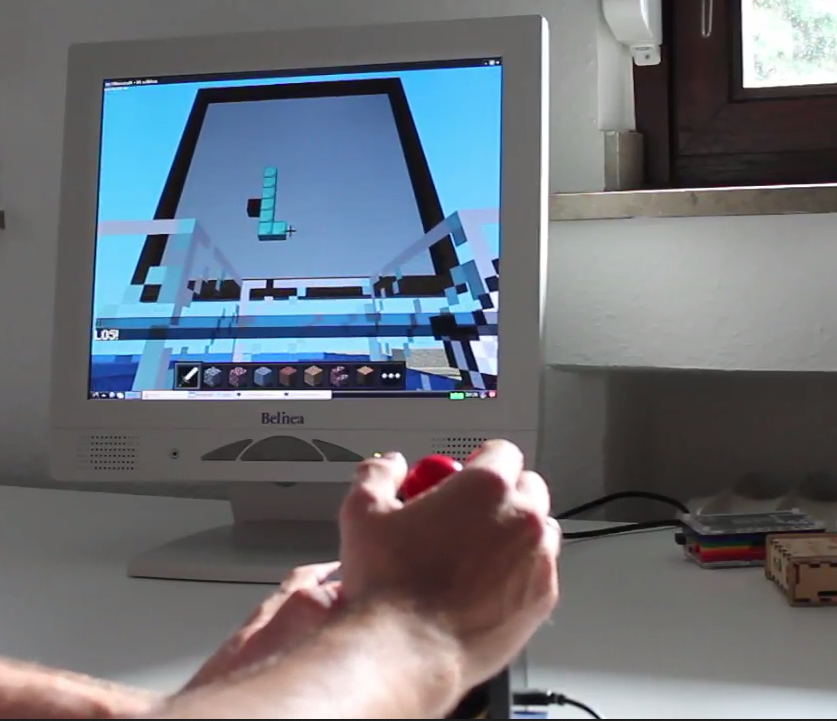
| You thought that we’d finished, didn’t you? You thought that I’d gone to bed to dream of building diamond cubes using nested loops. Think again! Tobias Hübner tells us how he has been using Raspberry Pi Minecraft in the classrooom (including interfacing using the GPIO pins) : I just read your blog post and wanted to let you know that I use mineceraft with my pupils in a school in Germany and they absolutely love it. When I bought a case from the guys at nwazet [Nwazet make brilliant add-on stuff for the Pi, check them out - clive] I had the idea to turn it into a joystick and then let my pupils play around with it. They came up with the idea to use it in minecraft. We therefore modified the snake game from stuffaboutcode.com so that it runs in a loop and made a little Raspberry Pi/Minecraft-arcade machine. I recorded a video for Fabien, the founder of nwazet, which shows how it runs. You can download it here: www.medienistik.de/case.mp4. Pictures of the case can be found at www.medienistik.de/case.zip. I also wrote a little Raspberry Pi-tutorial for teachers in Germany. It has a focus on using minecraft in combination with the GPIO-port. You can find it here: http://www.medienistik.de/Themenheft_RaspberryPi.pdf I gave a talk about all this at the last Raspberry Pi Jam at the university in Trier/Germany (http://medienistik.wordpress.com/2013/06/15/pi-and-more-treffen-an-der-uni-trier/). It was also featured in the latest Linux User issue (http://www.linux-user.de/Downloads/LUCE/2013/lu-ce_2013-08.pdf). Greetings from Germany and thanks so much for the awesome work you`re doing! No — thank you Tobi. |
Wattpad Launches New Fan Funding Platform
| When writers want to get funding to write their next book, they often have to deal with Kickstarter or get a publishing deal. Wattpad is bucking this trend with a new project called Fan Funding. Wattpad is currently the world’s largest community for reading and sharing stories. They have just announced a new fan funding pilot project with six writers. This experiment gives readers the option of supporting their favorite writers to help them fund a story, an ebook, or the development of their work with a publishing partner, in return for a range of novel rewards. The diversity of projects is intended to showcase the nature of today's publishing environment. The first wave of Wattpad fan funding includes campaigns by Brittany Geragotelis, author of Life's a Witch which started as a story on Wattpad and was published by Simon and Schuster last year. Writer Tara Sampson aka writer MercyRose had a campaign to continue writing on Wattpad which has already been successfully funded and Jordan aka XxSkater2Girl16xX is on track to reach her goals in a thirty day period. "The real goal for us is creating new options for writers to connect with their existing fan base on Wattpad," said CEO Allen Lau. "We want to enhance the social exchange not create a transactional culture. Ever since Wattpad started offering readers and writers a place to share and engage in digital storytelling, we knew we wanted to share the power of the platform with them. This project explores that." Wattpad Launches New Fan Funding Platform is a post from: E-Reader News |

Digital Comics Best-Sellers for August 12, 2013
| Here’s our weekly look at the digital comics best-sellers on four different platforms; note that the lists are updated hourly so this is just a snapshot. 1. Injustice: Gods Among Us #30 As usual with comiXology, it’s a list of DC and Marvel single-issue comics, but the latest issue of The Manhattan Projects, Jonathan Hickman’s Image series, made #11. When I checked the list last night, the first issue of the indy digital-first comic The Bunker was in the #10 spot. It has now dropped a few spaces, but it’s impressive to see a comic completely unaffiliated with any major publisher do so well. I have a special interest in this comic because I talked to the creators last week, and also because it’s a damn good comic. 1. The Walking Dead, vol. 1 As always, the Amazon list (this is for comics that use Kindle Panel View) is a mix of single-issue comics and graphic novels. 1. Injustice: Gods Among Us #23 I pulled out the free comics to make this list comparable to the others, but it’s worth noting that Nook users are spending a bit more; the first seven comics were not free. It’s also an odd mix, what with the Walking Dead, Injustice, Peanuts, and a Star Trek TNG/Doctor Who crossover. Those Peanuts comics might be worth a second look. iBooks 1. Injustice: Gods Among Us #30 Let’s look at Injustice: Gods Among Us as it appears on these list. The most recent issues, including #31, which is a pre-order, make the top of the iBooks list, but issue #1 is on there too, so people are still discovering it. Amazon allows pre-orders as well, but I have yet to see an upcoming issue make the list—on the contrary, the early issues in the series dominate the Kindle list. Are people discovering it there and then moving to another platform? Nook users are keeping current with the series via their devices, but they aren’t reading a whole lot of other stuff. And the most recent issue always tops the comiXology list, but other issues don’t make the top ten at all. That may be not so much because sales of Injustice are weak but because comiXology sells a lot of other comics. One would expect the first issue of the digital-first Batman Beyond 2.0 to be on the comiXology list, and perhaps it was on Wednesday, but by the time I looked at the best-sellers, on Monday morning, it had slipped to #17. It’s interesting that the debut issue makes the iBooks list, though, breaking up the Injustice/My Little Pony cartel. Digital Comics Best-Sellers for August 12, 2013 is a post from: E-Reader News |

Say Goodbye to Infrared Touchscreens on E Ink eBook Readers
| I’ve been keeping an eye on things over on E Ink’s website for anything new ever since they stated in a recent interview that they would be releasing a new generation of ebook reader screens soon that are capable of going up to 100 page turns without needing to do a full page refresh, just […] |
Bilingual Interface options for your next generation digital library
| Lisez-vous eBooks?
86 libraries in 20 countries world-wide are now live with bilingual interface options on OverDrive's Next Generation Digital Library platform. All of our partners on the new platform can now opt in to give their patrons the ability to change the interface of their library's OverDrive site to French Canadian, Simplified Chinese, and/or Spanish. Each library can enable two languages in addition to the Standard English interface—at no charge. Japanese and Traditional Chinese translations are coming soon, with additional languages on the way.
Library patrons from the US, Canada, South Korea, the Netherlands, Israel, the Dominican Republic and Qatar, among others are reaping the benefits of this new service. According to Adina Szalai, Integrated Library Systems Specialist at the Ottawa Public Library in Ontario, "The complete bilingual interface is a necessity in serving our population. Furthermore, having matching language layouts and understandable translation of e-downloading terminology simplifies service needs."
Navigation between the language options is easy for library staff and their patrons. Paul Burden, Manager of the Information Services Department at Eastern Regional Libraries in Australia relayed to me how much easier providing user assistance to Chinese-speaking patrons has become. "Emma Zeng, a native Chinese speaker, had previously been translating the OverDrive pages and putting together handouts and PowerPoint presentations of her own to help her explain how the whole platform works – now all she has to do is click the drop down button, select Chinese, and point when she is doing a live presentation," stated Burden. You can see how easy it is to switch between languages here.
Plenty of libraries are bound by certain legal statues or their libraries' Strategic Plans when it comes to providing multi-language support in the library. Virtual Branch Coordinator of the Sacramento Public Library, Amy Calhoun, explains it best: "One of Sacramento Public Library's goals in our Strategic Plan is to provide more of our services and information about these services in multiple languages. OverDrive has made this easy for us for the digital portion of our library service, because they now provide both content in several languages, and the interface as well."
As Calhoun mentions, OverDrive also offers a wide array of non-English digital content for your library's digital collection. Furthermore, if you're not sure how to select materials in a language other than English, just contact our Collection Development team at collectionteam@overdrive.com, and we'll happily set up carts of materials for your review.
According to Burden, "To quote the immortal Jean Luc Picard, as ever the experience of setting up a new product with OverDrive was as easy as saying, 'Make it so'…and it was done." So, if you'd like to add bilingual interface options on your library's OverDrive-powered digital library site, it's super easy! Just contact your Account Specialist and let them know which language(s) you would like to add.
Krystal Cole-Williams is an Account Specialist with OverDrive  |
Learning Python using Codecademy and Raspberry Pi Minecraft: a resource of great note
| I met Craig Richardson at Nottingham Maker Faire and we got to talking about teaching using Raspberry Pi Minecraft. For a while I’d harboured a plan to write some proper teaching resources for it and had scribbled a few notes but hadn’t had time to develop it. Craig had had the same idea – yes, it was just like Darwin and Wallace – and we decided to get our heads together. Shortly afterwards Craig sent me what he had been working on. And here it is. It’s so good that I haven’t got anything glib to say. It’s a magnum opus. Craig’s book is one of best teaching and learning resources that I’ve ever seen for any subject. It follows the Python lessons in Codecademy (one of the best online learning resources out there) and then reinforces these skills using Raspberry Pi Minecraft. It’s contemporary and it’s challenging and it’s fun. It’s got a 225 page student book with exercises plus separate teachers’ notes. It provides differentiation and it references the new Computing curriculum. It’s learning by stealth If you are a teacher and are teaching Python in September: please go and get this, your students will thank you. (Would you rather teach loops by printing a times table or by fighting trees?) Everyone else who would like to learn or improve their Python: please go and get this, it’s not just a classroom resource so don’t be put off. If you don’t want to work your way through it from the start just cherry pick what you find interesting – it’s an excellent reference and I’ve used it as such in workshops, to great effect. 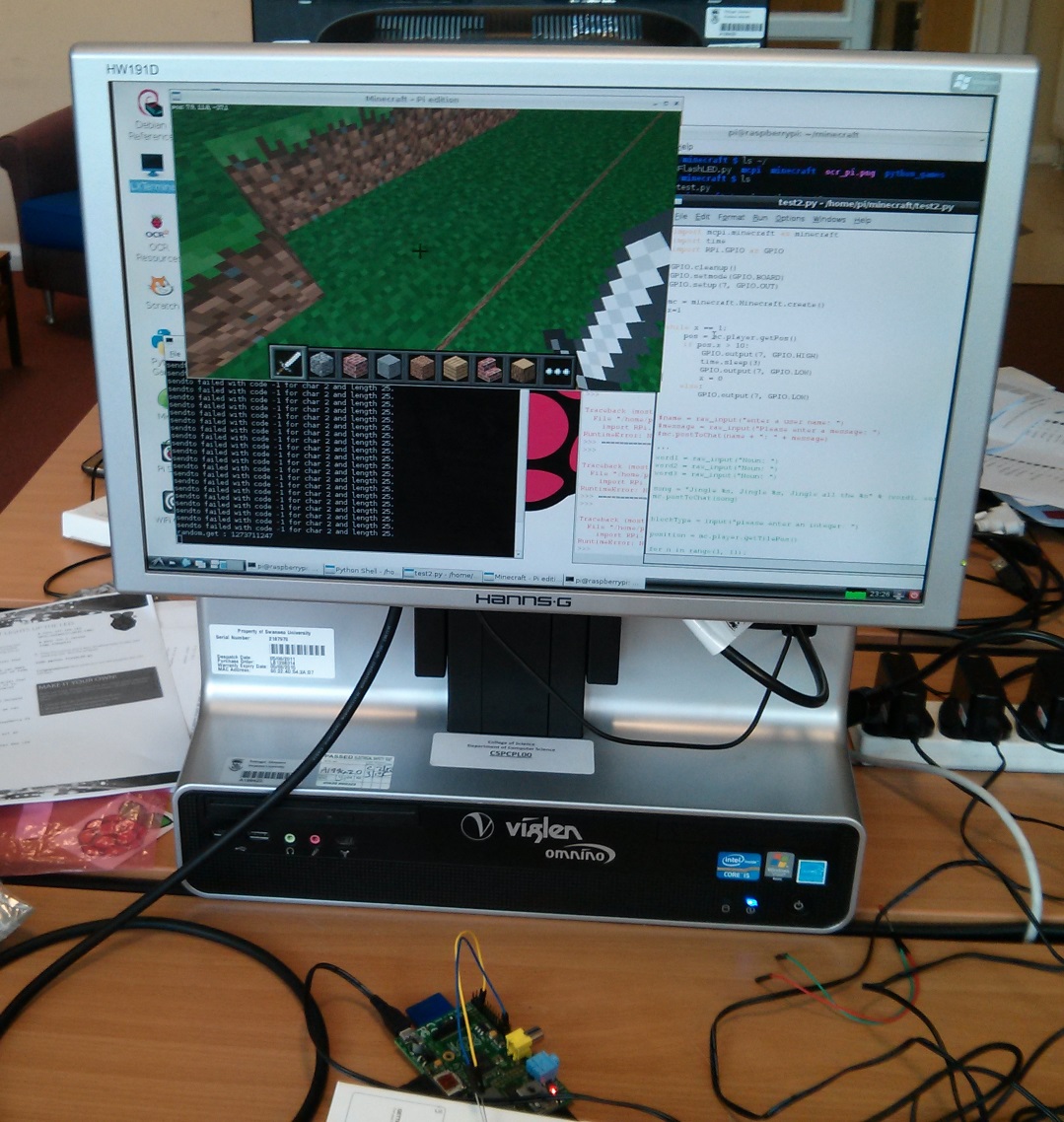 A treasure detector based on an exercise in Craig’s book. The LED flashes faster as you get nearer to the treasure. The book isn’t quite finished and Craig says:
When it is done it will surely be an essential resource for learning Python on the Raspberry Pi, so if you’d like to help then please contact Craig. Oh — and there’s lots of other good Pi-related stuff on his blog too. |

