| The Kobo Aura HD marks the company’s second iteration of a front-lit display on your traditional e-reader. No other company in the world has produced a second generation e-ink device that will allow you to read in the dark, and many people have questions on how it stacks up against the competition. Today, we compare the Kobo Aura HD against the Amazon Kindle Paperwhite, Nook Simple Touch with Glowlight, Kobo Glo, Kobo Arc, and the Bookeen Cybook Odyssey HD. These Nighttime Reading tests are very short videos and are conducted in our studio with all of the lights turned off. We show you how the front-lit displays compare against each other. Most of the tests take place on the main home menu and then within an ebook. Also, you can get a very good sense of how the screen technologies really function in real world conditions. Our last test compares the Aura HD against the Kobo Arc, an Android tablet. Many people often ask us the prime differences between a front-lit display and a back-lit one, so here we go into detail with the pros and cons of each. Kobo Aura HD Nighttime Reading Tests is a post from: E-Reader News |
Thursday, April 18, 2013
Kobo Aura HD Nighttime Reading Tests


Oliver and Amelia make a bee box
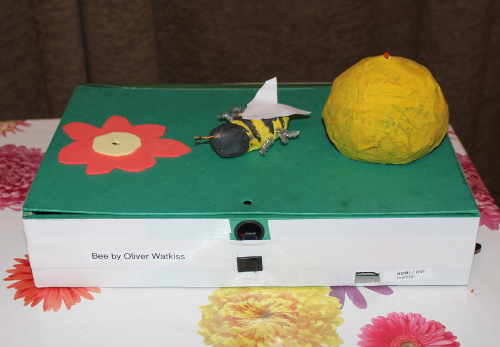
| Oliver is five, and has produced this lovely bee box for school. He did the modelling, the painting and some of the soldering, and had lots of help from his very talented big sister Amelia, who is seven and did all the programming for this project in Scratch. The bee is made of clay, and has a magnet inside his body. His location is determined by some reed switches inside the box, which are connected to the GPIO pins on a Raspberry Pi, as are the LEDs in the flower and the hive. Amelia’s Scratch program, running on the Pi, then uses a TV to display what the bee’s up to (and, to a very enthusiastic Oliver’s great pleasure, emits a buzzing noise). I mean it about the enthusiasm. Seriously. If you could bottle this stuff you’d make a fortune. Full instructions on how to make your own bee box (it’s a really enjoyable project for parents to set up with their kids, and I’m sure you can think of a million ways to customise it) are available at Dad Stewart’s website, along with the Scratch code you’ll need, some GPIO instructions and a costed parts list. Thanks to Oliver and Amelia from all of us at the Foundation – we are flapping our arms and shouting “BUZZ” right along with you. |
Online Job Search Resources
Searching for a job online can be difficult. To help you find the perfect position, we've compiled a list of basic job search resources. |
Raspberry Pi colocation
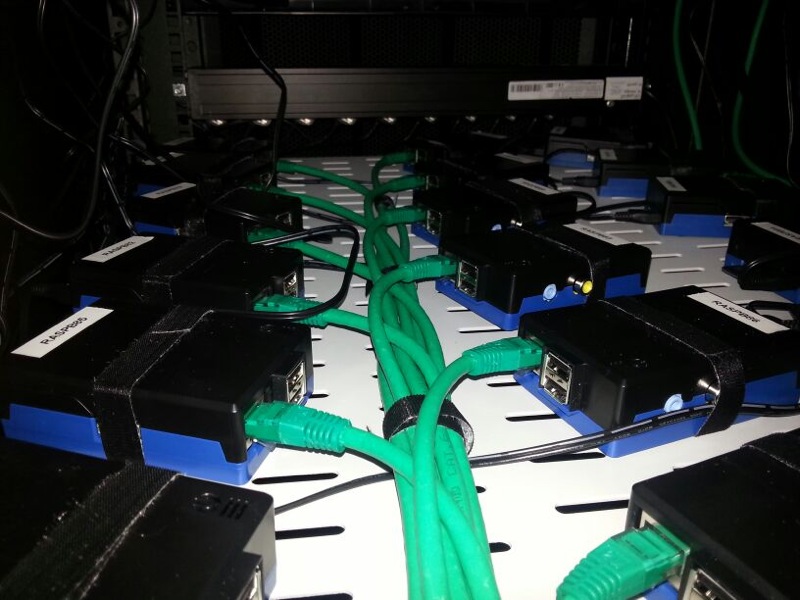
| Liz: Thor de Regt, from Amsterdam, emailed me back at the start of the month to tell me about the success his company has been having offering free Raspberry Pi colocation. There are a few companies around the world offering this service for free for Raspberry Pi users, and we were interested to find out how and why this was going on. Here’s what Thor had to say. Free Raspberry Pi colocation – How it all began, our success and our findings In late February we began giving people the opportunity to colocate their Raspberry Pi in our data center – for free. Now, almost two months later, we have over 400 people making use of the initiative with new signups still coming in daily. Of course this makes for a good story which we’re happy to share with you and the rest of the Raspberry Pi community! The beginning So, how did all this start? Well, it wasn’t a warm summer evening in ancient Greece (in fact it was a cold morning last winter in the Netherlands), when we thought it would be pretty cool to host a couple of Raspberry Pi’s in our data center. We were pretty confident that there would be at least some people interested. I remember getting excited by the thought of reaching enough people so we could end up hosting around 50 Raspberry Pi’s. Two days after the website went live that goal was quickly achieved though, but more on that later. Raspberrycolocation.com Before we could share the initiative with anyone we needed a platform, and thus raspberrycolocation.com was created. To keep our tone of voice in line with the Foundation we made the website as transparent as possible and people really seem to appreciate that. When people visit the website they can see for themselves that we have nothing to hide and that there is no hidden agenda. We believe this definitely contributed, in one way or another, to the popularity of the initiative so far. People just dig generous offers and our service is no different. I mean, where else can you get a 100 Mbit uplink, 500 GB bandwidth, power and the ability to boast about it to your friends for free?  One of the illustrations made for the website to give some pizazz to our applications page. In this illustration you can “clearly” see two raspberries chatting in fruit language. Success Just a few minutes after the website went live we knew we were in for something good. After having sent out a Facebook post and a tweet, we received close to 60 signups within two days. That amount more than tripled when we included the project in our not so monthly newsletter, and has been steadily increasing since. Every now and then the website gets shared on a popular forum or blog (like raspberrypi.org), usually resulting in a few thousand visitors for a day or two. At this moment we have received close to 450 signups, about 150 of which are currently operational. If we get all of them up and running we’re probably looking at three racks filled with Pi’s. Yum! 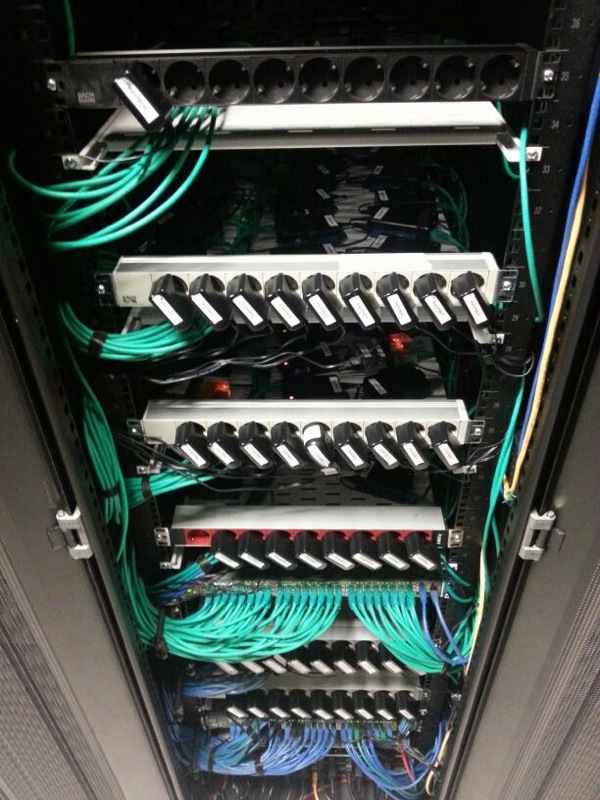 Our first rack, fully filled with Raspberry Pis. Quite a delicious sight! Setbacks The fact that the initiative has been so well received is great news of course, but also presented a few drawbacks. Because we had so many more signups than we first anticipated, our initial stock of Raspberry Pis and their necessary accessories were gone by the end of the first day. Thankfully, ModMyPi ships pretty fast (and their 5% profit donation is definitely a win), so getting new Raspberry Pis wasn’t that much of a problem. No: the real problem for us was the power adapters. For safety reasons, we wanted to supply the power adapters ourselves, but we quickly found out that the ones we had were no good and it took us quite a while to actually get a model we could trust. Ultimately, we went with the ones recommended by RS Components. Higher in price than we first set our sights on, but at least you can count on them! Our setup Currently we’re able to place 150 Raspberry Pi’s in a single rack. However, the method we use isn’t exactly the most efficient solution, as can be seen on the picture. For now it does get the job done though. In order to make better use of the space we have, we are working on a few custom designed boards that should make it possible to place close to 500 Raspberry Pi’s in a rack; this setup will also give us the opportunity to reboot them from a distance, but unfortunately is quite expensive to fabricate in its current state.  The prototype consists of 32 outlets connected to a power supply of 45 amps. We’re currently working on getting the cost per outlet down and maybe increase the outlets per board to 48. With the increase, we could house close to 500 Raspberry Pis in a single rack. Our findings When we first started, we thought only a few people would actually buy a Raspberry Pi through us. To our surprise this was not the case, as 62% of all signups bought Raspberry Pi’s (80% 16 GB version, 20% 8GB version). This amount is much higher than we originally thought it would be, but actually makes sense when you think about it. If I was colocating a Pi, I know I would buy a new one because there is just no way I’d want to send my current one away. The people that did send their own Pi probably had it as an extra just lying around the house. Another interesting thing is how they’re performing so far. Since we always monitor the power and bandwidth usage of our racks, monitoring the Raspberry Pi rack was pretty easy and gave us some great insights. As of 9 April 2013, a total of 150 Raspberry Pis steadily used 4.5 Amps on average and about 1 TB of bandwidth last month. Now, most of them were only placed a few days or weeks before, so this may not be the most accurate picture ever; however, it does give a general idea on how they perform. Oh well, I guess we’ll just have to follow up on this post in the future! 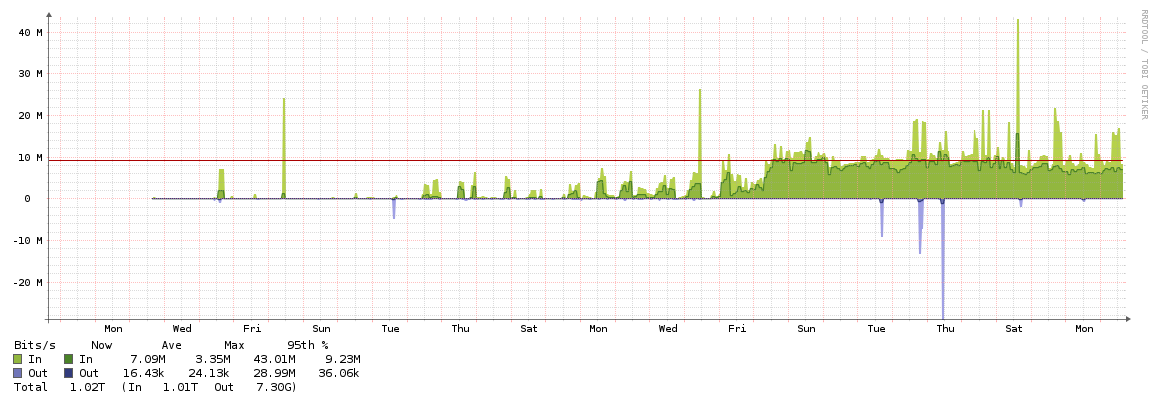 Click to enlarge. As you can see, only 1 TB of bandwidth has been used by 150 Raspberry Pis. This number is quite conservative in our opinion. The guys facilitating all this That’s pretty much the journey we have had so far regarding the project. For anyone interested in who we are and what we do (I’ll keep it short): we’re PCextreme, a webhosting company from the Netherlands offering a wide range of online services at competitive prices, such as domain name registration, colocation services, web- and soon cloudhosting. Should you want to help us out with the initiative, then feel free to share this post or the raspberrycolocation.com website with your friends so everyone can get in on the action. If you have any questions about us, the initiative or anything in general then feel free to ask them in the comments section. Thanks for reading! |
Digital Newspapers Growing in Popularity, Local Papers Need to Follow Suit
 Photo courtesy of visiolink.com Industry experts have been predicting the death of newspapers ever since the birth of televised news. Those predictions only became louder with the explosion of online and tablet-based newspapers. But an article by Laura Hazard Owen for paidContent.com demonstrates that digital editions have seen exponential grown while print is far from gone, but that the small-town newspaper is going to have to work to keep up. According to Owen, “The NAA-Nielsen study surveyed 5,000 adults on ’11 different metrics for engagement, including trust and ethics, how connected media makes people feel, the value or inspiration it adds to life, and the effectiveness of advertising.’ On that measure, print and online newspapers came out on top.” One other key piece of data from the Newspaper Association of America survey was the print advertising in newspapers was still very important to consumers, with print newspapers and digital newspapers scoring higher than any other form of advertising for effectiveness and for consumer sentiment that the ad would actually translate into sales. But if newspaper advertising is more effective, why are newspapers losing billions of dollars a year in advertising revenue? That, coupled with a drop in print subscriptions as more readers turn to app-based national news, may have caused a lack of confidence in newspaper advertising by companies who don’t know that consumers still put a measure of trust in newspaper ads. The survey results, along with other data, have shown that the publishers who still print newspapers understand the need to move to mobile devices. With more and more national newspapers making at least a digital edition in addition to their print, if not exploring going wholly digital, the progression to handheld devices is promising. The smaller, locally-owned newspapers need to follow the digital lead with web-based and apps for reaching their subscribers and their advertisers.
Digital Newspapers Growing in Popularity, Local Papers Need to Follow Suit is a post from: E-Reader News |
Wednesday, April 17, 2013
Sourcebooks Adds New Favorites to Put Me In The Story Platform
| Sourcebooks launched its highly innovative personalized children’s reading experience only a few months ago, but in that time, the Put Me In The Story platform has grown to include some of the most beloved characters in all of children’s reading. Today, Sourcebooks announced the addition of the Berenstain Bears, a classic for over fifty years. "We are delighted the Berenstain Bears will be part of the exciting interactive experience of Put Me in the Story," said Mike Berenstain in a press release. "We hope kids and families everywhere will be able to enjoy our books in a fun new way by becoming part of the story themselves." "We are thrilled to provide children with treasured Berenstain Bears stories, available for the first time in personalized form," continued Dominique Raccah, CEO and publisher of Sourcebooks. "These books engage children's imaginations and encourage a love of reading. Now parents will be able to create a personalized book that integrates their child's name throughout these classic stories. With the addition of Berenstain Bears, Put Me In the Story is creating an even greater bond through and with books, and changing how kids grow with books." The Put Me In The Story platform is innovative in part due to the ability of any publisher to take advantage of the level of sophistication and personalization that it offers. Besides encouraging works from other publishers to be adapted for the iPad, users can also order custom print editions of the book which incorporate the personalization from the tablet app. The Berenstain Bears join the likes of childhood favorites from Sesame Street in the Elmo Loves You! app, Dream Big, Little Pig by Kristi Yamaguchi, and Jennifer Fosberry’s New York Times bestselling titles My Name Is Not Isabella and My Name Is Not Alexander.
Sourcebooks Adds New Favorites to Put Me In The Story Platform is a post from: E-Reader News |

Kobo Aura HD and Kobo Glo Video Comparison
| The Kobo Glo was the companies first attempt at making an e-Reader utilizing the same type of front-lite technology that we saw with the Kindle Paperwhite and Nook Simple Touch with Glowlight. The Aura, is the companies latest product offering and really refines all aspects of software and hardware. This video comparison shows you the main distinctions between the two devices and what you can expect if you are on the fence about purchasing either of these. The Kobo Aura HD has a few main selling points, the 6.8 screen and the 1440 x 1024 resolution. It simply blows away any other e-reader of this size currently available and even destroys most 7 inch tablets. The front-lit display really refines what they did with the Glo, and gives the Kindle Paperwhite a run for its money. This video comparison really shows you the hardware and software differences between these two e-readers. The Aura HD has a new homescreen and lots of subtle UI elements. You will get a strong sense of what makes these two very unique, going head to head. Kobo Aura HD and Kobo Glo Video Comparison is a post from: E-Reader News |

Celebrate Teen Literature Day: Hooray for YA!
|
Throughout National Library Week, we've honored our beloved library workers, put a spotlight on the Digital Bookmobile and Thursday April 18th, we celebrate teen literature!
Contrary to what some may believe, not all teen lit falls into the vampire romance category – although there are some spectacular love stories featuring blood thirsty, pale Edward Cullen types. (Check out "Resurrected" and "The Vampire Diaries" series.)
No matter what your taste, you'll find there's a wide variety of young adult (YA) literature to choose from. There are contemporary stories, historical fiction and dystopian futures. Speaking of dystopian futures, now is a great time to get hooked on the Insurgent Trilogy, starting with "Divergent" before it becomes a movie next year.
Looking to stock up on YA content for your collection? You're in luck! Through the month of April, over 1,300 kids and teens titles are on sale in Content Reserve. Some popular books that are 30% off this month include:
"All Good Children" by Catherine Austen If you've ever thought the solution to wild children and sullen teens might be brainwashing them into obedience, you could see where the citizens of New Middletown are coming from in this futuristic eBook. Understandably, some teens aren't thrilled with that plan and Maxwell Connors and his best friend Dallas take matters into their own hands to protect themselves, their family and stop everyone around them from becoming 'zombies'.
"Three Little Words" by Sarah N. Harvey Sixteen-year-old Sid has great foster parents but when he learns disturbing news about his birth family, he goes on a mission to search for a biological brother he never knew he had.
"Winter White" by Jen Calonita This audiobook is the second in the "Belles" series, catching up with newly discovered sisters, Isabelle Scott and Mirabelle Monroe, as they prepare for a cotillion. Recommended for lovers of soap-opera style scandal, secrets and family drama.
Coming soon to help promote your teen titles throughout the year, we’ll have new young adult bookmarks that feature some of the highest circulating eBooks and audiobooks for your tween and teen readers. Check back soon for the link to download these new marketing materials!
For our public librarians, you may also grab the attention of a few readers outside of that teen demographic. Just as your digital collections provide anonymity for patrons who want to read "Fifty Shades of Grey" and other romance novels but aren't comfortable carrying around the paperbacks with suggestive titles and pictures of shirtless men, you'll find that many adults will devour your YA eBooks and audiobooks who would never think to browse the teen section in your physical branches.
As a teen literature lover, I've recently read "Bumped" and the sequel "Thumped" by Megan McCafferty and "Every Day" by David Levithan. What teen titles are you currently reading? Let us know in the comments here on the blog or connect with us on Facebook, Twitter or Pinterest. While you’re leaving comments, don’t forget to stop over to the National Library Worker’s Day post and leave a comment about why your library loves eBooks for a chance to win prizes!
Melissa Marin is a Marketing Specialist at OverDrive.
 |


Sales and Deals Roundup – 4/17/13
| Looking around the web today there are some ebooks, ereaders, and tablets on sale. And if you don’t mind buying something refurbished there are some really good deals to be had, like a 32GB Google Nexus 10 for $429 or a Kindle Touch for $69. The Kobo Mini is on sale again too, and there’s [...] |
Amazon to Expand their App Store to 200 Countries
| Amazon has announced that they will be expanding the footprint of their Android App Store to over 200 different countries this summer. This will give customers in Canada, Brazil, Australia and many more the ability to download and purchase apps. Developers are encouraged to submit their apps and aim them at those specific countries. This is a boon for anyone with a Kindle Fire tablet, and find its very hard to get any type of apps or games within the Amazon ecosystem. Currently, the Amazon Android App Store only works in the US and five European countries. This prevents the majority of the world from downloading any newspapers, magazines, games or apps from their store, unless they have a US credit card and billing address. The expansion will finally fuel a massive growth spurt and start giving Google Play a run for their money. Amazon Kindle Fire tablet sales have tapered off since the new product line was unveiled late last year. When Amazon expands to all of those countries you can bet that more people will be buying dedicated Kindle Fire devices, because they can actually use them. The one main difference between Amazon and Google, is that Amazon runs a curated app store. This gives people a higher quality app experience, because humans manually verify all submissions. Amazon Coins is a new virtual currency program, that will also be available this summer, for most of the world. Amazon to Expand their App Store to 200 Countries is a post from: E-Reader News |

The “Limited Edition” eReader: A New Trend?
| When Kobo announced their new Aura HD eReader two days ago, I was overwhelmed with excitement. Within seconds of seeing Nathan’s post on my Google Reader feed, I was on Kobo’s website placing my pre-order. The Aura HD embodies everything I have ever wanted in an E Ink device: a real HD E Ink [...] |
Top 5 Comic Book Android Apps for the Blackberry Playbook
| The Blackberry Playbook may not have a ton of native apps written for it, and Blackberry World is a veritable barren wasteland of content. The Good e-Reader App Store exclusively focuses on Android apps that are confirmed working on the Playbook, we obviously are more concerned with quality apps, then what Blackberry does. We have compiled a review of the Top 5 comic book reading apps that perform the best with the Playbook. Over the course of this review video we take a look at Dark Horse, Comixology, Marvel Comics, Manga Reader 2 and Mango. All of these apps have different functionality and tap into deep ecosystems of graphic novels, comic books and manga. By the end of our review, you will get a strong sense of what each of these apps bring to the table, and there is something for everyone! If you are interested in downloading any of these apps, or finding instructions on how to load them into your Blackberry Playbook, check out the Good e-Reader BB10 and Playbook App Store. We have also introduced a new APK to BAR converter tool, that will make the process of converting Android files to a Playbook friendly format, you can check it out HERE. Top 5 Comic Book Android Apps for the Blackberry Playbook is a post from: E-Reader News |

How Pixar Used Moore’s Law to Predict the Future

Whether you call it a data-driven prediction or think of it as a self-fulfilling prophecy, Moore’s Law has been going strong. It’s approaching half a century despite frequent observations that it can’t continue forever (Gordon Moore himself only gave it a decade).
Moore’s formulation was that the density of transistors on an integrated circuit doubles every 18 months. (He actually first said 12 months, then 24 months — but the average stuck. It’s a “law,” not a law, after all.) But here’s my way of formulating Moore’s Law: Everything good about computers gets an order of magnitude better every five years....
http://www.wired.com/opinion/2013/04/how-pixar-used-moores-law-to-predict-the-future/
Meet Babbage the Bear!
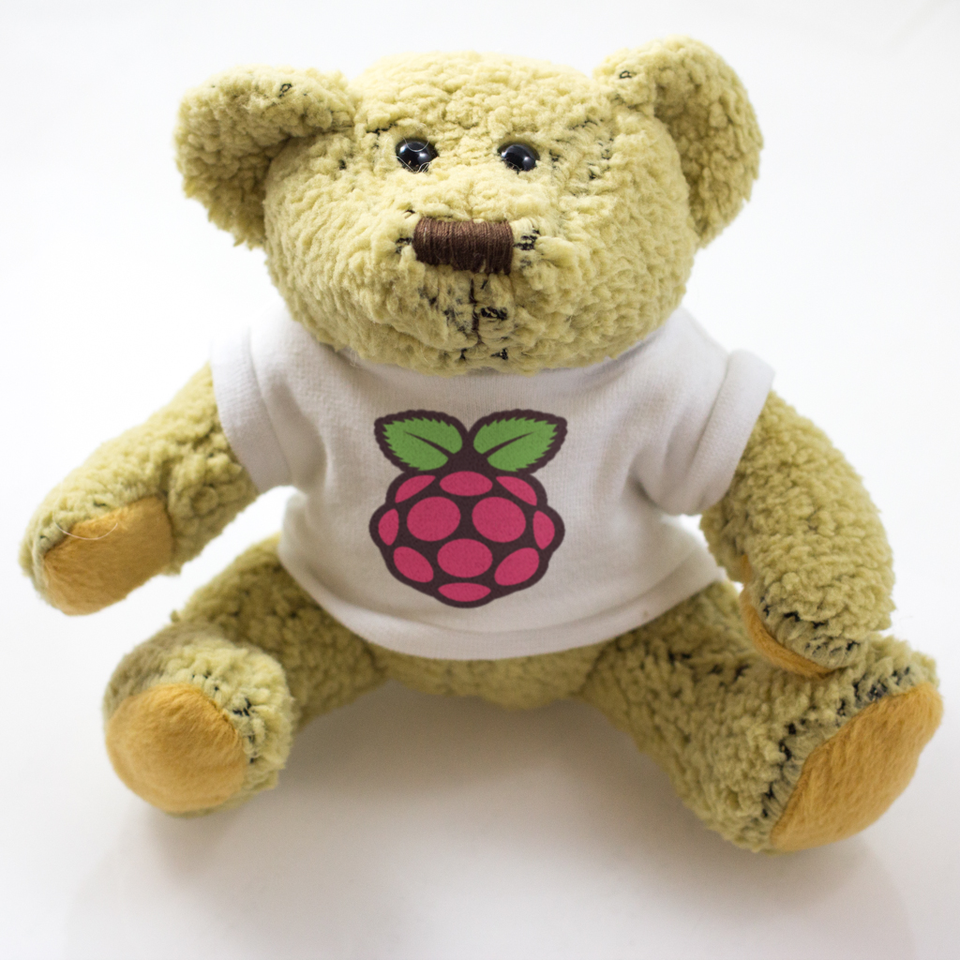
| Your votes have been counted: there was a clear winner. Congratulations to Fergal Butler, who was the first person to respond to the original post with the name Babbage. Well done Fergus! Emma will be in touch with you next week to get your address. The prototype bear has already found a home with Clive’s little girl, and production Babbage won’t be with us for a couple of weeks, but we’ll make sure yours is the first to be sent out.
|
Raspberry-VI: accessibility for visually impaired Pi users
| Liz: We’ve had some really interesting conversations this year with visually impaired users of the Raspberry Pi. Accessibility on the Pi is something the community’s been working on since we launched; Michael Ray started a Raspberry-vi (vi stands for visually impaired) mailing list has been running for a while now, and the group behind it have made some serious advancements in accessibility on the Pi. Jason Miller mailed me to let me know he had Emacs/Emacspeak working, and stable. Michael is working on Speakup at the moment for Raspbian, and Jason and Mobeen Iqbal are working with him on getting it ready for Arch Linux too. All three of them are totally blind. This whole area’s really fascinating; it’s very hard to get to a point where work that’s been done by sighted users can be totally adapted so that blind users don’t need any sighted assistance at all. I asked them if they had a few words for us about just how they approached the problem, and Jason sent me what’s below. We’ve pushed the Emacs/Emacspeak Arch image the guys released out to the Raspberry Pi mirrors network, so please click the link if you’d like to download it. Michael: With no screen-reader or Braille display support out-of-the-box in any of the Linux distros so far available for the Pi, as visually-impaired hackers our only approach was to connect to the beast using SSH from a client machine running access tools. In my case that is a Windows PC running an Open Source screen-reader called NVDA. Jason: As for myself, I’ve been connecting to the Pi using SSH from another Linux box, be it a Ubuntu derivative called Vinux, or from an Archlinux machine. Many of us searched around, be it through the Raspberry Pi forums, through the Orca accessibility lists, or in the speakup mailing list for accessible solutions. I’ve also found people asking about making Emacspeak work on the Pi as well. There seem to have been the needle in a haystack of “I’ve got it working” or “I’ve got it talking” but no proof, no images to go from, and no steps on how to accomplish the task of making it accessible so one needs absolutely no sighted assistance. Michael: For blind techies like the three of us, email reflectors are a valuable way to share ideas and experience with others. So I created the raspberry-vi list. Two other Linux and Pi, erm, interested parties (this is more polite than geeks) quickly joined the list; Jason Miller in the USA and Mobeen Iqbal from the north of England. Both of these guys have been involved with other Linux projects connected with accessibility for the visually impaired. Indeed the three of us are all totally blind. With Mo’s help we created the web-site to go with the list, and Jason and I set about trying to get some accessibility tools running. Jason: Mike, myself and Mo have talked about what could be possible with the Pi, what we can do to help bring this to fruition, and also how it could impact the rest of the VI/blind community. We don’t want just an accessible image, if it has to come with the price tag of being a bit buggy. Mike has been working with the Raspbian image, as it is closest to what most VI and blind user’s of Linux are used to with Debian and Vinux. I myself, have been working solely with Arch for Arm, because of the simplistic approach, and the responsiveness of the system. Mike was working with YASR, but stability was, to say the least, unobtainable. He would be lucky if YASR would stay up and running for more than 10 minutes at a time, and I believe his personal best time, with different synthesizers has been half of an hour. In his eyes, as well as Mo’s and mine, that wasn’t good enough to release. At this point, I started to look into Speakup, as well as Emacs with Emacspeak, and finally Orca in XFCE. I did some basic work with Speakup, and realized I would probably have to recompile the kernel. I also toyed around with Emacspeak, never really learning how to use it before. I finally did some testing with Orca, and XFCE, but unfortunately at the moment, it’s not working as I would like. Back to Emacspeak. I managed to get something up and running, but only after hours and hours of building, tinkering, and scrapping the image, only to restart. At first, I had it start Emacs, but the speech server wouldn’t start. When I tried scripting a log file to see what was the issue, for some reason starting the script made the speech server start… I can’t understand what or why, but at least we had a beginning point of something finally working. Again though, that’s buggy, and I could have made a hack to work around that, but didn’t wish to release something that was, what I considered, unstable. When I started again, I followed the same steps as before, building everything under a user account instead of a root account. Same errors, but this time, even scarting a log file didn’t get the speech server to start up. It was worse, and I had to issue a “sudo reboot” command to get it to shut off. This is when I decided to sit down, and go through every package installed for Emacspeak to work. Going through every folder, every program supposedly linked to the server, I had to clean up files, tweak build scripts, and remove/reinstall everything. Finally one evening after who knows how many hours of tweaking, and working, I gave it one last shot. Started the Pi, and connected through an SSH session, started Emacspeak, and it worked. received the loading messages, and finally the final functioning message. We have stability. I gave it one last test for stability by blindly logging into the Pi without SSH, directly into it. Started Emacspeak, and same, working and stable. Now, the group, Michael and myself are working on speakup. He has had great success on Raspbian, and should have an image shortly for download, and myself, well, I like Arch, so once I can get back to working on things we’ll see what happens. My next goal, after speakup is getting a working, accessible desktop on the Pi. It looks like our best bet may be XFCE and Orca at this moment. Finally, what would I like to see? Don’t ever disable SSH login by default. A lot of VI users will definitely need that. Also, for those of us using speech, getting rid of those pops right off the bat with audio would be more than a huge help as well. Thank you for designing the Pi, and keeping it low cost. It lets us nerds and tinkerers in the VI community have an affordable way to both get our hands dirty, and once speakup is working, offers a way to learn Linux to those that aren’t everyday users. – Interested in the Raspberry Pi, and accessibility? Check out the websitefor RPi accessibility, or if would you like to take part in discussion on accessibility on it, join the discussion group. |
eBook Review: Earthquake, Fire and Epidemic
| Verdict: 5 Stars In this look at one of the most devastating natural disasters in US history, digital publishing is responsible for a number of key factors. First, the timeliness of the book is important, as ebook-only publisher Untreed Reads released the title to coincide with the anniversary of the 1906 earthquake and resulting fire that destroyed San Francisco. But perhaps more importantly, this work was created to dispel a lot of the long-held beliefs about the San Francisco earthquake, which can be a risky investment for a more traditional publisher, especially when some of the incorrect beliefs and myths that are explained in the book border on conspiracy. Authors Gladys Hansen, Richard Hansen, and Dr. F. William Blaisdell, all highly respected and honored in their fields, sorted through exhaustive archives on the event that historians have long believed claimed the lives of 478 people. Their research, begun by Gladys Hansen almost forty years ago, led to the conclusion that the number is actually closer to three thousand people. But after noting the diligence and quick work of the city leadership in gathering personal accounts from the event and storing newspaper articles from papers around the country whose reporters covered the devastation, the logical conclusion in the face of so much stored up evidence is that the city’s political and economic leadership attempted to downplay the horror of the event. Still other myths about that event are also closely examined by the authors. A rumored street riot sparking a brawl between members of two of the city’s immigrant populations apparently never took place. The rumors about the mass shootings of private citizens by US soldiers were apparently false, as well. Possibly most disturbing, the researchers were able to uncover numerous leads and documents that point to the existence of crucial records and accounts of the events, records that were commissioned by the city leadership, only those records have vanished, possibly because they contain evidence of the devastation that the leadership didn’t want coming to light. Most appealing from a historical and literary standpoint, however, is the fact that this title does what the various committees formed immediately after the earthquake were supposed to do: gather personal accounts from the people who lived it. Their stories are finally being told, more than 100 years later. Earthquake, Fire and Epidemic is available now for e-readers and compatible devices at Untreed Reads, Amazon, Barnes and Noble, Kobo, and more.
eBook Review: Earthquake, Fire and Epidemic is a post from: E-Reader News |

New Steps Towards Allowing In-Flight Electronic Devices
| Anyone who has traveled by plane has felt the frustration of being required to endure a long flight sans certain electronic devices. While restrictions were eased to allow some electronics such as e-readers, tablets, and laptops during certain portions of the flight, and many airlines now offer in-flight pay-as-you-go internet access, the ban on device use is still too restrictive for some consumers. Senator Claire McCaskill (D-MO) has been at work on easing the restrictions on in-flight use of portable devices in light of the lack of scientific evidence that the devices do, in fact, interfere with the flight controls in some detrimental way. That reported interference is a long-standing belief, but McCaskill states that no evidence has been brought forward to support that belief. "It appears to me to not be grounded in any type of data or evidence whatsoever," McCaskill said in a press release on the ban. As she explained in a Commerce Committee meeting on aviation safety, these rules seem almost arbitrary in light of the fact that they are not in place for the numerous people who travel on Air Force One, all presumably with portable devices. The photo of then-Secretary of State reading a text on her cell phone from her seat aboard an air transport even became a popular Internet meme. "If it's safe enough for the President of the United States, it's safe enough for the traveling public.” In addition to the lack of evidence that would support the ban, McCaskill has pointed to the airlines’ own standards. Many airlines have replaced the manuals that pilots originally used in the cockpit with tablet computers, the same devices that passengers aboard those same planes are not allowed to use for the entire flight, rather having their devices relegated to key times in travel. McCaskill has had words with the Federal Aviation Administration’s Michael Huerta, and has stated that his lack of response on the issue has prompted her to move forward in drafting legislation that will address the issue. McCaskill is already receiving support for lifting this ban from the FCC and from other members of Congress from both parties.
New Steps Towards Allowing In-Flight Electronic Devices is a post from: E-Reader News |

Bear deadlock
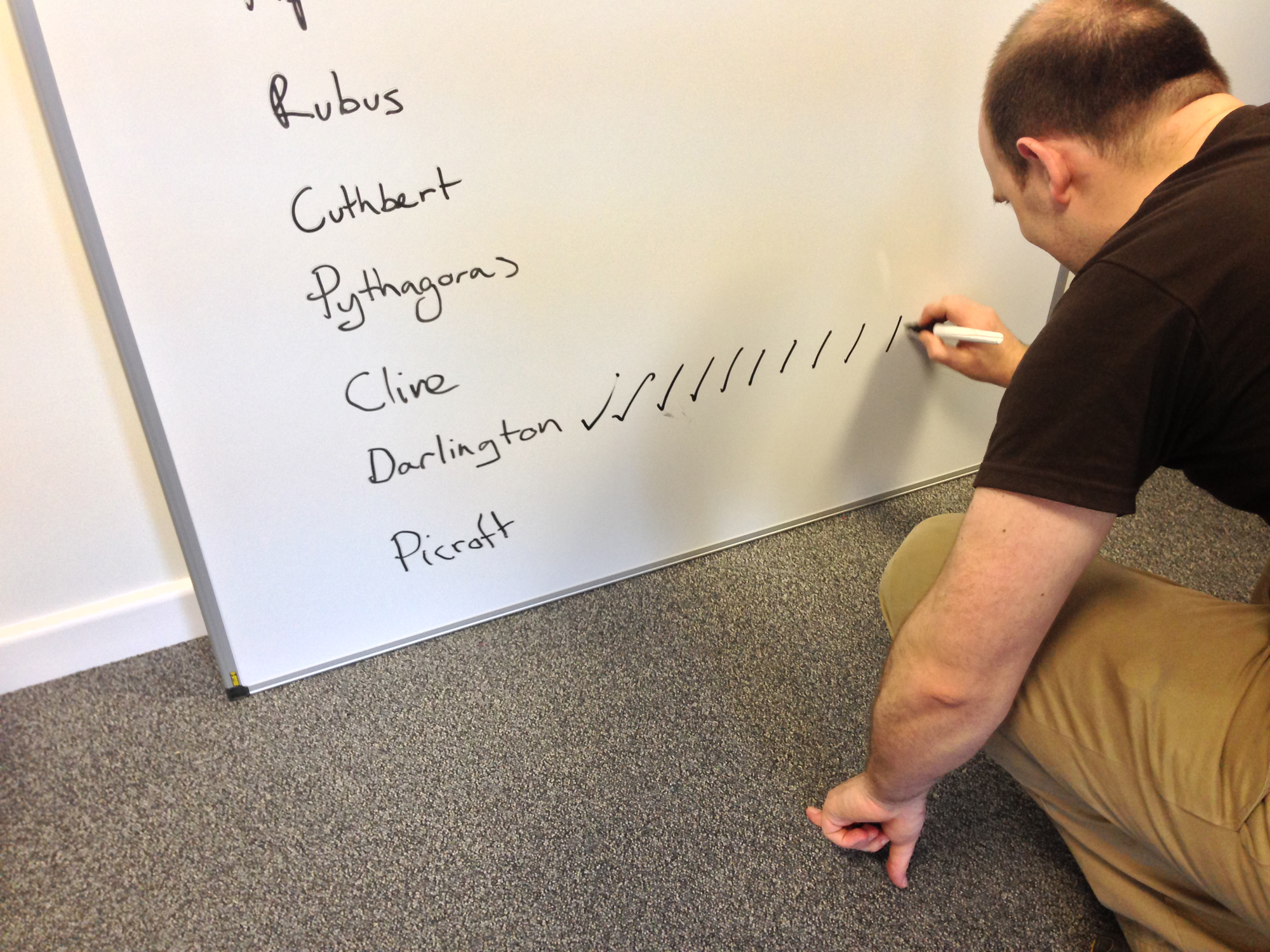
| We’ve been choosing bear names for the competition today. We ended up with a shortlist of the best names, and set to voting. 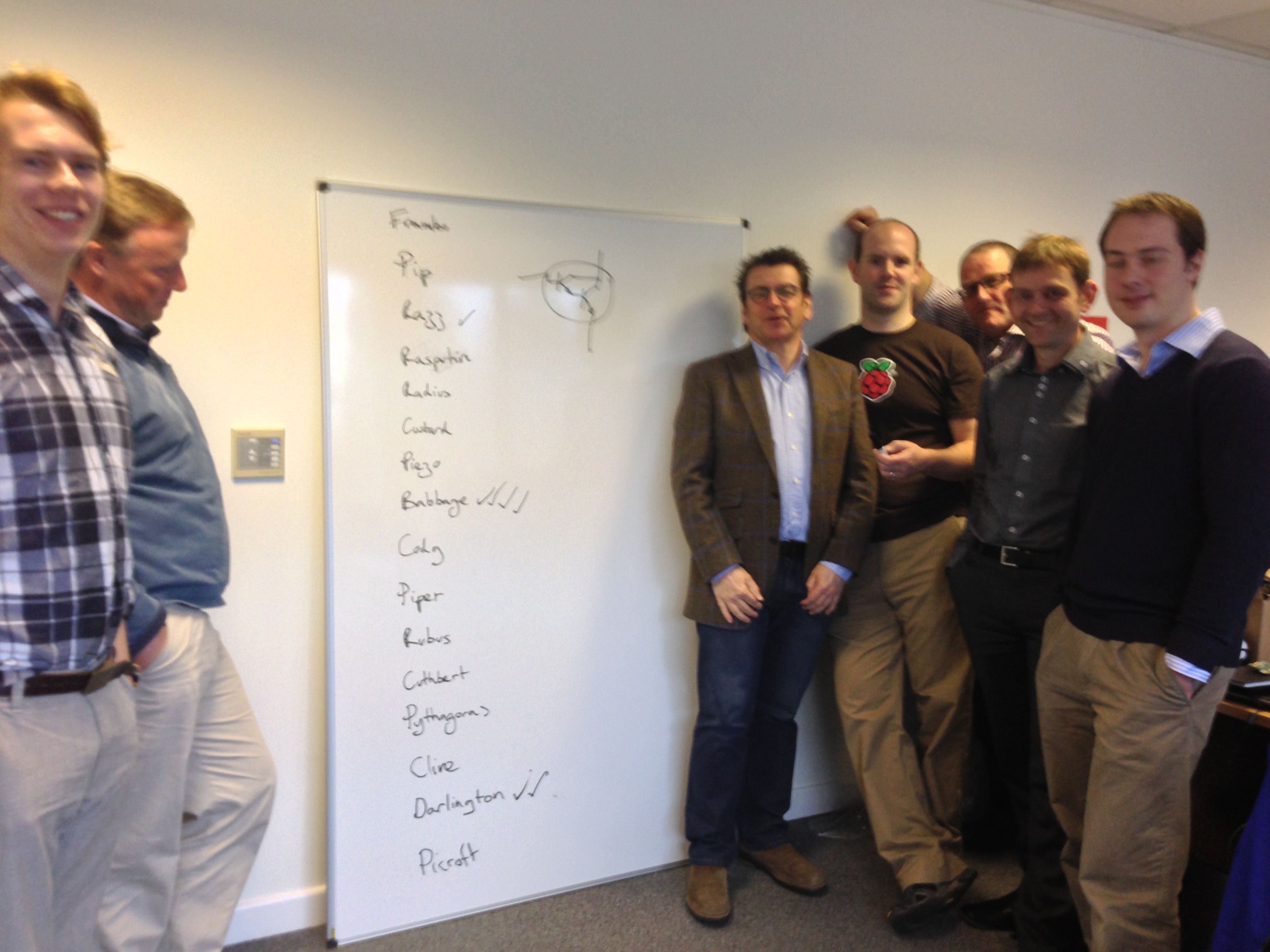 Thirty seconds after this, the shouting started. Note that Gordon has drawn a Darlington pair (badly) to explain things to the software guys, who are slow to catch on. Unfortunately, we ended up in deadlock, with four votes each for Darlington and Babbage. Eben went so far as to try cheating, and added some extra ticks when he thought nobody was looking. So we’ve decided we need your help. The two choices we’ve boiled things down to are Babbage and Darlington. We’d like you to let us know which you prefer. Please leave a comment letting us know which is your favourite! (Babbage and Darlington only, please; we know some of you want to call the bear Pinus after Linus Torvalds, but there were all kinds of problems with that.) |
3M Signs New Deal with the BiblioTech Digital Library
| The BiblioTech Digital Library gained a ton of attention when it was first announced in January. Bexar County in San Antonio will be launching the first pure digital library in the United States in the fall. The library plans on outfitting a massive computer lab and intends to lend out 100 e-readers to the public. The big hyping point is that the organizers want to make the entire operation give you the look and feel as an Apple Store. In order to facilitate the digital content, they have formed a new partnership with the 3M Cloud Library Service. 3M will be bringing its titles from Penguin and many other top publishers when the BiblioTech Digital Library opens this fall. There was much speculation in the library industry on who exactly would land this contract. This new library will be super high-end and will be followed closely to see if an all digital library will work, that actually has a physical location. Nelson Wolff is the man spearheading the initiative in Bexar County and told me that the entire project will cost $250,000 for the first 10,000 ebook titles. The intention behind this entire system is to allow people living in outlying areas to get access to books where they normally wouldn't. 3M Signs New Deal with the BiblioTech Digital Library is a post from: E-Reader News |

Sony Reader Store to Announce New Partnership with idreambooks
| The Sony Reader Store obviously has new management and the company has been working very hard lately to add new features to its online bookstore. Recently they have added Discover Map and a revised UK store, with tons of features. Sony, is forming a partnership with iDreambooks to tap into their wellspring of ratings and critic reviews. Kobo and Sony both relied on the GoodReads API to tap into their extensive user reviews and ratings for their eBooks. When Amazon purchased GoodReads a few weeks ago, it put the stores in a uncomfortable position. It is only a matter of time before the public API is pulled and online bookstores will have to either develop their own review system or partner with existing companies. Sony decided to do business with idreambooks, which could be compared to Rotten Tomatoes. The company aggregates critic reviews and provides recommendations based on them. idreambooks was originally founded in March 2012 and launched in July. Their business model centers around the aggregation of literary reviews from publications like the NYTimes and Washington Post and recommends books that were given a positive rating by 70% of critics. It functions a bit like RottenTomatoes or Metacritic in terms of eBooks and mainly focuses on bestsellers or perennial favorites. Currently the company is adding reviews from all top-tier publications going as far back as 2008 in the next couple of weeks. They have thousands available right now, and tend to add more every day. We spoke to a idreambooks spokesman to get a sense on what the deal was about. He said “If you look at the twitter account of NYTimes books, it has around 700k followers and NPR books has round 100k followers. People care about what experts think about new books that are coming out. It is because of this Sony wants to use our ratings and reviews. We don’t have 100% coverage for all the books Sony has in it’s eBook store simply because bestsellers, books from big publishers….or the ‘head’ so to speak…is what gets reviewed in major publications. That’s what we have coverage for and we are expanding coverage for the head as well. They want to use our ratings and reviews to drive book discovery and enhance user experience.” There is no release date in mind, but the deal should be officially announced at the end of the week. I applaud Sony for redoubling their efforts on their Reader Store. There was a time, not too long ago, where their online presence was very stagnant, and they lagged behind every other major company, in terms of innovation. It seems like in the last few months, they have been introducing a copious amount of new enhancements to their site. Currently, Sony is working on the PRS-T3, which should be announced within the next month. Sony Reader Store to Announce New Partnership with idreambooks is a post from: E-Reader News |
